

Vercast Studio
Jefin George Jose Productivity iPad
Vercast Studio is a free Productivity app for iPad by Jefin George Jose. Requires iOS 17.0. Updated November 10, 2026.
- Price
- Free
- on the App Store
- Size
- 18 MB
- Age 4+
- Updated
- Nov 10
- 2026 · v1.2
Screenshots


About Vercast Studio
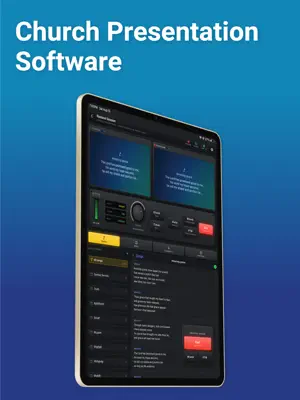
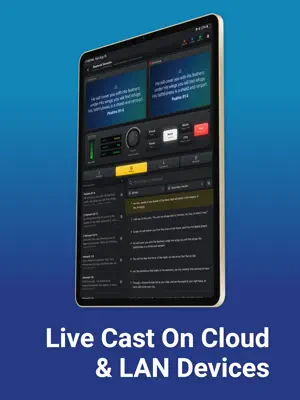
Vercast Studio is the operator's console for a live service. It runs on iPad, at the desk, and it decides what everyone else sees. PREVIEW, THEN TAKE IT TO AIR The run of show sits down one side. Tap an item to load it into Preview and check it there. When it is right, press Take and it becomes Program — what the congregation is actually looking at. Nothing reaches anyone until you take it, so a mistyped name or the wrong verse never leaves your desk. Songs advance verse by verse. Timers count down. The clock stays right. Cut, blank and fade to black are one tap away, on a control deck that sits where your hand already is. EVERYTHING A SERVICE PUTS ON SCREEN Songs with chords and lyrics. Bible verses from 48 public-domain translations, in two versions side by side when you need them. Announcements, event ads and offering details with a scannable code. Prayer requests, praise reports and testimonies. Birthdays and anniversaries. Baptisms, holy communion, child dedications and ordinations. Title cards and obituaries. A podium slide for whoever is speaking. And the things that make a room answer back: live polls, quizzes, a question queue the congregation can write into, and a randomizer for drawing a name or a number in front of everyone. THE CONGREGATION SEES IT ON THEIR OWN PHONES Anyone with the free Vercast app follows along on their own screen. They get the words to the song, the verse being read, the announcement — at the moment you send it, not a slide behind. People at the back read as well as people at the front, and anyone joining late catches up instantly. For the screen at the front of the room, Vercast opens a full-screen view in any browser — a laptop on the projector, or the television's own browser. It follows Program the same way, with no app to install. IT WORKS WHEN THE INTERNET DOES NOT Church halls have bad signal. Studio keeps your songs and Bibles on the device, so browsing and searching never wait on a network. If there is no connection at all, open the console straight from the sign-in screen and run the room over your local network without an account. BUILT FOR ONE PAIR OF HANDS The console is laid out for whoever is running it. Put the controls under your dominant hand. Choose a look for the room and keep the desk dark so it does not glow at the person beside you. Reorder the run of show mid-service. Everything is one deliberate action, because there is no undo in front of a congregation. PLANS The free tier runs a complete service. Paid plans are for organizations rather than individuals, and raise the limits a growing church runs into — more members, more events, more songbooks. They are managed by whoever administers the organization, and every member gets the benefit. Vercast Studio is designed for iPad. It is the companion to the free Vercast app, which is what your congregation installs. SUBSCRIPTIONS Vercast Studio offers optional auto-renewing subscriptions that raise an organization's limits. Plans are Pro and Enterprise, each in Basic, Platinum, Gold and Ultimate, on a monthly or an annual period. Prices are shown in your local currency on the plan screen before you buy. Payment is charged to your Apple ID at confirmation of purchase. A subscription renews automatically unless auto-renew is turned off at least 24 hours before the end of the current period, and your account is charged for renewal within 24 hours before the period ends. Manage or cancel your subscription in your Apple ID account settings after purchase. Terms of Use (EULA): https://www.apple.com/legal/internet-services/itunes/dev/stdeula/ Privacy Policy: https://vercast.app/privacy
What’s new
Version 1.2 · Updated November 10, 2026
• Over 11,000 songs in the library. • Choose each slide line's language: show a song in two transliterations without its original script. • Recently cast reopens a song in the languages it went out in. • New Arctic and Midnight Embers themes. • Add the date to a slide's fine print. • Wake screens and Search & connect find Roku and Fire TV more reliably. • Fixes and small improvements.
App privacy
The developer, Jefin George Jose, reported these privacy practices to Apple.
Data Linked to You
The following data, which may be collected and linked to your identity, may be used for the following purposes:
- Purchases: Purchase History
- Contact Info: Email Address, Name, Phone Number
- User Content: Photos or Videos, Other User Content
- Identifiers: User ID
Used for: App Functionality
Alternatives to Vercast Studio
Looking for apps like Vercast Studio? Here are 6 similar apps on the App Store. The highest rated is Pocket Worship (5.0/5), and all 6 are free to download.
-
 Pocket Worship
5.0
-
 Church Presenter
5.0
-
 Second Brain - AI Assistant
-
 ProRemote - Presenter Control
3.7
-
 FreeShow Remote
-
 WorshipStorm Projector Classic
4.2
| App | Rating | Price | Last updated | Compare |
|---|---|---|---|---|
| Vercast Studio | – | Free | November 10, 2026 | |
| Pocket Worship | 5.0 / 5 (2) | Free | Nov 10, 2026 | Compare |
| Church Presenter | 5.0 / 5 (1) | Free | Nov 2, 2026 | Compare |
| Second Brain - AI Assistant | – | Free | Sep 12, 2026 | Compare |
| ProRemote - Presenter Control | 3.7 / 5 (3) | Free | Mar 13, 2026 | Compare |
| FreeShow Remote | – | Free | Dec 2, 2025 | Compare |
| WorshipStorm Projector Classic | 4.2 / 5 (20) | Free | Aug 27, 2026 | Compare |
Compare Vercast Studio with the top alternatives: ratings, updates, ASO score and keyword gaps →