

Photo Print Size: Auto Layout
Yuya Takamoto Photo & Video iPhoneiPadiPod touch
Photo Print Size: Auto Layout is a free Photo & Video app for iPhone and iPad by Yuya Takamoto. Requires iOS 17.0. Updated October 6, 2026.
- Price
- Free
- on the App Store
- Size
- 6 MB
- Age 4+
- Updated
- Oct 6
- 2026 · v1.1
Screenshots

About Photo Print Size: Auto Layout
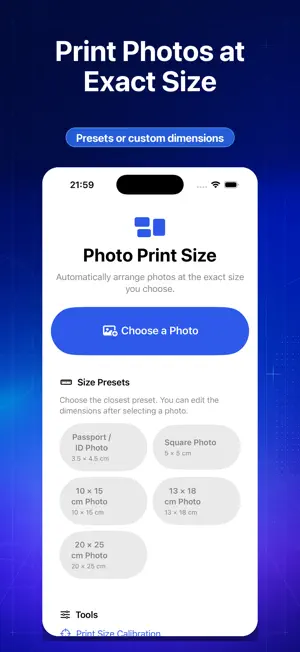
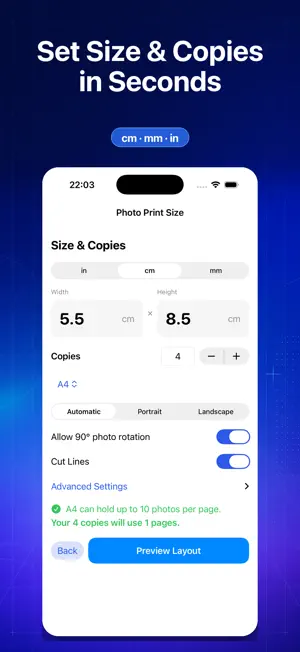
Select one photo, enter its physical dimensions and the number of copies, and let Photo Print Size automatically arrange the copies on paper. Export a print-ready PDF in just a few steps. PRECISE PHYSICAL SIZING Enter dimensions in inches, centimeters, or millimeters. Choose the paper size, orientation, margins, spacing, and whether rotation is allowed. AUTOMATIC PAPER LAYOUT Copies are arranged efficiently across one or more pages. Preview every page before exporting, with optional cut lines for easier trimming. PRINT-READY EXPORT Create accurately sized PDF files for sharing, saving, AirPrint, or another printing workflow. JPEG export is also available with Pro. CALIBRATION Create a 100 mm test PDF and save separate horizontal and vertical correction values for your printing environment. PRIVATE BY DESIGN Photo selection, cropping, layout, PDF generation, and JPEG generation happen on your device. Selected photos and generated files are not uploaded to our servers. PHOTO PRINT PRO A one-time purchase unlocks unlimited copies, multiple pages, additional paper sizes, millimeter input, JPEG export, additional projects and calibration profiles, and removes ads. Free users can also choose to watch a rewarded ad for a single restricted export. IMPORTANT PRINTING NOTE For accurate physical dimensions, print the exported PDF using “Actual Size” or 100% scale. Disable options such as Fit to Page or automatic scaling.
What’s new
Version 1.1 · Updated October 6, 2026
Improved the reliability of rewarded output access and ad presentation.
App privacy
The developer, Yuya Takamoto, reported these privacy practices to Apple.
Data Used to Track You
The following data may be used to track you across apps and websites owned by other companies:
- Identifiers: Device ID
- Usage Data: Advertising Data
Data Not Linked to You
The following data, which may be collected but is not linked to your identity, may be used for the following purposes:
- Location: Coarse Location
- Identifiers: Device ID
- Usage Data: Product Interaction, Advertising Data
- Diagnostics: Crash Data, Performance Data
Used for: Third-Party Advertising, Analytics, App Functionality
Alternatives to Photo Print Size: Auto Layout
Looking for apps like Photo Print Size: Auto Layout? Here are 6 similar apps on the App Store. The highest rated is Photo Print Size: PrintFit (5.0/5), and all 6 are free to download.
-
 Photo Print: Size & Layout
-
 PrintExact: Print to Size
1.0
PrintExact: Print to Size
1.0
-
 Photo Print Size: PrintFit
5.0
Photo Print Size: PrintFit
5.0
-
 TextTrail
-
 FanCut Photo Stickers
-
 MilliPrint – Exact Size Print
| App | Rating | Price | Last updated | Compare |
|---|---|---|---|---|
| Photo Print Size: Auto Layout | – | Free | October 6, 2026 | |
| Photo Print: Size & Layout | – | Free | Oct 24, 2026 | Compare |
| PrintExact: Print to Size | 1.0 / 5 (1) | Free | Sep 24, 2026 | Compare |
| Photo Print Size: PrintFit | 5.0 / 5 (2) | Free | Oct 14, 2026 | Compare |
| TextTrail | – | Free | Sep 12, 2026 | Compare |
| FanCut Photo Stickers | – | Free | Aug 20, 2026 | Compare |
| MilliPrint – Exact Size Print | – | Free | Oct 7, 2026 | Compare |