

Photo Print Size: PrintFit
Confianza LLP Photo & Video iPhoneiPadiPod touch
Photo Print Size: PrintFit is a free Photo & Video app for iPhone and iPad by Confianza LLP. Rated 5.0/5 from 2 ratings. Requires iOS 15.0.
- Rating
- 5.0
- 2 ratings
- Price
- Free
- on the App Store
- Size
- 20 MB
- Age 4+
- Updated
- Oct 14
- 2026 · v1.0.4
Screenshots



About Photo Print Size: PrintFit
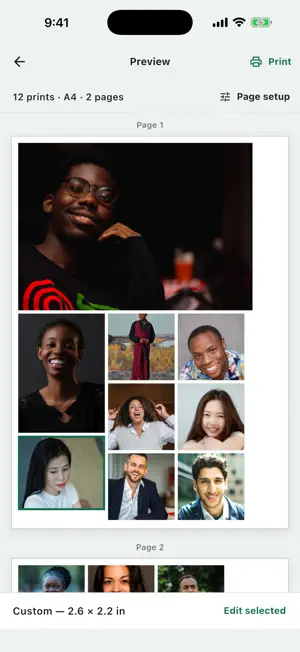
PrintFit helps you print photos at the physical size you choose without silently shrinking them to fit the page. Add JPEG, PNG or HEIC photos, select a print size and number of copies, adjust the crop, and let PrintFit arrange the pages. Review the complete sheets, print with AirPrint, or share the same layout as a precise PDF. CHOOSE THE PRINT SIZE Start with the default 4 × 6 in size, or choose: • 3.5 × 5 in • 5 × 7 in • Passport / visa — 35 × 45 mm • U.S. passport — 2 × 2 in • Any custom width and height Standard photo sizes automatically follow each photo’s portrait or landscape orientation. Passport sizes remain at their exact dimensions. Use Change All to apply one size to every photo, or set each photo individually. Choose from 1 to 99 copies per photo. ADJUST EACH PHOTO Pan and zoom inside a fixed print frame, rotate the photo by 90°, or reset the crop. These adjustments are non-destructive, and your original photos are never edited or deleted. A PAPER SIZE FOR YOUR PRINTER PrintFit supports: • A3, A4, A5 and A6 • Letter, Legal and Tabloid / 11 × 17 in • 4 × 6, 5 × 7 and 8 × 10 in photo paper • Custom paper from 50 to 1300 mm on each side A4 is the default. You can also choose automatic, portrait or landscape paper orientation and set the measurement display to millimetres, centimetres or inches. SMART PAGE LAYOUTS Mix standard photos, passport photos and custom print sizes on the same sheet. Optimize Paper arranges prints efficiently to reduce unnecessary pages. Keep Photo Order preserves the order in which you added the photos, even when that uses more paper. Automatic photo rotation can turn an individual print by 90° when it is needed to fit or save a page. You can turn this off when you want every print to retain its selected orientation. Margins and spacing remain exact throughout the layout. Optional cut marks make printed photos easier to trim. EXACT PREVIEW AND OUTPUT The Preview and generated PDF use the same page geometry and photo placement. PrintFit never stretches a photo or silently changes its selected physical dimensions. If a print cannot fit on the selected paper with the current margins, PrintFit tells you instead. Create multi-page PDFs, open the iOS share sheet, or send the layout directly to an AirPrint-compatible printer. For accurate physical dimensions, select Actual Size or 100% in your printer settings and turn off Fit to Page. LOCAL AND PRIVATE Your photos and current project stay on your device. PrintFit has no accounts, advertisements, analytics, tracking or cloud uploads. Your current project is saved locally so you can continue where you left off. Passport and visa presets provide exact print dimensions only. PrintFit does not verify government photo requirements, replace backgrounds or certify passport photos. Preview and the printable size-test sheet are free. One lifetime purchase unlocks unlimited printing and PDF sharing. No subscription.
What’s new
Version 1.0.4 · Updated October 14, 2026
PrintFit now supports 13 additional languages: Hindi, Spanish, German, French, Brazilian Portuguese, Italian, Japanese, Korean, Simplified Chinese, Traditional Chinese, Dutch, Polish, and Indonesian. Use PrintFit in your preferred language, with translated controls and instructions for photo sizing, cropping, paper setup, preview, printing, and PDF sharing. The same precise print sizes and paper-saving layouts you rely on remain unchanged.
App privacy
The developer, Confianza LLP, reported these privacy practices to Apple.
Data Not Collected
The developer does not collect any data from this app.
Alternatives to Photo Print Size: PrintFit
Looking for apps like Photo Print Size: PrintFit? Here are 6 similar apps on the App Store. The highest rated is PrintExact: Print to Size (1.0/5), and all 6 are free to download.
-
 PrintExact: Print to Size
1.0
-
 Printfit: Print Photos to Size
-
 Photo Print: Size & Layout
-
 Printlyra
-
 Photo Printer: Print to Size
-
 Printly: Photo Print Size
| App | Rating | Price | Last updated | Compare |
|---|---|---|---|---|
| Photo Print Size: PrintFit | 5.0 / 5 (2 ratings) | Free | October 14, 2026 | |
| PrintExact: Print to Size | 1.0 / 5 (1) | Free | Sep 24, 2026 | Compare |
| Printfit: Print Photos to Size | – | Free | Oct 6, 2026 | Compare |
| Photo Print: Size & Layout | – | Free | Oct 24, 2026 | Compare |
| Printlyra | – | Free | Aug 21, 2026 | Compare |
| Photo Printer: Print to Size | – | Free | Aug 19, 2026 | Compare |
| Printly: Photo Print Size | – | Free | Oct 4, 2026 | Compare |