

Vector Curve
Cengiz Bodur Graphics & Design iPhoneiPadiPod touch
Vector Curve is a free Graphics & Design app for iPhone and iPad by Cengiz Bodur. Requires iOS 17.6. Updated October 15, 2026.
- Price
- Free
- on the App Store
- Size
- 7 MB
- Age 4+
- Updated
- Oct 15
- 2026 · v1.5
Screenshots

About Vector Curve
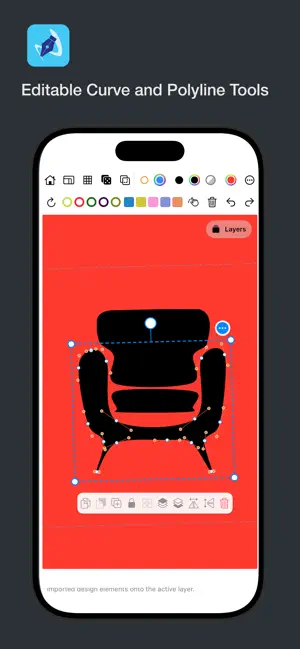
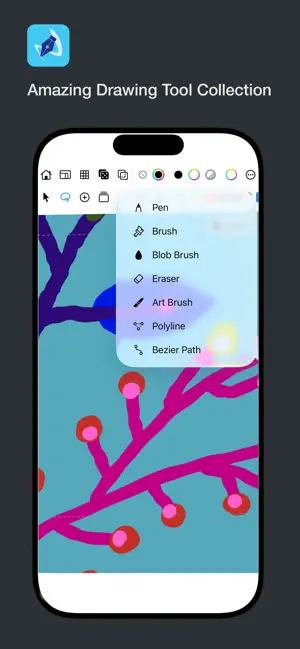
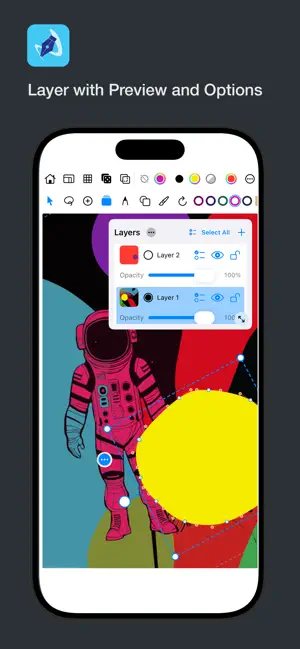
Vector Curve is a vector drawing workspace for illustration and design on iPhone and iPad. Sketch freely with pen and brush tools, edit paths and shapes, organize layers, and export files ready for social, print, and production. DRAW WITH PRECISION • Pen, brush, eraser, and shape tools (line, rectangle, circle, triangle) • Classic, taper, end-taper, and jitter brushes with pressure and smoothing • Custom brush presets, path points, and simplify for clean vectors • Premium tools: Blob Brush, Art Brush, Polyline, and Bézier Path DESIGN LIKE A PRO ILLUSTRATOR • Layers with lock, opacity, reorder, and blend modes • Symmetry modes: horizontal, vertical, quadral, and radial • Grid and snap for aligned layouts • Boolean pathfinder: combine, minus front, intersect, exclude, divide • Draw Inside This Shape and Fill Shape with Elements • Shape library, image import, and SVG import • Group, ungroup, break apart, and copy/paste across layers and projects EXPORT FOR REAL WORK • JPEG and PNG for everyday sharing • Premium: hi-res PNG (up to 3600px), SVG with or without background, and layered ZIP for Photoshop-friendly workflows • Canvas presets for square, landscape, portrait, Instagram, A4, Letter, or custom sizes STAY ORGANIZED • Document gallery with autosave and continue last session • Share selected elements as reusable design snippets PREMIUM Unlock advanced drawing tools, unlimited gallery saves, and high-resolution export formats. Choose weekly, monthly, or lifetime. Restore purchases anytime. Whether you create illustrations, motifs, social graphics, or print-ready artwork, Vector Curve gives you a focused vector workflow in your pocket. Privacy Policy: https://sites.google.com/view/vectorcurveprivacypolicy/ Terms of Use (EULA): https://www.apple.com/legal/internet-services/itunes/dev/stdeula/ Additional Terms: https://sites.google.com/view/vectorcurvetermsofuse/
What’s new
Version 1.5 · Updated October 15, 2026
The drawing tools menu interface has been updated A quick-access menu has been added The simplification slider is now active when a line is selected A new Texture brush has been added The Pathfinder Shape Builder has been fixed The Blending Modes menu interface has been updated
App privacy
The developer, Cengiz Bodur, reported these privacy practices to Apple.
Data Not Collected
The developer does not collect any data from this app.
Alternatives to Vector Curve
Looking for apps like Vector Curve? Here are 6 similar apps on the App Store.
-
 BladeDraw – Vector Drawing
-
 Layer-Art
-
 Doodle - Vector Drawing
-
 Light Animator
-
 Paintlustrator
-
 Particle Generator
| App | Rating | Price | Last updated | Compare |
|---|---|---|---|---|
| Vector Curve | – | Free | October 15, 2026 | |
| BladeDraw – Vector Drawing | – | Free | Oct 21, 2026 | Compare |
| Layer-Art | – | 1.99 USD | Sep 15, 2026 | Compare |
| Doodle - Vector Drawing | – | 3.99 USD | Sep 16, 2026 | Compare |
| Light Animator | – | 7.99 USD | Jun 24, 2026 | Compare |
| Paintlustrator | – | Free | Oct 11, 2026 | Compare |
| Particle Generator | – | 2.99 USD | May 29, 2025 | Compare |
Compare Vector Curve with the top alternatives: ratings, updates, ASO score and keyword gaps →