

Doodle - Vector Drawing
CARLOS FERNANDEZ PLAZA Graphics & Design iPad
Doodle - Vector Drawing is a paid Graphics & Design app for iPad by CARLOS FERNANDEZ PLAZA. Requires iOS 17.0. Updated September 16, 2026.
- Price
- 3.99 USD
- on the App Store
- Size
- 6 MB
- Age 4+
- Updated
- Sep 16
- 2026 · v1.0
Screenshots


About Doodle - Vector Drawing
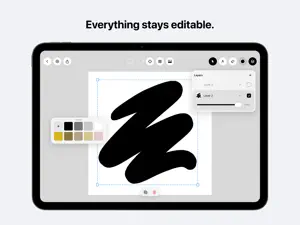
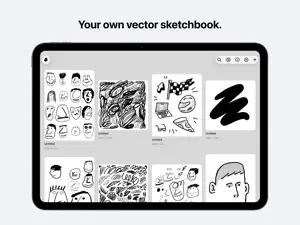
Doodle is a vector sketchbook for iPad. Everything you draw stays editable — a stroke you made an hour ago is still a stroke, not a patch of pixels. Move it, scale it, recolour it, or change its brush entirely, and it redraws itself at full quality. DRAWS LIKE INK, BEHAVES LIKE VECTOR Over thirty brushes, from a clean gel pen to chalk, bristle, crayon, rope, chain and cross-stitch. Every one of them responds to Apple Pencil pressure and tilt, with palm rejection so you can rest your hand on the glass while you work. Under the texture it is all real geometry. SELECT ANYTHING, ANY TIME Tap a single stroke — not the whole layer — to move, scale, rotate, duplicate or recolour it. The brush texture survives the transform instead of stretching into mush. LAYERS THAT WORK LIKE LAYERS Stack, reorder, rename, lock, hide, and set the opacity of every layer. Drop a photo onto the layer you have selected and it stacks with everything else — over the sketch below it, under the ink above it. Each layer's preview shows what is actually on it, photos included. MAKE YOUR OWN BRUSHES The Brush Studio turns a drawing into a brush. Draw a tip, then tune its spacing, pressure response, jitter, rotation and whether it follows the stroke, trying it on a live canvas as you go. Save it to your palette, and share it as a file so someone else can use it too. EXPORT REAL VECTORS SVG and PDF come out as clean editable outlines rather than thousands of overlapping stamps — Doodle unions each stroke into its true silhouette and fits curves to it before writing the file. Open the result in Illustrator, Affinity or Figma and the anchor points are where you would have put them yourself. PNG and JPEG are there for when you just need a picture. SET UP THE PAGE A3, A4, A5, Letter, square, 16:9, 9:16 and 4:5 — or any size you like, down to the pixel. Print a grid on the page to draw against, and dress the workspace behind it with lines or dots. Panels float where you leave them and stay put between drawings. BUILT FOR THE HAND Two fingers to undo, three to redo. Pinch to zoom without losing your selection. Everything you reach for often is under a thumb. QUIET BY DEFAULT No account, no subscription, nothing to sign up for. Your drawings live on your iPad; iCloud backup is a switch you turn on, not something that happens to you. Light and dark both, and the paper stays white in each, because it is paper. Made for iPad and Apple Pencil.
App privacy
The developer, CARLOS FERNANDEZ PLAZA, reported these privacy practices to Apple.
Data Not Collected
The developer does not collect any data from this app.
Alternatives to Doodle - Vector Drawing
Looking for apps like Doodle - Vector Drawing? Here are 6 similar apps on the App Store.
-
 Layer-Art
-
 BladeDraw – Vector Drawing
-
 Paintlustrator
-
 Light Animator
-
 Particle Generator
-
 Sable: Pixel • Draw • Vector
| App | Rating | Price | Last updated | Compare |
|---|---|---|---|---|
| Doodle - Vector Drawing | – | 3.99 USD | September 16, 2026 | |
| Layer-Art | – | 1.99 USD | Sep 15, 2026 | Compare |
| BladeDraw – Vector Drawing | – | Free | Oct 21, 2026 | Compare |
| Paintlustrator | – | Free | Oct 11, 2026 | Compare |
| Light Animator | – | 7.99 USD | Jun 24, 2026 | Compare |
| Particle Generator | – | 2.99 USD | May 29, 2025 | Compare |
| Sable: Pixel • Draw • Vector | – | Free | Oct 26, 2026 | Compare |