

Waker: Loud Mission Alarm
Aleksandr Saliukov Lifestyle iPhoneiPadiPod touch
Waker: Loud Mission Alarm is a free Lifestyle app for iPhone and iPad by Aleksandr Saliukov. Requires iOS 26.0. Updated August 11, 2026.
- Price
- Free
- on the App Store
- Size
- 27 MB
- Age 4+
- Updated
- Aug 11
- 2026 · v1.1
Screenshots
About Waker: Loud Mission Alarm
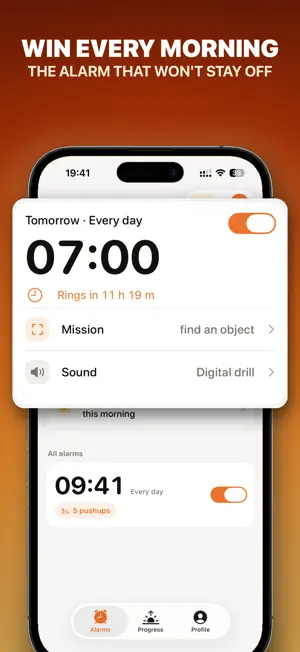
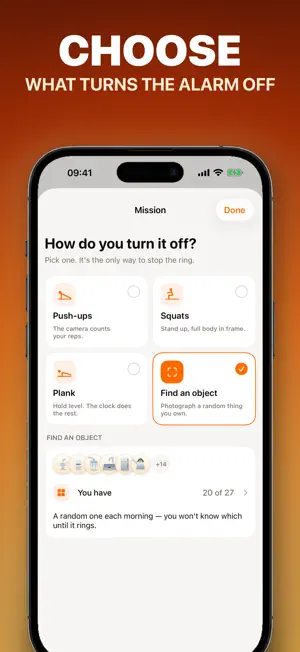
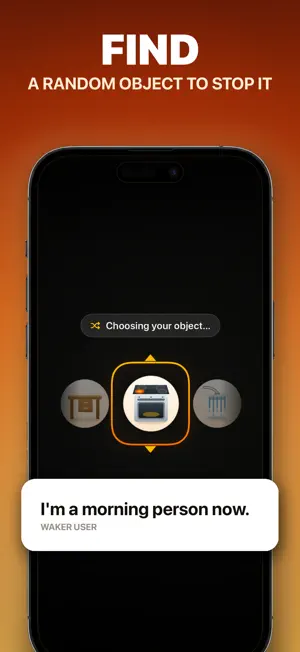
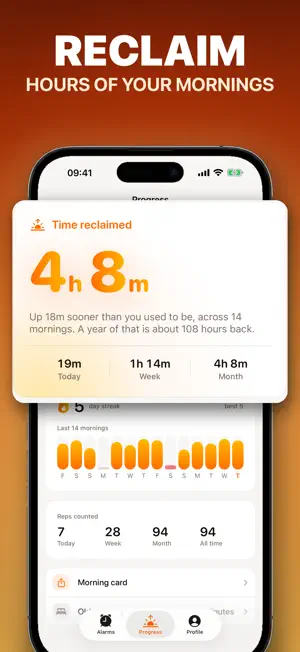
Waker is the alarm for people who can dismiss anything half-asleep. Stopping the ring is the easy part. Keeping it off is not — the alarm keeps coming back until your iPhone's camera has watched you finish a morning mission. No mission, no silence. By the time you're done, you're awake. That's the whole trick. PICK HOW YOU GET UP • Find an object — a roulette spins and lands on something in your home. Go photograph it. Nothing is chosen until the alarm rings, so there is nothing to stage the night before. • Push-ups — counted live by the camera, with a skeleton tracking your body. • Squats — the same tracker, standing up. • Plank — hold it. The clock only runs while you actually are. HOW IT WORKS • Set your wake time and your mission: "Turn off by: 10 push-ups". • The alarm rings through Silent mode and Focus. It is a real alarm, built on Apple's alarm framework. • Stop the ring, stand your phone up, do the thing. • You get three quiet minutes to start. Skip it and the alarm comes back. • Finish and the whole chain shuts down. An unfinished mission stops ringing on its own after about 30 minutes. YOUR MORNINGS, MEASURED Tell Waker how long you normally lie there after the alarm, and it shows you what you are winning back — this morning, this week, all of it. Streaks, totals, and a morning card built to be posted. 24 ALARM SOUNDS, OR YOUR OWN A sunrise chime at one end. An air-raid siren, a smoke detector and a dive klaxon at the other. Or import a track from Files and wake up to that. PRIVATE BY DESIGN Everything the camera does happens on your iPhone. Frames are never recorded, stored or uploaded — no photo is saved, not even for the object mission. The alarm and the mission make zero network calls. No account, no sign-up. Switching an alarm off or deleting it is never blocked and never behind a subscription. QUESTIONS OR IDEAS Email [email protected] — we read everything. SUBSCRIPTION Waker Pro is offered as a weekly or yearly auto-renewing subscription. Payment is charged to your Apple ID at confirmation of purchase. It renews automatically unless canceled at least 24 hours before the end of the current period; manage or cancel anytime in your App Store account settings. Alarms you have already set keep ringing even if your subscription lapses. Terms of Use: https://soloranez21.github.io/waker-legal/terms/ Privacy Policy: https://soloranez21.github.io/waker-legal/privacy/
What’s new
Version 1.1 · Updated August 11, 2026
The Waker mark now signs your missions, the object roulette and the morning poster. Plus small polish.
App privacy
The developer, Aleksandr Saliukov, reported these privacy practices to Apple.
Data Linked to You
The following data, which may be collected and linked to your identity, may be used for the following purposes:
- Purchases: Purchase History
- Identifiers: Device ID
- Usage Data: Product Interaction
- Contact Info: Name
Used for: Analytics, Product Personalization, App Functionality
Alternatives to Waker: Loud Mission Alarm
Looking for apps like Waker: Loud Mission Alarm? Here are 6 similar apps on the App Store. The highest rated is Ryse - Alarm Clock to Wake Up (5.0/5), and all 6 are free to download.
-
 Waker - Loud Alarm Clock
-
 Ryse - Alarm Clock to Wake Up
5.0
Ryse - Alarm Clock to Wake Up
5.0
-
 Wakeforce: Mission alarm
5.0
Wakeforce: Mission alarm
5.0
-
 Mission Alarm - Wake Up App
-
 Nearlie
-
 Offbed
5.0
Offbed
5.0
| App | Rating | Price | Last updated | Compare |
|---|---|---|---|---|
| Waker: Loud Mission Alarm | – | Free | August 11, 2026 | |
| Waker - Loud Alarm Clock | – | Free | Aug 27, 2026 | Compare |
| Ryse - Alarm Clock to Wake Up | 5.0 / 5 (2) | Free | Sep 30, 2026 | Compare |
| Wakeforce: Mission alarm | 5.0 / 5 (5) | Free | Sep 15, 2026 | Compare |
| Mission Alarm - Wake Up App | – | Free | Aug 4, 2026 | Compare |
| Nearlie | – | Free | Aug 12, 2026 | Compare |
| Offbed | 5.0 / 5 (1) | Free | Jun 3, 2026 | Compare |