

Calliary - Sticker Calendar
HAEDUN KIM Lifestyle iPhoneiPadiPod touchMacApple Watch
Calliary - Sticker Calendar is a free Lifestyle app for iPhone and iPad by HAEDUN KIM. Rated 5.0/5 from 2 ratings. Requires iOS 26.0.
- Rating
- 5.0
- 2 ratings
- Price
- Free
- on the App Store
- Size
- 344 MB
- Age 4+
- Updated
- Nov 5
- 2026 · v1.0.8
Screenshots


About Calliary - Sticker Calendar
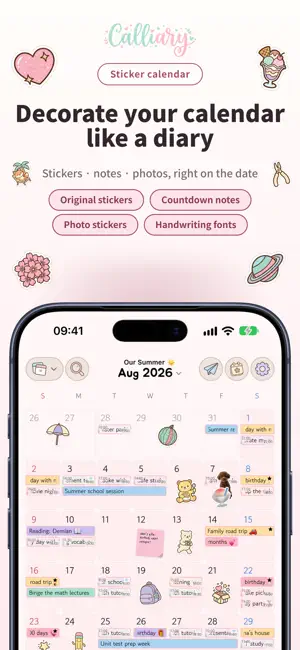
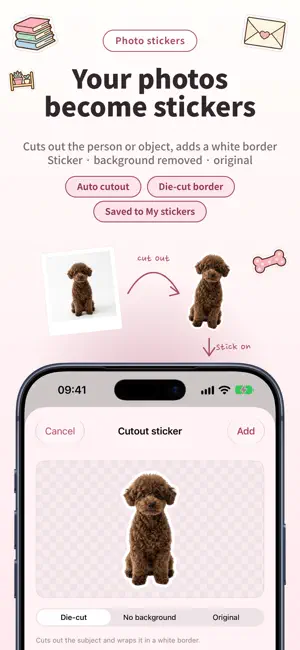
Decorate your calendar like a diary and share it with your partner, friends, or family. Plan together on one calendar, and see it on your Home Screen widget exactly as you decorated it. ■ Turn your photos into stickers Pick a photo and the background is removed automatically. It becomes a sticker with a white border. Put your favorite person, your dog, or today's dessert straight onto the calendar. No scissors, no glue. ■ One calendar, shared and decorated together Share a whole calendar, not just a few events. Invite people with an invite code, and they add events to the same calendar in real time. Their stickers and plans appear right where they put them. The calendar's creator decides whether others can decorate it too. Create a calendar, invite people, and look at categories together. ■ Your decorated calendar, on your widgets Widgets show your calendar exactly as you decorated it. Add a sticker and the widget changes too. There are eight widgets: Calliary Calendar, Text Calendar, Upcoming, One Page, Countdown, Countdown Counter, Cycle, and At a Glance. Calliary Calendar, Text Calendar, Upcoming, and One Page let you pick the calendar for each widget: your own or a shared calendar. Lock Screen widgets work on iPhone and iPad; StandBy widgets on iPhone. ■ A calendar and lined notes on one page A lined MEMO section sits below the month grid on the same page. Add events to the grid and monthly plans to the lines below. ■ One diary page a day Text and stickers together on one page. Write by hand on iPad with Apple Pencil, and see it on iPhone and Mac too. One sticker and a line are enough for a day. ■ Fonts and 6 themes Use handwriting, sans serif, and serif fonts, or any font on your device. Six theme presets change your fonts and colors to match today's mood. ■ Cycle tracking Log your period and Calliary predicts your next cycle, ovulation, and fertile window. Record mood, symptoms, contraception, and basal body temperature; insight charts show trends. It imports Health data and saves your logs to Health. If you like, share your current cycle with a partner. Sensitive data, strict rules: · No ads. Cycle data is never used for advertising or tracking. · Lock Screen notifications can hide their wording. You choose what shows. ■ Small everyday features · Weather on the grid, before you plan · A checklist for everything due this month · Countdowns for exams, trips, and anniversaries · Repeating events, reminders, and medication alerts · Lunar dates and public holidays for 49 countries · Categories like school, work, and home, so you see just what you need · Import from Apple Calendar, Google Calendar, or .ics files · Face ID or Touch ID to lock the app ■ Share your month as an image Save your month as an image and share it anywhere. An Instagram Story preset is built in. ■ iPhone, iPad, Mac, and Apple Watch Calliary syncs through iCloud. Stickers you place on iPhone appear on iPad and Mac, and today's plans show up on your wrist. ■ 19 languages Korean, English, Japanese, Chinese, and more, with sticker search in each language. ■ Decorating tools Fill your calendar, MEMO, and diary with stickers, notes, photos, and drawings. Create your own calendar theme, and pick icon sets and fonts to make it yours. Save your finished calendar as an image without the Calliary mark, or export it as a PDF. On iPad, write your diary with Apple Pencil. Some decorating tools are available with Calliary Pro. Choose a monthly or yearly subscription, or pay once for a lifetime pass. All of them support Family Sharing. ■ Calliary is for you if… · you want a decorated calendar you'll keep using for years · you'd like to plan and decorate with your partner or friends · you love decorating your calendar with stickers Start by putting one sticker on today's date. Terms of Use (EULA): https://www.apple.com/legal/internet-services/itunes/dev/stdeula/
What’s new
Version 1.0.8 · Updated November 5, 2026
1.0.8 update - Based on your feedback and the inconveniences I experienced while using the app myself, this update refines repeating event deletion, Apple Watch complications and widgets. ■ Repeating events: “Delete this and later ones” · When you delete a repeating event, you can now choose “Delete this and later ones” in addition to “Delete only this one” and “Delete all repeats”. Events before the date you choose stay as they are. · It is available both on the event edit screen and in the menu you open by touching and holding an event. I added it based on a request sent to support. ■ Apple Watch complication improvements · Circular complications showed only the time of your next event, so you had to tap them to see what the event was and which day it was on. This has been improved: the circle now shows the day, such as “Tomorrow”, together with the event name. · Countdowns show the name of the occasion, today’s event count shows “Today” alongside the number, and this month’s to-dos show the number remaining, for example “2 left”. · The “Cally today” complication has been removed. If you placed it on a watch face, please switch to another complication. ■ Widget month label fix · In languages that write months as numbers (such as Korean and Japanese), two-digit month numbers were split digit by digit in the month label on the right side of calendar widgets. This has been fixed. I look forward to your support and feedback.
App privacy
The developer, HAEDUN KIM, reported these privacy practices to Apple.
Data Linked to You
The following data, which may be collected and linked to your identity, may be used for the following purposes:
- Identifiers: User ID
Used for: App Functionality
Alternatives to Calliary - Sticker Calendar
Looking for apps like Calliary - Sticker Calendar? Here are 6 similar apps on the App Store. The highest rated is Q Calendar: Sticker Planner (5.0/5), and all 6 are free to download.
-
 Puffy StickerNote: Planner
-
 Sticker Calendar-Cute Planner
-
 Q Calendar: Sticker Planner
5.0
-
 Journal Decor: Sticker Diary
-
 めちゃかわカレンダー
1.5
-
 ごみの日通知 ゴミ出しカレンダー|第1第3木曜
| App | Rating | Price | Last updated | Compare |
|---|---|---|---|---|
| Calliary - Sticker Calendar | 5.0 / 5 (2 ratings) | Free | November 5, 2026 | |
| Puffy StickerNote: Planner | – | Free | Sep 28, 2026 | Compare |
| Sticker Calendar-Cute Planner | – | Free | Aug 15, 2026 | Compare |
| Q Calendar: Sticker Planner | 5.0 / 5 (1) | Free | Nov 5, 2026 | Compare |
| Journal Decor: Sticker Diary | – | Free | Oct 25, 2026 | Compare |
| めちゃかわカレンダー | 1.5 / 5 (2) | Free | Sep 9, 2026 | Compare |
| ごみの日通知 ゴミ出しカレンダー|第1第3木曜 | – | Free | Sep 7, 2026 | Compare |