

Q Calendar: Sticker Planner
Regnum Digital Company Lifestyle iPhoneiPadiPod touch
Q Calendar: Sticker Planner is a free Lifestyle app for iPhone and iPad by Regnum Digital Company. Rated 5.0/5 from 1 ratings. Requires iOS 15.6.
- Rating
- 5.0
- 1 ratings
- Price
- Free
- on the App Store
- Size
- 78 MB
- Age 4+
- Updated
- Oct 14
- 2026 · v1.7.3
Screenshots


About Q Calendar: Sticker Planner
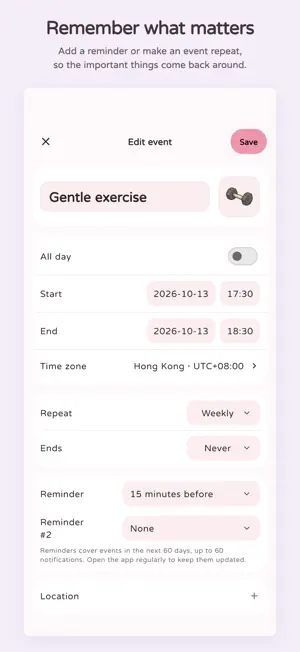
A little more joy in your everyday plans. Q Calendar brings a calm, colorful feel to keeping track of what matters, with cute stickers to make the month your own. MAKE PLANS YOUR WAY • See your month at a glance and add events for the moments ahead. • Set reminders and create repeating events for the routines you want to remember. • Add stickers to dates and events. Browse the library, import your own images, and organize favorites and collections. • Choose a soft theme and make the calendar feel like yours. MADE FOR YOUR DEVICE Your calendar is stored locally on your device, and core planning works offline. A CALMER KIND OF CALENDAR No ads. No busy dashboards. Just a personal place for plans, routines, and small things worth looking forward to. To help improve the app, Q Calendar collects usage analytics and crash reports. Both are enabled by default and can be turned off separately in Settings > Privacy. Calendar details are never included in analytics.
What’s new
Version 1.7.3 · Updated October 14, 2026
New in 1.7.3 • Export your calendar, stickers and settings to a backup file, or import a backup to restore them. • Optional cloud backup for your calendar and stickers. Changes back up automatically while the app is open; restore your backup on a new installation. • Find local backups, scheduled reminders and deleted events together in Settings > Calendar tools. • Recover deleted events for up to 30 days, or delete them permanently.
App privacy
The developer, Regnum Digital Company, reported these privacy practices to Apple.
Data Linked to You
The following data, which may be collected and linked to your identity, may be used for the following purposes:
- Location: Coarse Location
- Identifiers: Device ID, User ID
- Usage Data: Product Interaction
- Diagnostics: Crash Data, Other Diagnostic Data
- Contact Info: Email Address, Name
- User Content: Photos or Videos, Other User Content
Used for: Analytics, App Functionality
Data Not Linked to You
The following data, which may be collected but is not linked to your identity, may be used for the following purposes:
- Identifiers: Device ID
- Usage Data: Product Interaction
- Diagnostics: Other Diagnostic Data
Used for: App Functionality
Alternatives to Q Calendar: Sticker Planner
Looking for apps like Q Calendar: Sticker Planner? Here are 6 similar apps on the App Store. The highest rated is DuoCal (5.0/5), and all 6 are free to download.
-
 Calkku: Diary Decoration
-
 Khmer Calendar: Lunar & Rasei
-
 DuoCal
5.0
DuoCal
5.0
-
 CYPRIS
-
 Griddy: Day Planner & Journal
-
 The Henderson
| App | Rating | Price | Last updated | Compare |
|---|---|---|---|---|
| Q Calendar: Sticker Planner | 5.0 / 5 (1 rating) | Free | October 14, 2026 | |
| Calkku: Diary Decoration | – | Free | Jun 30, 2026 | Compare |
| Khmer Calendar: Lunar & Rasei | – | Free | Sep 23, 2026 | Compare |
| DuoCal | 5.0 / 5 (1) | Free | Oct 9, 2025 | Compare |
| CYPRIS | – | Free | Oct 14, 2026 | Compare |
| Griddy: Day Planner & Journal | – | Free | Oct 15, 2026 | Compare |
| The Henderson | – | Free | Apr 14, 2026 | Compare |