

Recast: Convert & Compress
LEON NELIO FIGUEIRA Utilities iPhoneiPadiPod touch
Recast: Convert & Compress is a free Utilities app for iPhone and iPad by LEON NELIO FIGUEIRA. Requires iOS 17.0. Updated October 12, 2026.
- Price
- Free
- on the App Store
- Size
- 2 MB
- Age 4+
- Updated
- Oct 12
- 2026 · v1.3.1
Screenshots


About Recast: Convert & Compress
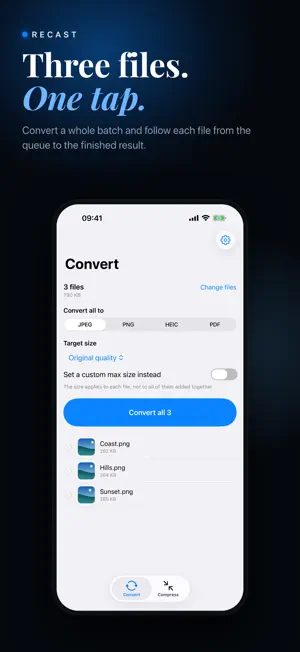
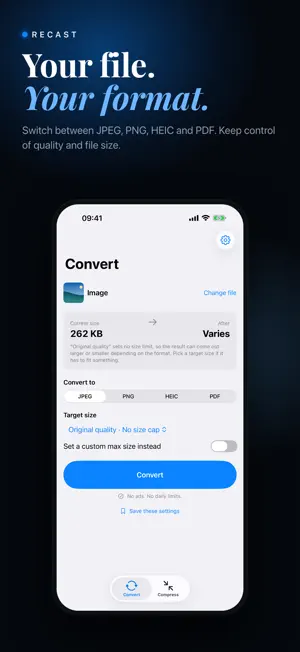
Recast turns a file into the format you need, or makes it smaller for sharing. Every feature is free, with no daily limits, no ads and no account. CONVERT Convert images into JPEG, PNG, HEIC or PDF. Turn videos into MP4, MOV or GIF, or extract their audio as M4A. Export PDF pages as images and turn GIFs into video or still images. Extract the video from a Live Photo. HEIC encoding depends on device support. COMPRESS Choose an actual target size or enter your own. Recast can reduce quality and dimensions to reach the target and tells you when a target cannot be met. GIF conversion may shorten a clip to keep the output manageable. Compressing a PDF may flatten selectable text into images; the result explains when this happens. BATCH AND AUTOMATE Convert or compress multiple files in one go. Combine photos into one PDF, in the order you choose. Run conversions from Shortcuts and the Action button. Save your favourite settings and reuse them with one tap. ON YOUR DEVICE Your files are never uploaded. Conversion works offline on your iPhone or iPad. Optional tips use Apple's in-app purchase system. HONEST ABOUT RESULTS Some conversions and ZIP archives make files bigger. Recast shows the actual result and explains any size or quality tradeoffs. An already suitable file is kept as it is where possible. ALSO INCLUDED Compress images and PDFs from the share sheet Pack other files into a ZIP archive Keep recent results ready to share again Choose an export folder Preview before and after Light and dark appearance OPTIONAL SUPPORT If Recast helps you, you can leave a tip in Settings > Support Recast. Tips are one-time consumable in-app purchases. They are entirely optional, do not unlock features, and are not subscriptions. Every feature stays free whether you tip or not. Thank you to everyone who previously bought Recast or Recast Pro. All existing functionality remains available without restoring a purchase.
What’s new
Version 1.3.1 · Updated October 12, 2026
Refreshed App Store artwork gives you a closer look at converting and compressing files.
App privacy
The developer, LEON NELIO FIGUEIRA, reported these privacy practices to Apple.
Data Not Linked to You
The following data, which may be collected but is not linked to your identity, may be used for the following purposes:
- Identifiers: Device ID
- Usage Data: Product Interaction, Advertising Data
- Purchases: Purchase History
- Diagnostics: Crash Data, Performance Data
Used for: Third-Party Advertising, Analytics, App Functionality
Alternatives to Recast: Convert & Compress
Looking for apps like Recast: Convert & Compress? Here are 6 similar apps on the App Store. The highest rated is Zip,RAR,7z Extractor-SpeedZip (5.0/5), and 4 of the 6 are free to download.
-
 3D Print Doctor
-
 TV Remote for Google & Android
-
 U-Hear: Live Subtitles
-
 Countdown Log - Days Until
-
 Zip,RAR,7z Extractor-SpeedZip
5.0
-
 ShadowClip
| App | Rating | Price | Last updated | Compare |
|---|---|---|---|---|
| Recast: Convert & Compress | – | Free | October 12, 2026 | |
| 3D Print Doctor | – | Free | Sep 9, 2026 | Compare |
| TV Remote for Google & Android | – | Free | Oct 27, 2026 | Compare |
| U-Hear: Live Subtitles | – | Free | Oct 10, 2026 | Compare |
| Countdown Log - Days Until | – | 1.99 USD | Jul 11, 2026 | Compare |
| Zip,RAR,7z Extractor-SpeedZip | 5.0 / 5 (2) | Free | Oct 24, 2026 | Compare |
| ShadowClip | – | 3.99 USD | Oct 19, 2026 | Compare |