

Work Orders: SwiftOrderUp
Moises Wendt Business iPhoneiPadiPod touch
Work Orders: SwiftOrderUp is a free Business app for iPhone and iPad by Moises Wendt. Requires iOS 15.0. Updated October 28, 2026.
- Price
- Free
- on the App Store
- Size
- 24 MB
- Age 4+
- Updated
- Oct 28
- 2026 · v1.0.16
Screenshots


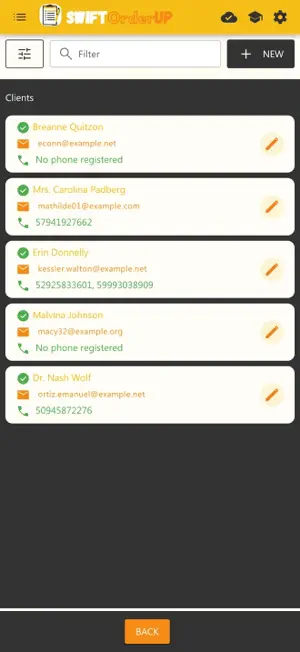
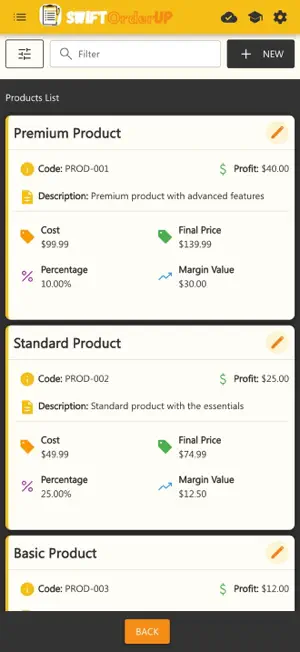
About Work Orders: SwiftOrderUp
Work orders, clients, team and photos in one place — with offline mode to keep working in the field without internet • Works Offline: Work without internet: create and update work orders offline; everything syncs automatically when you are back online. • Work Orders: Create, manage and track all your work orders (service orders) in one place • Team Management: Organize your team and assign tasks quickly and efficiently • Work Order as PDF: Generate the work order PDF and share it with your customer from any app — or download it on your computer. • Daily Overview: See at a glance which orders are active, waiting in the queue and completed today How It Works • Register Your Company: Create your account and set up your company data in seconds • Register Your Employees: Add your team to the system (optional, but recommended for better control) • Create a Work Order: Start a new work order with just a few clicks. All client data is optional - you decide the level of detail • Enjoy the Benefits: Record start/end times, materials used, and automatically calculate service value using your custom metrics Use Anywhere, Anytime • Web Browser: Access directly from your computer or mobile browser. No installation required. Offline mode is available only in the app. Pricing that Fits Your Budget • Free Plan: Perfect to get started. Try all basic features at no cost, that never expires • Flexible Plans: Scale as your business grows. Pay only for what you use • Room to Grow: For larger companies: more users, teams and work orders per day Terms of Service (EULA): https://swiftorderup.com/terms-of-service Privacy Policy: https://swiftorderup.com/privacy-policy
What’s new
Version 1.0.16 · Updated October 28, 2026
Clearer plan purchases: if your country's app store does not sell the plan you picked, the app now says so instead of asking you to try again. When a form is refused, the message names the field to fix. And on a poor connection the app no longer hangs waiting: it gives up after a while and tries again.
App privacy
The developer, Moises Wendt, reported these privacy practices to Apple.
Data Linked to You
The following data, which may be collected and linked to your identity, may be used for the following purposes:
- Contact Info: Email Address, Name, Physical Address, Phone Number
- Usage Data: Product Interaction
- Identifiers: User ID, Device ID
- Diagnostics: Other Diagnostic Data
- Purchases: Purchase History
- User Content: Photos or Videos, Customer Support, Other User Content
- Other Data: Other Data Types
Used for: Developer’s Advertising or Marketing, Analytics, App Functionality
Alternatives to Work Orders: SwiftOrderUp
Looking for apps like Work Orders: SwiftOrderUp? Here are 6 similar apps on the App Store. The highest rated is My Technical Assistance (5.0/5), and all 6 are free to download.
-
 Gestão Consert
-
 Instinto Força de Vendas
-
 Freeboard — Cash Flow
-
 Agenda OS: Controle Servicos
-
 PraticOS
-
 My Technical Assistance
5.0
| App | Rating | Price | Last updated | Compare |
|---|---|---|---|---|
| Work Orders: SwiftOrderUp | – | Free | October 28, 2026 | |
| Gestão Consert | – | Free | Oct 29, 2026 | Compare |
| Instinto Força de Vendas | – | Free | Oct 27, 2026 | Compare |
| Freeboard — Cash Flow | – | Free | Sep 22, 2026 | Compare |
| Agenda OS: Controle Servicos | – | Free | Sep 16, 2026 | Compare |
| PraticOS | – | Free | Oct 11, 2026 | Compare |
| My Technical Assistance | 5.0 / 5 (1) | Free | Mar 24, 2026 | Compare |