

Freeboard — Cash Flow
iPucu Bilişim Teknolojileri Finance iPhoneiPadiPod touch
Freeboard — Cash Flow is a free Finance app for iPhone and iPad by iPucu Bilişim Teknolojileri. Requires iOS 17.0. Updated September 22, 2026.
- Price
- Free
- on the App Store
- Size
- 4 MB
- Age 4+
- Updated
- Sep 22
- 2026 · v1.0
Screenshots


About Freeboard — Cash Flow
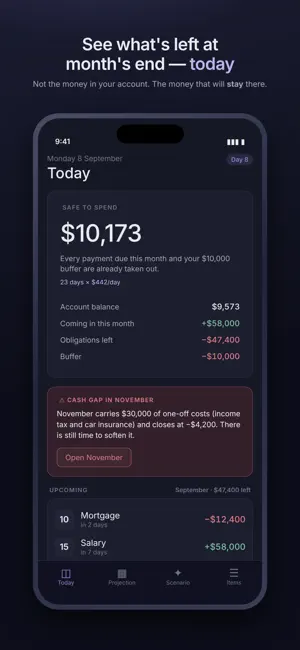
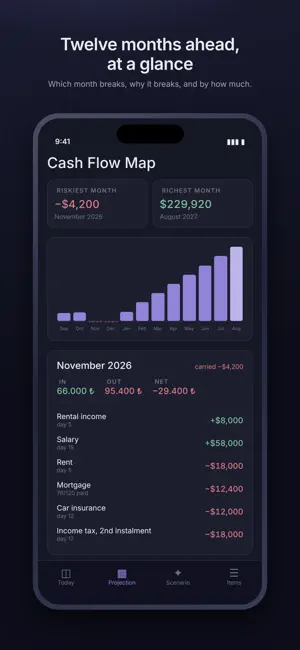
Most budgeting apps tell you where your money went. This one tells you where it is going. You enter what comes in and what goes out — salary, rent, loan instalments, the tax bill in November — and the app projects your balance month by month. Not an average. The actual closing balance for each month, with the reason it turns out that way. WHAT IT ANSWERS • How much can I spend today without breaking the month? Your safe-to-spend figure takes every payment still due this month and your buffer out of the balance you see in the bank. • Which month breaks, and why? The cash flow map shows twelve months at once. The app names the month, names the expenses that caused it, and says how far below zero it goes. • The month closes fine — but do I stay in the black all the way through it? Money doesn't arrive evenly. Rent leaves on the 5th, salary arrives on the 15th. The day-by-day view catches the dips a monthly total hides. • What if I buy this now? Simulate a purchase before you make it, and compare paying cash against 3, 6 or 12 instalments — each with the lowest point it leaves you at. • What actually happened? Mark each payment as paid, partly paid, missed or cancelled. The unpaid part isn't lost: it carries into next month as its own line, and every following month is recalculated. • Will I have the money in June? Set a goal and the app checks it against the plan — including the dips on the way, because money you spend in November isn't there in June. BUILT FOR REAL MONEY Credit cards are modelled properly: a card delays a payment rather than removing it, so the app follows the statement cycle to the day the cash actually leaves. Unpaid statement balances accrue interest. Instalments have raise rates and end dates. Recurring items can grow with inflation. YOUR DATA STAYS ON YOUR PHONE No account. No sign-up. No server. Nothing is uploaded, because there is nowhere to upload it to. Lock the app with Face ID, and export a backup file you keep wherever you like. Available in 15 languages, with the currency set separately from the language. FREE AND PRO The free version is a complete app, not a demo: unlimited items, six months of projection, this month day by day, reconciliation, risk warnings, backup and Face ID. Pro extends the horizon to 12 or 24 months, opens the day-by-day view for every month, compares payment plans, builds a debt payoff plan and lifts the card and goal limits. Yearly with a free trial, or a one-time lifetime purchase — there is no server to pay for, so you shouldn't have to pay forever. SUBSCRIPTION Freeboard Pro is available as a yearly subscription with a 1-week free trial, or as a one-time lifetime purchase. The yearly plan renews automatically unless cancelled at least 24 hours before the period ends; you can manage or cancel it any time in your App Store account settings. The lifetime option never renews. Terms of Use (EULA): https://www.apple.com/legal/internet-services/itunes/dev/stdeula/ Privacy Policy: http://www.ipucubilisim.com.tr/freeboard-gizlilik.html
App privacy
The developer, iPucu Bilişim Teknolojileri, reported these privacy practices to Apple.
Data Not Collected
The developer does not collect any data from this app.
Alternatives to Freeboard — Cash Flow
Looking for apps like Freeboard — Cash Flow? Here are 6 similar apps on the App Store.
-
 Cashy IA
-
 Freeboard: Personal Finance
-
 SpendNext
-
 Nakit Kontrol
-
 BS Mszczonów
-
 CaixaMEI: Bookkeeping & Sales
| App | Rating | Price | Last updated | Compare |
|---|---|---|---|---|
| Freeboard — Cash Flow | – | Free | September 22, 2026 | |
| Cashy IA | – | Free | May 22, 2026 | Compare |
| Freeboard: Personal Finance | – | Free | Oct 18, 2026 | Compare |
| SpendNext | – | Free | Oct 2, 2026 | Compare |
| Nakit Kontrol | – | Free | Aug 8, 2026 | Compare |
| BS Mszczonów | – | Free | Sep 28, 2026 | Compare |
| CaixaMEI: Bookkeeping & Sales | – | Free | Oct 15, 2026 | Compare |