

Compact Contacts Manager
CAGLAR SERDAR Productivity iPhoneiPadiPod touch
Compact Contacts Manager is a paid Productivity app for iPhone and iPad by CAGLAR SERDAR. Requires iOS 18.0. Updated October 21, 2026.
- Price
- 14.99 USD
- on the App Store
- Size
- 10 MB
- Age 4+
- Updated
- Oct 21
- 2026 · v1.6.1
Screenshots


About Compact Contacts Manager
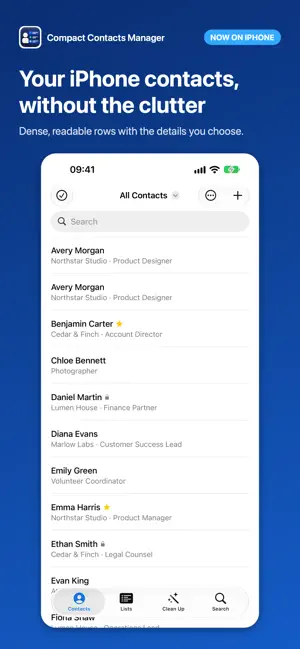
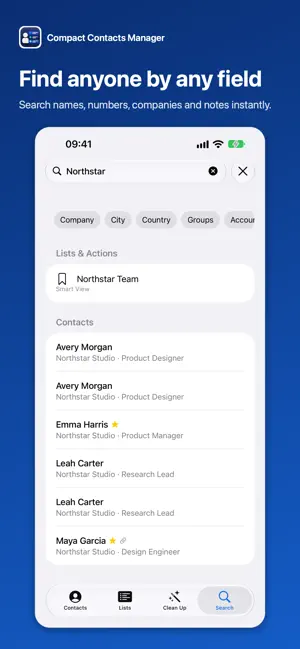
Now on iPhone too: the same private workspace for the contacts already on your iPhone and iPad, in one purchase. Compact Contacts Manager is a private, focused workspace for the contacts already on your iPad. Browse an adaptive contact table in landscape or a touch-friendly layout in portrait. Choose columns and row density, work with keyboard or pointer when attached, and use the Command Palette to reach contacts, Saved Views, groups, accounts, and safe actions. Search names, organizations, email addresses, phone numbers, postal addresses, groups, and—when enabled—contact Notes locally on iPad. Work with Notes, with your permission: • Read and edit long contact Notes in the detail panel. • Focus on Notes or hide other detail sections to give longer text more room. • Choose whether Notes are included in the in-memory search index on this iPad. Organize and hand off exactly what you intend: • Build Saved Views with ALL or ANY rules, sorting, columns, density, and detail layout. • Use Recently Edited for contacts successfully saved by Compact Contacts, plus built-in Missing Phone and Missing Company views. • Preview a selection or filtered result before exporting it as CSV or vCard through Files or the system share sheet. • Export a Saved View directly as a vCard bundle for a coworker. Contact Notes are excluded by default and require an explicit choice for each export. • Review ready, warning, and blocked cards before a vCard import writes anything. • Use Bulk Edit for names, organization fields, labeled phones, emails, URLs and relationships, postal fields, birthdays, groups, and Notes. Apply text or regular-expression transformations and review exact changes before saving. • Merge duplicate contacts field by field, choose a destination account, and undo from encrypted on-device Merge History. • Edit simple fields directly in the contact table, and delete selected contacts after a preview and a verified recovery backup. • Search results are grouped by where they matched: name, phone, email, company, address, or Notes. • Remove repeated phone numbers, email addresses, URLs, and postal addresses inside the same card, and relabel entries by their current label. Your iPad’s system Contacts database remains the source of truth, and iPadOS manages synchronization for configured accounts. Compact Contacts has no ads, third-party analytics, developer account, or contact cloud. Contact and Notes content is processed on your device and is not uploaded to a developer server. Only a file or system handoff you explicitly start can carry the selected contact data outside the app.
What’s new
Version 1.6.1 · Updated October 21, 2026
Fix from your feedback: company cards now show the person's name under the company name.
App privacy
The developer, CAGLAR SERDAR, reported these privacy practices to Apple.
Data Not Collected
The developer does not collect any data from this app.
Alternatives to Compact Contacts Manager
Looking for apps like Compact Contacts Manager? Here are 6 similar apps on the App Store. The highest rated is Qillo (5.0/5), and all 6 are free to download.
-
 People by Super Simple
-
 Qillo
5.0
Qillo
5.0
-
 Tag Keep
5.0
Tag Keep
5.0
-
 IndyCRM: Clients & Invoices
4.6
IndyCRM: Clients & Invoices
4.6
-
 OIT Connect
4.1
OIT Connect
4.1
-
 Plinky: Save & Bookmark Links
4.8
Plinky: Save & Bookmark Links
4.8
| App | Rating | Price | Last updated | Compare |
|---|---|---|---|---|
| Compact Contacts Manager | – | 14.99 USD | October 21, 2026 | |
| People by Super Simple | – | Free | Sep 28, 2026 | Compare |
| Qillo | 5.0 / 5 (4) | Free | Jun 7, 2026 | Compare |
| Tag Keep | 5.0 / 5 (2) | Free | Aug 31, 2026 | Compare |
| IndyCRM: Clients & Invoices | 4.6 / 5 (5) | Free | Aug 27, 2026 | Compare |
| OIT Connect | 4.1 / 5 (9) | Free | Jul 23, 2026 | Compare |
| Plinky: Save & Bookmark Links | 4.8 / 5 (166) | Free | Oct 21, 2026 | Compare |