

Qillo
JESSE THOMAS LEE Productivity iPhoneiPadiPod touch
Qillo is a free Productivity app for iPhone and iPad by JESSE THOMAS LEE. Rated 5.0/5 from 4 ratings. Requires iOS 15.1. Updated June 7, 2026.
- Rating
- 5.0
- 4 ratings
- Price
- Free
- on the App Store
- Size
- 44 MB
- Age 4+
- Updated
- Jun 7
- 2026 · v1.0.2
Screenshots
About Qillo
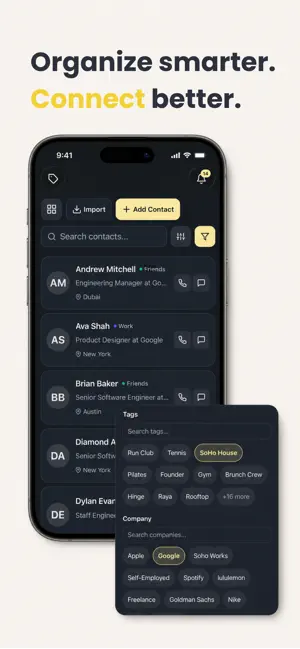
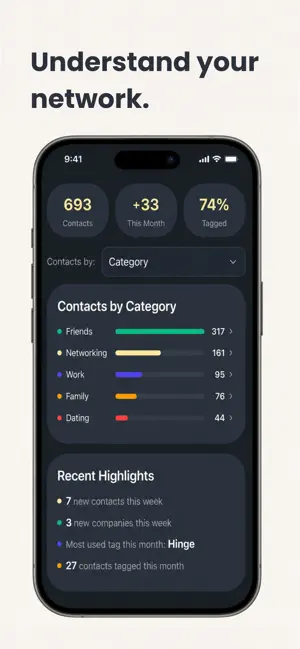
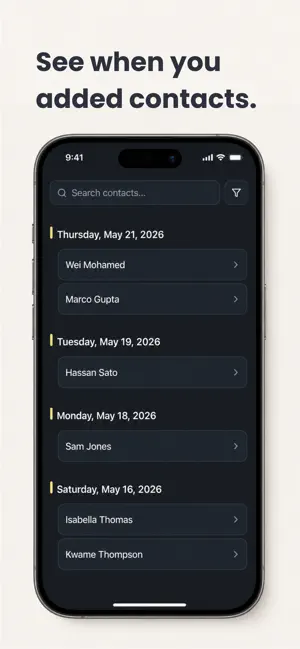
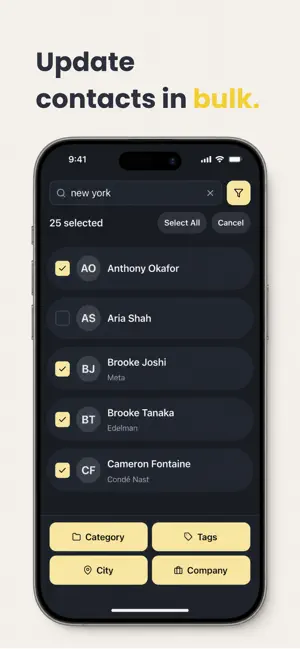
Qillo transforms your contacts with smart organization, AI enrichment, and powerful analytics. Your Apple Contacts and Qillo stay in perfect two-way sync – add or update contacts in either app and everything stays connected. No replacement, just enhancement ORGANIZE YOUR CONTACTS YOUR WAY Organize contacts into custom categories like Networking, Friends, Family, Dating, or Clients. Add custom tags to group people however makes sense — by project, event, interest, or anything else. Filter and sort by company, city, tag, category, and more to find exactly who you need in seconds. BEAUTIFUL ANALYTICS & INSIGHTS Visualize your entire network with interactive charts and analytics. See breakdowns by category, company, city, and tags. Check your total contacts, new contacts this month, percent tagged, monthly growth, and more. Drill into any chart to explore the specific people behind the numbers. TIMELINE VIEW See a chronological history of when you added each contact. Browse by date to remember exactly who you added last week, last month, or any time in the past. Perfect for when you need to say, "I met someone at that event last weekend, who was that?" BULK EDIT & ENRICH IN SECONDS Struggling with messy contact data? Filter your contacts, multiselect in bulk, and update tags, categories, or companies all at once. Instantly clean up and enrich your entire network. SMART AI-POWERED ENRICHMENT Add contact details the natural way — just type or dictate something like "works in design at Apple, lives in New York, met at run club" and Qillo's AI parses it all and fills in the fields for you. Enrich existing contacts with a single tap. TWO-WAY SYNC WITH APPLE CONTACTS Here's the key: Qillo doesn't replace Apple Contacts — it enhances it. Everything syncs both ways, automatically. Add a contact in Apple Contacts? It appears in Qillo. Add one in Qillo? It syncs to Apple Contacts. Update a birthday, company, or field in either app? Both stay in perfect sync. You're never forced to use one or the other — use whichever feels right, and everything stays connected. FAVORITES AT A GLANCE Mark important contacts as favorites and pin them to the top of your list for instant access. BIRTHDAY TRACKING Never miss an important date. Get notified on birthdays and see upcoming birthdays at a glance so you can stay thoughtful and connected. QR CODE SHARING Share your contact info instantly with a personalized QR code. Scan someone else's to add them in seconds. LIGHT & DARK MODE Choose your preferred look with full dark mode and light mode support. Free to Start, Pro When You're Ready Your contacts are yours. Qillo never shares your data with third parties. Terms of Use: https://www.apple.com/legal/internet-services/itunes/dev/stdeula/
What’s new
Version 1.0.2 · Updated June 7, 2026
Improved Apple contacts syncing.
App privacy
The developer, JESSE THOMAS LEE, reported these privacy practices to Apple.
Data Linked to You
The following data, which may be collected and linked to your identity, may be used for the following purposes:
- Diagnostics: Crash Data, Performance Data
- Contacts: Contacts
- User Content: Photos or Videos
- Identifiers: User ID, Device ID
- Usage Data: Product Interaction
Used for: Analytics, Product Personalization, App Functionality
Alternatives to Qillo
Looking for apps like Qillo? Here are 6 similar apps on the App Store. The highest rated is Starrise Contacts: Notes & CRM (4.5/5), and 5 of the 6 are free to download.
-
 Compact Contacts Manager
-
 People by Super Simple
-
 ContactMind: Clean & Organize
-
 Buildry: Home Renovation
-
 OsmO AI Phone Assistant
4.4
OsmO AI Phone Assistant
4.4
-
 Starrise Contacts: Notes & CRM
4.5
Starrise Contacts: Notes & CRM
4.5
| App | Rating | Price | Last updated | Compare |
|---|---|---|---|---|
| Qillo | 5.0 / 5 (4 ratings) | Free | June 7, 2026 | |
| Compact Contacts Manager | – | 14.99 USD | Sep 29, 2026 | Compare |
| People by Super Simple | – | Free | Sep 28, 2026 | Compare |
| ContactMind: Clean & Organize | – | Free | Jun 20, 2026 | Compare |
| Buildry: Home Renovation | – | Free | Jun 16, 2026 | Compare |
| OsmO AI Phone Assistant | 4.4 / 5 (11) | Free | Oct 18, 2026 | Compare |
| Starrise Contacts: Notes & CRM | 4.5 / 5 (13) | Free | Oct 11, 2026 | Compare |
Compare Qillo with the top alternatives: ratings, updates, ASO score and keyword gaps →