

Face Search: Reverse Image
translateimage.io Utilities iPhoneiPadiPod touch
Face Search: Reverse Image is a free Utilities app for iPhone and iPad by translateimage.io. Requires iOS 17.0. Updated October 16, 2026.
- Price
- Free
- on the App Store
- Size
- 5 MB
- Age 17+
- Updated
- Oct 16
- 2026 · v1.1
Screenshots


About Face Search: Reverse Image
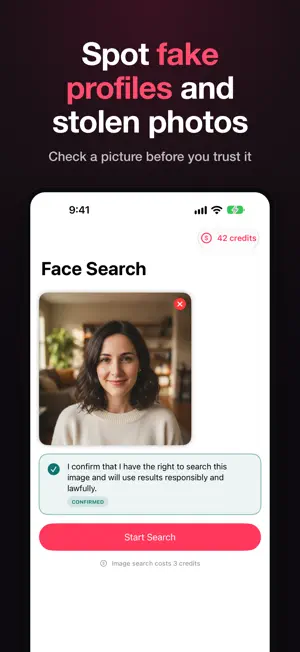
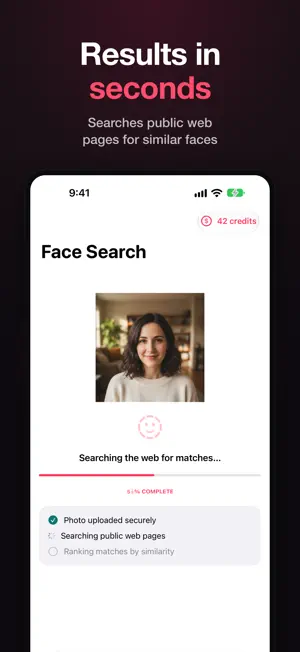
Ever wondered where your photos have ended up? FaceSearch is a reverse image search for photos with faces. Choose a picture and see the public web pages where a visually similar face already appears, each match ranked by similarity and linked to its original source. WHY PEOPLE USE FACESEARCH • Protect your own images: find out where pictures of you have been republished, then request removal. • Spot fake profiles: check whether a dating or social profile photo was taken from someone else before you trust it. • Catch reused or stolen photos: see if a picture you were sent already exists elsewhere online. HOW IT WORKS 1. Choose a clear photo of a face 2. Confirm you have the right to search it 3. Review matched public pages, grouped as Exact, High and Possible matches, each with a link to its source BUILT FOR TRUST • Every result links to its source, so you can verify it yourself • Report a result or request removal from inside the app • Uploads are deleted automatically within 24 hours and are never sold • No face templates or biometric identifiers are stored • Delete your account and data at any time in Settings SIMPLE, HONEST PRICING Each search costs 3 credits. Buy one-time credit packs that never expire, with no subscription required. Optional PRO monthly plan: 60 credits per month, search history and PDF export. PRO renews automatically unless canceled at least 24 hours before the end of the current period; manage it in your account settings. MADE FOR EVERY SCREEN Designed for iPhone, iPad and iPhone Duo, in portrait and landscape. CONSENT AND ACCEPTABLE USE Every search requires you to confirm you have the right to search that image. FaceSearch is for adults (18+) checking their own likeness or images they are entitled to check. It may not be used to identify, locate, track, monitor or contact a stranger, or for any decision about employment, credit, housing, insurance or education. Those uses are prohibited by our Terms. FaceSearch performs no face recognition of its own and keeps no database of identified people; it searches an index of publicly published web pages and returns links to them. Questions or removal requests: [email protected] Terms: https://facesearch.net/terms Privacy: https://facesearch.net/privacy
What’s new
Version 1.1 · Updated October 16, 2026
Version 1.1 • A clearer search screen with photo tips for better matches • Step-by-step progress while your search runs • Results show how many websites matched, with a reminder to verify each source • Made for iPad and iPhone Duo: two-column layouts, landscape and sidebar navigation • Contact support and manage your subscription right from Settings
App privacy
The developer, translateimage.io, reported these privacy practices to Apple.
Data Linked to You
The following data, which may be collected and linked to your identity, may be used for the following purposes:
- Purchases: Purchase History
- Contact Info: Email Address
- User Content: Photos or Videos
- Search History: Search History
- Usage Data: Other Usage Data
Used for: App Functionality
Alternatives to Face Search: Reverse Image
Looking for apps like Face Search: Reverse Image? Here are 6 similar apps on the App Store. The highest rated is AI Face Search - Image Search (3.0/5), and all 6 are free to download.
-
 FaceSearch AI
-
 Reverse Image Search:RIS,Lense
-
 VSkip: Voice to Text
-
 AI Face Search - Image Search
3.0
AI Face Search - Image Search
3.0
-
 Caught4K AI Catfish Detector
-
 ReverseEyes: Search By Image
| App | Rating | Price | Last updated | Compare |
|---|---|---|---|---|
| Face Search: Reverse Image | – | Free | October 16, 2026 | |
| FaceSearch AI | – | Free | Aug 18, 2026 | Compare |
| Reverse Image Search:RIS,Lense | – | Free | Oct 8, 2026 | Compare |
| VSkip: Voice to Text | – | Free | Oct 12, 2026 | Compare |
| AI Face Search - Image Search | 3.0 / 5 (2) | Free | Sep 2, 2026 | Compare |
| Caught4K AI Catfish Detector | – | Free | Aug 24, 2026 | Compare |
| ReverseEyes: Search By Image | – | Free | Sep 10, 2026 | Compare |