

iPrompter Studio by StatsKey
Ryan Sullivan Photo & Video iPhoneiPadiPod touch
iPrompter Studio by StatsKey is a free Photo & Video app for iPhone and iPad by Ryan Sullivan. Requires iOS 17.0. Updated September 21, 2026.
- Price
- Free
- on the App Store
- Size
- 1 MB
- Age 4+
- Updated
- Sep 21
- 2026 · v1.2
Screenshots
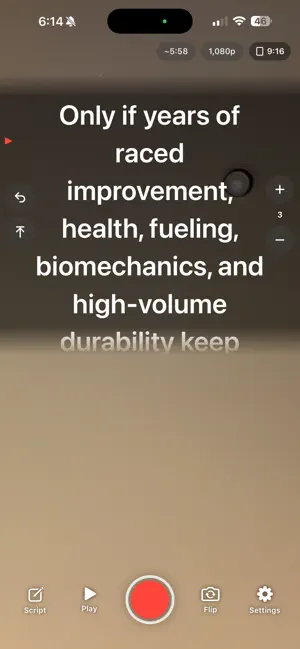


About iPrompter Studio by StatsKey
iPrompter Studio helps you deliver long scripts start to finish while recording clean, publish-ready video on iPhone or iPad. Your script stays on screen only—it is never burned into the video. ZOOM & CAMERA CONTROL • Smooth pinch-to-zoom before and during recording • On-screen zoom controls and native lens presets when available • Front and rear cameras, tap to focus, matching preview and recording mirroring, and rear-camera torch level • 720p, 1080p, or 4K; 24, 30, or 60 fps; H.264 or HEVC; stabilization and microphone controls, subject to device support • Clear device-specific fallbacks when hardware cannot apply a requested setting COMPREHENSIVE PROMPTER CONTROL • Text size, font design, weight, alignment, case, color, character spacing, line height, paragraph spacing, margins, and maximum width • Horizontal and vertical text mirroring for glass rigs • Panel size, position, color, opacity, corners, edge fade, reading marker, reading line, and colors • Constant scrolling with speed, direction, rewind distance, auto-resume delay, end behavior, and target-WPM speed fitting • Choose how scrolling synchronizes with recording and what happens at script end FRAMING & WORKFLOW • 9:16, 4:5, 1:1, or custom crop guides while recording full-frame video in portrait or landscape • Fill or fit preview, outside shade, guide color, labels, rule-of-thirds grid, and crosshair • Adjustable countdown and haptics • Presets for studio, teleprompter glass, vertical video, and accessible reading • Configurable on-camera controls, sizing, opacity, status, feedback, and keep-awake behavior • Completed takes save to Photos; if saving needs attention, retry, export, or discard without losing the take PRIVATE BY DESIGN No account, ads, analytics, tracking, subscription, or cloud upload. Scripts, settings, and pending takes remain on your device unless you choose to share them.
What’s new
Version 1.2 · Updated September 21, 2026
• Choose portrait, landscape left, landscape right, or automatic recording orientation. • Quickly select 720p, 1080p, or 4K and 24, 30, or 60 fps, subject to your camera's capabilities. • See the complete video with Full frame preview, now the default. Front-camera mirroring matches the saved take, and you can hide the script to check your framing. • Zoom out to the widest view available for your camera and capture settings, with convenient zoom and lens controls. • Review and share your last take in the app after recording.
App privacy
The developer, Ryan Sullivan, reported these privacy practices to Apple.
Data Not Collected
The developer does not collect any data from this app.
Alternatives to iPrompter Studio by StatsKey
Looking for apps like iPrompter Studio by StatsKey? Here are 6 similar apps on the App Store. The highest rated is PromptSmart Max (4.5/5), and 5 of the 6 are free to download.
-
 CreatorCut
-
 ViralUp: AI Social Growth
-
 PromptSmart Max
4.5
-
 PhotoFlashLight: Photo Manager
4.0
-
 Teleprompter: Video & Script
-
 LiveConvert: HEIC to JPG
4.0
| App | Rating | Price | Last updated | Compare |
|---|---|---|---|---|
| iPrompter Studio by StatsKey | – | Free | September 21, 2026 | |
| CreatorCut | – | Free | Aug 17, 2026 | Compare |
| ViralUp: AI Social Growth | – | Free | Nov 5, 2026 | Compare |
| PromptSmart Max | 4.5 / 5 (2) | Free | Sep 24, 2026 | Compare |
| PhotoFlashLight: Photo Manager | 4.0 / 5 (4) | 14.99 USD | Aug 6, 2026 | Compare |
| Teleprompter: Video & Script | – | Free | Aug 17, 2026 | Compare |
| LiveConvert: HEIC to JPG | 4.0 / 5 (9) | Free | Sep 26, 2026 | Compare |