

OcthoMind
VOLKAN TEZKAN Productivity iPhoneiPadiPod touch
OcthoMind is a free Productivity app for iPhone and iPad by VOLKAN TEZKAN. Requires iOS 17.0. Updated October 1, 2026.
- Price
- Free
- on the App Store
- Size
- 12 MB
- Age 4+
- Updated
- Oct 1
- 2026 · v1.0.6
Screenshots
About OcthoMind
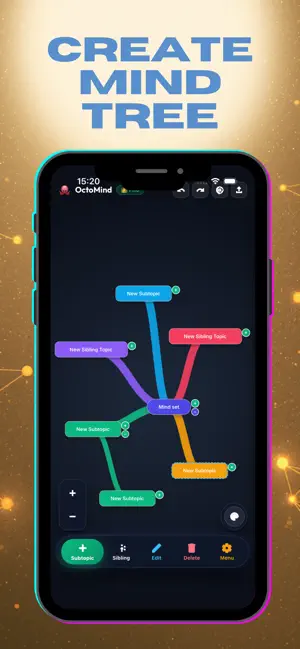
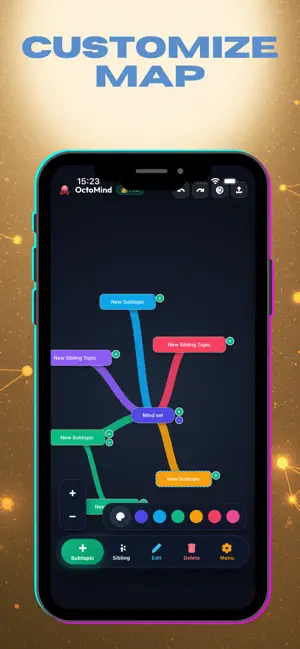
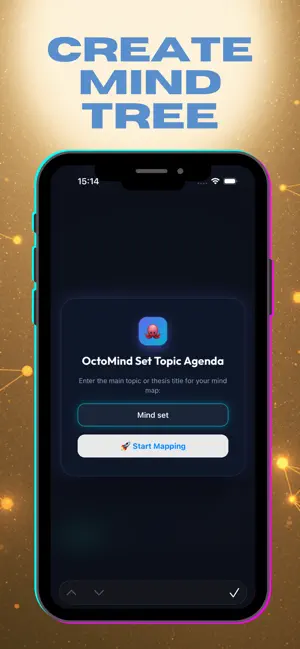
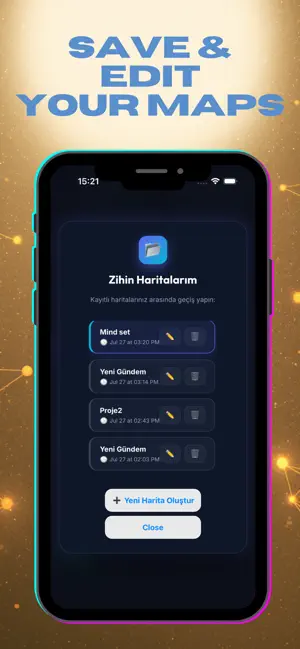
Organize your thoughts, plan your academic research, or visualize your daily agendas in seconds! OctoMind is a next-generation visual thinking tool that transforms your complex ideas into sleek, structured, and easy-to-manage mind maps. Tailored specifically for academics, students, project managers, and creative professionals. WHY OCTOMIND? • 100% LOCAL PRIVACY (Offline-First): Your mind maps and personal notes are never uploaded to cloud servers. All your data remains securely stored on your device. • MULTI-MAP DASHBOARD: Create, rename, and delete unlimited independent maps for different courses or projects, and switch between them instantly. • COLLABORATIVE NOTES & OUTLINE: Add detailed rich text notes to any node, and check your map structure as a hierarchical tree outline in the side drawer. • RETINA-QUALITY EXPORTING: Save and share your maps via the native iOS Share Sheet as vector SVG, high-resolution Retina PNG, or print-quality PDF files. • PREMIUM HAPTIC UI: Experience a fully native iOS look and feel with a beautiful dark mode, smooth canvas animations, and precise tactile haptic feedback. BEST FOR: - Academic lecture notes & research structuring - Project planning & workflow visualization - Brainstorming sessions & conceptual drafting - Meeting agendas & interactive checklists Subscription & Pricing: You can start mapping for free. To unlock unlimited maps and high-res vector PDF, SVG, and PNG exports, you can upgrade to PRO via our Monthly Subscription (comes with a 3- Day Free Trial) or One-Time Lifetime Purchase. Transactions are securely managed via the official Apple StoreKit. Terms of Use (EULA): https://www.apple.com/legal/internet-services/itunes/dev/stdeula/
What’s new
Version 1.0.6 · Updated October 1, 2026
OctoMind 1.0.6 brings a desktop-grade and tablet-optimized flagship experience to your workflow: • Spotlight Command Palette (Cmd + K): Instantly search across all your nodes and maps; smoothly pan and zoom to any topic in milliseconds. • Infinite Dot-Grid Canvas: A modern, scalable dot-grid canvas background inspired by Miro & Figma, delivering spatial depth and clarity. • Interactive Task Nodes: Turn any node into a checklist item with a single tap. Track progress with satisfying haptic feedback and strikethroughs. • Universal Keyboard Ergonomics (Mac & iPad): - Tab: Add child branch instantly - Enter: Add sibling topic - Cmd + Z / Cmd + Shift + Z: Undo / Redo - Shift + Enter: Dynamic multi-line node titles • Touch & Stability Polish: Apple HIG-compliant touch targets and hardened StoreKit 2 restore flow.
App privacy
The developer, VOLKAN TEZKAN, reported these privacy practices to Apple.
Data Used to Track You
The following data may be used to track you across apps and websites owned by other companies:
- Identifiers: Device ID
Data Not Linked to You
The following data, which may be collected but is not linked to your identity, may be used for the following purposes:
- Identifiers: Device ID
- Usage Data: Product Interaction
- Diagnostics: Crash Data
Used for: Third-Party Advertising, Analytics, App Functionality
Alternatives to OcthoMind
Looking for apps like OcthoMind? Here are 6 similar apps on the App Store. The highest rated is MyScanner: Scan PDF & QR Code (5.0/5), and all 6 are free to download.
-
 K37 Simple Flows
-
 MyScanner: Scan PDF & QR Code
5.0
MyScanner: Scan PDF & QR Code
5.0
-
 Threadmap: Mind Maps & Collab
-
 PocketClaw: Business AI Agent
-
 Organization Chart Builder
-
 MindMap AI: Mind Map Maker
| App | Rating | Price | Last updated | Compare |
|---|---|---|---|---|
| OcthoMind | – | Free | October 1, 2026 | |
| K37 Simple Flows | – | Free | Aug 21, 2026 | Compare |
| MyScanner: Scan PDF & QR Code | 5.0 / 5 (6) | Free | Sep 19, 2026 | Compare |
| Threadmap: Mind Maps & Collab | – | Free | Jul 14, 2026 | Compare |
| PocketClaw: Business AI Agent | – | Free | Oct 13, 2026 | Compare |
| Organization Chart Builder | – | Free | Jul 30, 2026 | Compare |
| MindMap AI: Mind Map Maker | – | Free | Oct 9, 2026 | Compare |
Compare OcthoMind with the top alternatives: ratings, updates, ASO score and keyword gaps →