

MindMap AI: Mind Map Maker
Van Hiet Ho Productivity iPhoneiPadiPod touchMacApple Watch
MindMap AI: Mind Map Maker is a free Productivity app for iPhone and iPad by Van Hiet Ho. Requires iOS 16.0. Updated September 14, 2026.
- Price
- Free
- on the App Store
- Size
- 31 MB
- Age 4+
- Updated
- Sep 14
- 2026 · v1.0.9
Screenshots

About MindMap AI: Mind Map Maker
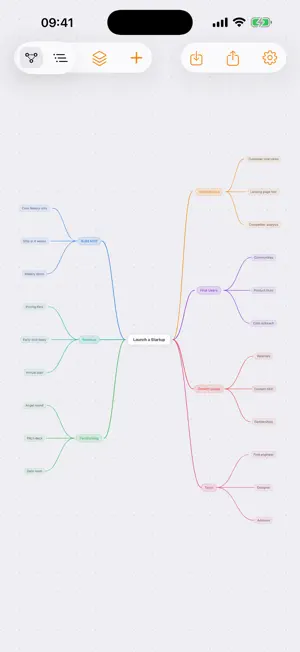
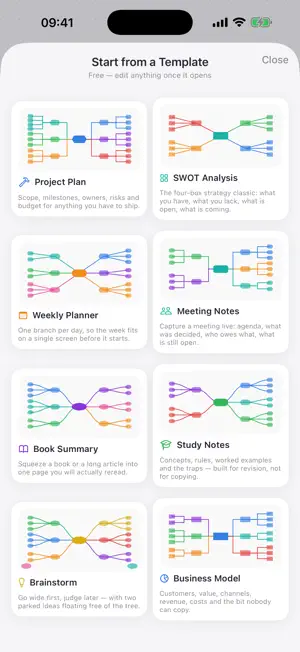
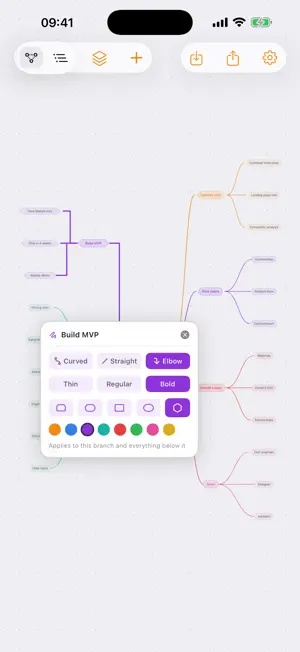
Turn any idea into a professional mind map in seconds — then find it on every device you own. There is no account and no sign-up: open the app, start mapping, and your maps sync across iPhone, iPad and Mac through your own iCloud. With MindMap Pro, type a topic, paste a long text, or drop in a URL and AI builds a complete, beautifully organized mind map for you. CREATE WITH AI (Pro) • Generate a full mind map from a single topic • Summarize long articles and documents into a visual map • Paste a URL and map out the whole page • Up to 100 AI actions per day THINK DEEPER • Add, edit and rearrange nodes freely on an infinite canvas — free, no account needed • Type straight into a node: tap and write, with no dialog in the way • Start from one of 8 built-in templates, all free — Project Plan, SWOT Analysis, Weekly Planner, Meeting Notes, Book Summary, Study Notes, Brainstorm and Business Model • Give a node the shape that fits it: rounded, pill, rectangle, oval or hexagon • Style the connectors too — curved, straight or elbow, in the thickness and color you choose. Tap one connector and the whole branch below it follows. • Drag one node onto another to re-parent it, or leave an idea standalone until you know where it belongs • Fit to screen brings a sprawling map back into view with a single tap • Tap any node and let AI expand it with new sub-ideas (Pro) • Ask AI to explain any concept — the answer attaches as a note (Pro) STAY ORGANIZED • Outline view: your whole map as a clean, collapsible list • Library with previews — your maps stay on your device and sync across iPhone, iPad and Mac through your own iCloud account • Works in light and dark mode EXPORT & SHARE (Pro) • PDF — as the mind-map diagram, or as an outline • HTML — as the mind-map diagram, or as an outline • JSON for your own tools • Share straight into another app, or use Save As to choose exactly where the file lands FREE VS PRO Free: up to 3 saved maps, the full manual mind-map editor with node shapes and connector styling, all 8 templates, outline view, and iCloud sync across your devices. MindMap Pro: all AI features — build a map from a topic, expand a node, explain a node, up to 100 AI actions per day — plus unlimited saved maps and export to PDF, HTML and JSON. Available as a monthly or yearly auto-renewable subscription; the yearly plan includes a 3-day free trial. The exact price for your region is shown in the app before you buy. Payment is charged to your Apple ID at confirmation of purchase (after the free trial, if included). Renews automatically for the same price and period unless cancelled at least 24 hours before the end of the current period. Manage or cancel anytime in App Store settings. PRIVACY There is no account and no login. Your maps live on your device and sync only through your own iCloud. iCloud is optional — without it, the app works local-only on that device. Terms of Use: https://sakura5.app/mindmapai/terms Privacy Policy: https://sakura5.app/mindmapai/privacy
What’s new
Version 1.0.9 · Updated September 14, 2026
This update is about sync getting your maps right. Fixed the big one: a device that only OPENED a map, without changing anything, could overwrite the version you had just edited somewhere else. The copy you edited last is now the copy that wins. Opening a saved map fetches the latest version first, so you never start editing an out-of-date map. If a map you already have open is changed on another device, it now updates itself and tells you. Signing in with Google or Apple now actually turns on syncing through your account, instead of quietly leaving your maps on iCloud. Worth knowing: iCloud sync only reaches devices signed in to the SAME Apple ID. If your Mac and your iPhone use different Apple IDs, sign in and choose account sync in Settings ▸ Sync — that reaches both.
App privacy
The developer, Van Hiet Ho, reported these privacy practices to Apple.
Data Used to Track You
The following data may be used to track you across apps and websites owned by other companies:
- Identifiers: Device ID
Data Linked to You
The following data, which may be collected and linked to your identity, may be used for the following purposes:
- Contact Info: Email Address, Name
- User Content: Other User Content
- Identifiers: User ID
Used for: App Functionality
Data Not Linked to You
The following data, which may be collected but is not linked to your identity, may be used for the following purposes:
- Identifiers: Device ID
- Purchases: Purchase History
Used for: Third-Party Advertising, App Functionality
Alternatives to MindMap AI: Mind Map Maker
Looking for apps like MindMap AI: Mind Map Maker? Here are 6 similar apps on the App Store. The highest rated is Idea Note : MindMap AI (2.0/5), and all 6 are free to download.
-
 MindWoods
-
 Idea Note : MindMap AI
2.0
Idea Note : MindMap AI
2.0
-
 relnote
-
 AI-PromptCraft: Prompt Builder
-
 Prompt Rewriter
-
 ArchFlowy
| App | Rating | Price | Last updated | Compare |
|---|---|---|---|---|
| MindMap AI: Mind Map Maker | – | Free | September 14, 2026 | |
| MindWoods | – | Free | Mar 6, 2026 | Compare |
| Idea Note : MindMap AI | 2.0 / 5 (1) | Free | Apr 27, 2026 | Compare |
| relnote | – | Free | Aug 29, 2026 | Compare |
| AI-PromptCraft: Prompt Builder | – | Free | Aug 17, 2026 | Compare |
| Prompt Rewriter | – | Free | Jun 6, 2026 | Compare |
| ArchFlowy | – | Free | Feb 7, 2026 | Compare |