

Pavilion: Pro Video Player
Paul Sahner Photo & Video iPad
Pavilion: Pro Video Player is a free Photo & Video app for iPad by Paul Sahner. Requires iOS 26.0. Updated October 11, 2026.
- Price
- Free
- on the App Store
- Size
- 45 MB
- Age 4+
- Updated
- Oct 11
- 2026 · v2026.3
Screenshots

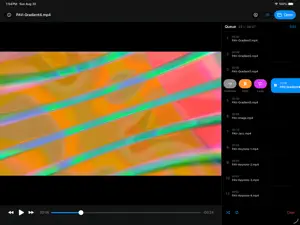


About Pavilion: Pro Video Player
Pavilion is a free video player for iPad geared toward motion designers and video editors. Watch your work with flexible playback, focused review tools, and native controls that stay clear of the picture. CONTROLS THAT DON’T OBSCURE THE FRAME Playback controls sit outside the video, leaving the whole frame in view. Use touch gestures or keyboard to navigate your footage. DROP A FOLDER, GET A QUEUE Open files from Files, or choose a folder—even one full of subfolders—to gather playable media into an ordered Queue. LOOP, HOLD, OR KEEP GOING Choose what happens after each clip: continue to the next item, hold the last frame, or loop. Mute individual clips, reorder items, or shuffle and repeat the Queue. MARK UP THE FRAME Draw directly over the picture to point something out, or display safe-area guides to check your layout. Markup is temporary and leaves your source file untouched. LOOK CLOSER Inspect detailed media metadata, including production information from popular editing suites when available. Step through frames, jump to a timecode or frame number, and switch between embedded video, audio, and subtitle tracks. WIDE FORMAT SUPPORT Play MP4, MOV, MKV, WebM, AVI, MXF, MPEG-TS, and many other formats. Pavilion works with your files, without a media library or account to manage. Completely free, with no subscriptions or in-app purchases.
What’s new
Version 2026.3 · Updated October 11, 2026
TRANSITIONS Add transitions to Queue items with custom durations. Transitions are a property of the outgoing Queue item. Transitions can be added by long-pressing or right-clicking on items in the Queue and include: - Cross Dissolve - Fade Through Black - Push (Four direction) - Linear Wipe (Four directions) - Star Wipe - Circle Wipe - Square Wipe Transitions persist through Queue re-orders or shuffles. The last item in the Queue cannot have a transition and will have the function disabled. To remove a transition, you can right-click in the Queue and choose "Remove selected transitions", or click the transition icon for the specific item in the Queue. Settings now include default transition duration. CODECS NotchLC has been added for playback. This is a software-only implementation and does not leverage NotchLC's GPU acceleration. MARKERS The timeline will now display indicators when a file contains chapters or markers. Hold Shift while scrubbing to snap to these indicators. CONTEXTUAL MENUS You can now long-press or right-click on Queue items to access common shortcuts.
App privacy
The developer, Paul Sahner, reported these privacy practices to Apple.
Data Not Collected
The developer does not collect any data from this app.
Alternatives to Pavilion: Pro Video Player
Looking for apps like Pavilion: Pro Video Player? Here are 6 similar apps on the App Store. The highest rated is Cassette: Home Video Player (4.9/5), and all 6 are free to download.
-
 Social Saver: Video Downloader
4.8
-
 ArtStory: insta story maker
4.7
-
 Cassette: Home Video Player
4.9
-
 Mugen Player
4.0
-
 Loopideo - Loop Videos
4.5
-
 Looper
4.4
| App | Rating | Price | Last updated | Compare |
|---|---|---|---|---|
| Pavilion: Pro Video Player | – | Free | October 11, 2026 | |
| Social Saver: Video Downloader | 4.8 / 5 (38) | Free | Sep 26, 2026 | Compare |
| ArtStory: insta story maker | 4.7 / 5 (48) | Free | Feb 29, 2024 | Compare |
| Cassette: Home Video Player | 4.9 / 5 (214) | Free | Oct 10, 2026 | Compare |
| Mugen Player | 4.0 / 5 (6) | Free | Nov 1, 2026 | Compare |
| Loopideo - Loop Videos | 4.5 / 5 (2,615) | Free | Oct 30, 2026 | Compare |
| Looper | 4.4 / 5 (4,879) | Free | Oct 21, 2026 | Compare |