

Mugen Player
Koichiro Kamada Photo & Video iPhoneiPadiPod touch
Mugen Player is a free Photo & Video app for iPhone and iPad by Koichiro Kamada. Rated 4.0/5 from 6 ratings. Requires iOS 17.4. Updated October 12, 2026.
- Rating
- 4.0
- 6 ratings
- Price
- Free
- on the App Store
- Size
- 35 MB
- Age 4+
- Updated
- Oct 12
- 2026 · v5.27.1
Screenshots

About Mugen Player
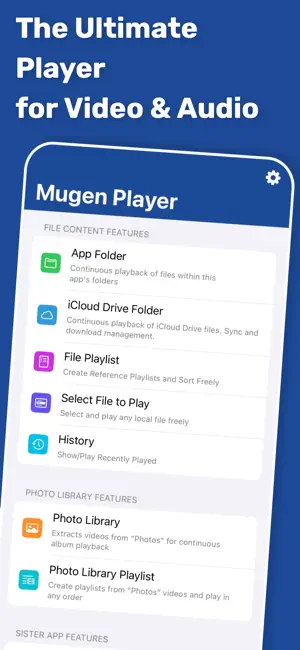
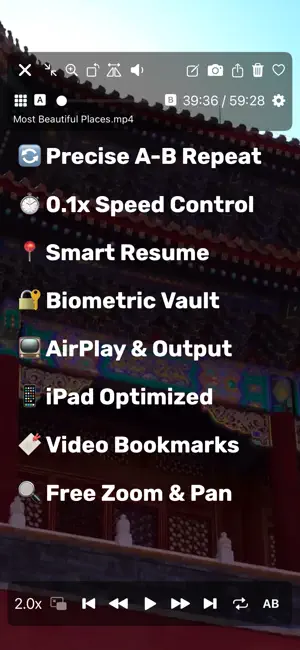
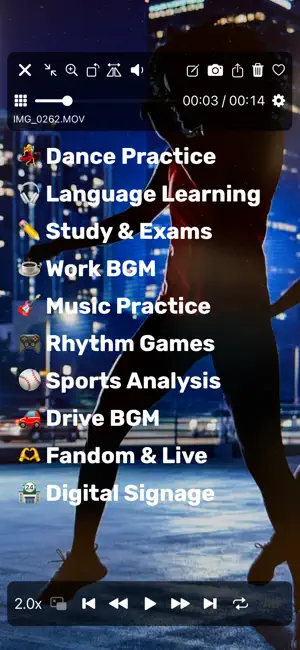
[Overview & Features] An easy-to-use, ultra-lightweight player designed for smooth continuous media playback. - Switch media instantly with intuitive swipe gestures and control playback with gestures such as short skips forward and back. - Create playlists that mix video and audio, then play them continuously in the background. - Resume playback or playlists naturally from where you left off. - Loop playback is ideal for in-store displays, demo videos, or background music. - Supports earphones, headphones, car controllers, AirPlay, and flexible iPad screen and multitasking modes. [Play Directly from Files] - Select media from a wide range of locations using the standard iOS file interface. - Play directly from the original location without creating unnecessary copies in the app. - Select multiple files for continuous playback, with playback history saved automatically for quick access. [Photo Library Playback] - Play continuously by album and automatically select only videos. - Supports all Photo Library videos, iCloud Shared Albums, and direct playback from iCloud Photo Library. - Choose whether iCloud loading prioritizes speed or quality. - Change playback order, filter by Favorites, toggle Favorites, and create or edit playlists. [App Folder Playback] - Play directly from the Mugen Player app folder without importing or registering files. - Start continuous playback with a tap and sort by file name, size, or other attributes. [Secure Vault] - Store media in a protected area within the app. - Restrict how the vault is opened, securely export items, and choose whether vault data is included in OS backups. [Sister App Integration] - Directly play recordings from Mugen Camera and Zero Camera. - Installed apps and their folders are detected automatically, with no linking, importing, or registration required. [Premium Features (Paid)] - Hide advertisements - Loop, normal repeat, and A-B repeat - Resume and restart playback - Customize gestures and button controls - Lock with Face ID or Touch ID See the in-app store for details. [Supported File Formats] - Supports formats natively playable by iOS and by the standard Files app.
Ratings & reviews
4.0
6 ratings
What’s new
Version 5.27.1 · Updated October 12, 2026
File playlists are now faster and more responsive. 【Smoother file playlists】 With many files registered, the playlist list could become unexpectedly slow to display, and adding or removing files could lag. We've reworked how the list loads, so everything stays quick even with large collections. If anything feels off, just let us know through in-app support.
App privacy
The developer, Koichiro Kamada, reported these privacy practices to Apple.
Data Used to Track You
The following data may be used to track you across apps and websites owned by other companies:
- Usage Data: Advertising Data
Data Not Linked to You
The following data, which may be collected but is not linked to your identity, may be used for the following purposes:
- Usage Data: Advertising Data
- Diagnostics: Crash Data, Performance Data
Used for: Third-Party Advertising, App Functionality
Alternatives to Mugen Player
Looking for apps like Mugen Player? Here are 6 similar apps on the App Store. The highest rated is File Manager App - PATOPI (5.0/5), and all 6 are free to download.
-
 File Manager App - PATOPI
5.0
File Manager App - PATOPI
5.0
-
 動画保存 WeBox - 動画再生 & 管理アプリ
-
 WMDPlayer
4.1
WMDPlayer
4.1
-
 高画質な画面録画BREMEN〜音楽 動画
4.6
高画質な画面録画BREMEN〜音楽 動画
4.6
-
 Re-Player
3.5
Re-Player
3.5
-
 トルミル
4.7
トルミル
4.7
| App | Rating | Price | Last updated | Compare |
|---|---|---|---|---|
| Mugen Player | 4.0 / 5 (6 ratings) | Free | October 12, 2026 | |
| File Manager App - PATOPI | 5.0 / 5 (5) | Free | Aug 22, 2025 | Compare |
| 動画保存 WeBox - 動画再生 & 管理アプリ | – | Free | Jan 17, 2024 | Compare |
| WMDPlayer | 4.1 / 5 (10) | Free | Oct 13, 2026 | Compare |
| 高画質な画面録画BREMEN〜音楽 動画 | 4.6 / 5 (30) | Free | Oct 6, 2026 | Compare |
| Re-Player | 3.5 / 5 (26) | Free | Jun 9, 2026 | Compare |
| トルミル | 4.7 / 5 (108) | Free | Oct 9, 2026 | Compare |
Compare Mugen Player with the top alternatives: ratings, updates, ASO score and keyword gaps →