

Speech It
ColorBoxStudio Productivity iPhoneiPadiPod touch
Speech It is a free Productivity app for iPhone and iPad by ColorBoxStudio. Requires iOS 18.0. Updated August 29, 2026.
- Price
- Free
- on the App Store
- Size
- 7 MB
- Age 4+
- Updated
- Aug 29
- 2026 · v1.0.2
Screenshots

About Speech It
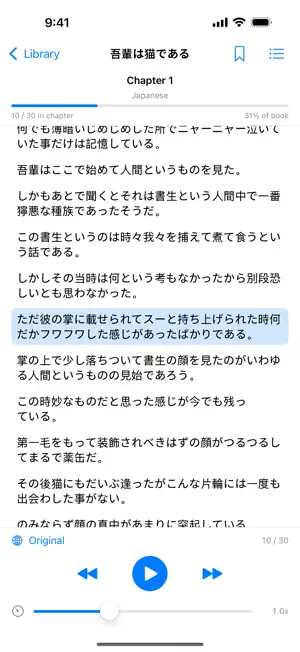
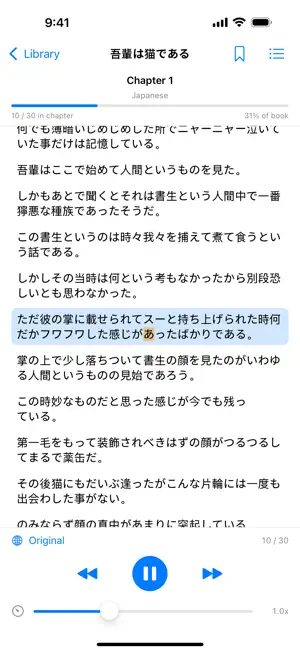
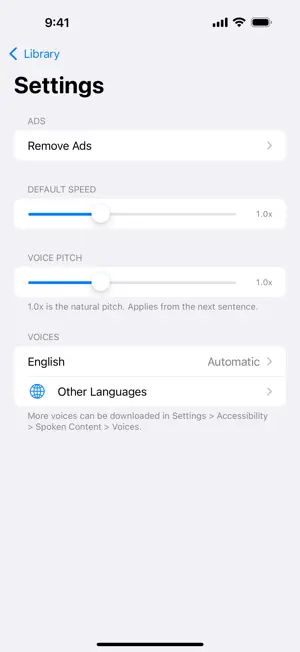
Speech It turns the books and documents piling up on your device into audio you can enjoy anywhere. Import DRM-free EPUBs, PDFs, text files, and web articles, and listen to them read aloud in a natural voice. Clear your reading backlog during your commute, chores, or walks. ◆ Key Features - Flexible importing EPUB / PDF / plain text / web pages by URL / clipboard text. Files can also be opened from the Files app and the share sheet. - On-device translated listening Listen to an English book in Japanese and more: translation happens while reading aloud (iOS 18 or later, supported language pairs), with the translation and original shown side by side. - Background playback Keeps playing while your screen is locked, with full control from the Lock Screen and Control Center. Playback resumes automatically after interruptions such as phone calls. - Follow along visually The current sentence and word are highlighted and kept in view. Tap any sentence to start playback from there. - Table of contents & bookmarks Jump between chapters, bookmark individual sentences, and browse bookmarks across your whole library. - Organized library Sort books into folders. Your reading position is saved automatically, so you always pick up where you left off. - Voice customization Adjust speed (0.5x-2.0x), pick from your device's voices, tune the pitch, and preview voices before choosing. - Privacy first Parsing, translation, and speech synthesis all happen on your device. The contents of your books are never sent to a server. ◆ Notes - DRM-protected e-books are not supported. - Image-only (scanned) PDFs cannot be read aloud. - Translation requires iOS 18 or later. The app shows ads; an optional subscription removes them. Terms of Use (EULA): https://www.apple.com/legal/internet-services/itunes/dev/stdeula/
What’s new
Version 1.0.2 · Updated August 29, 2026
- Reading progress is now shown for both the current chapter and the whole book, including on the Lock Screen and in Control Center. - Playback no longer stops when you return to the library while listening. - Ads have been introduced. An optional subscription in Settings removes them at any time.
App privacy
The developer, ColorBoxStudio, reported these privacy practices to Apple.
Data Used to Track You
The following data may be used to track you across apps and websites owned by other companies:
- Location: Coarse Location
- Identifiers: Device ID
- Usage Data: Product Interaction
- Diagnostics: Crash Data, Performance Data
Data Linked to You
The following data, which may be collected and linked to your identity, may be used for the following purposes:
- Location: Coarse Location
- Identifiers: Device ID
- Usage Data: Product Interaction
- Diagnostics: Performance Data
Used for: Third-Party Advertising, Analytics
Data Not Linked to You
The following data, which may be collected but is not linked to your identity, may be used for the following purposes:
- Diagnostics: Crash Data
Used for: Third-Party Advertising, Analytics
Alternatives to Speech It
Looking for apps like Speech It? Here are 6 similar apps on the App Store. The highest rated is Text Editor (5.0/5), and all 6 are free to download.
-
 Nagara 読み上げ - 記事・メールを音声で耳読書
-
 Listenly - AI PDF Reader Aloud
-
 Text Editor
5.0
Text Editor
5.0
-
 Text to Speech, Voice Reader
-
 Read It: Audio Articles
-
 Read Aloud: Text to Speech
| App | Rating | Price | Last updated | Compare |
|---|---|---|---|---|
| Speech It | – | Free | August 29, 2026 | |
| Nagara 読み上げ - 記事・メールを音声で耳読書 | – | Free | Jul 13, 2026 | Compare |
| Listenly - AI PDF Reader Aloud | – | Free | May 1, 2026 | Compare |
| Text Editor | 5.0 / 5 (1) | Free | Oct 6, 2026 | Compare |
| Text to Speech, Voice Reader | – | Free | Sep 4, 2026 | Compare |
| Read It: Audio Articles | – | Free | Oct 3, 2026 | Compare |
| Read Aloud: Text to Speech | – | Free | Sep 28, 2026 | Compare |
Compare Speech It with the top alternatives: ratings, updates, ASO score and keyword gaps →