

smalltype – Markdown Notes
Herman Haidin Productivity iPhoneiPadiPod touch
smalltype – Markdown Notes is a free Productivity app for iPhone and iPad by Herman Haidin. Requires iOS 26.0. Updated September 21, 2026.
- Price
- Free
- on the App Store
- Size
- 8 MB
- Age 4+
- Updated
- Sep 21
- 2026 · v1.2.1
Screenshots


About smalltype – Markdown Notes
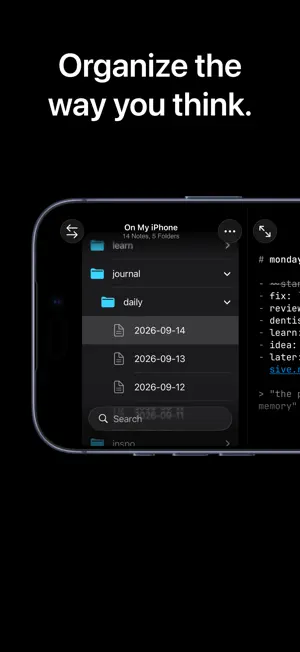
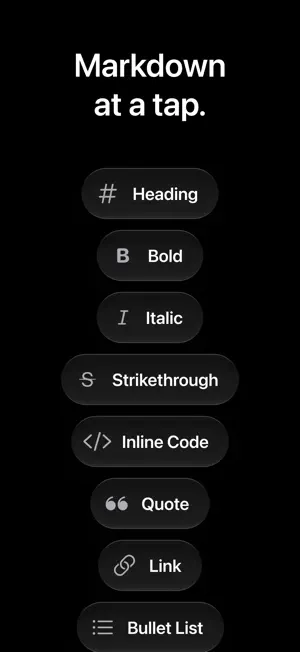
Short notes, many times a day, saved as plain .md files in real folders. Open the same folder on your Mac in VS Code, Vim, or any editor. Calm, minimal, and ready for iPhone Duo. smalltype is for your notes. The small ones, the quick ones, the big ones, the unpolished ones. It's a fast, quiet place to type. ## Start No tutorial, no setup screen. Tap New Note and start typing. Leave one empty and it quietly disappears, so you never end up with a pile of blank untitled notes. That's the whole app. ## Yours Every note is a real .md file, sitting right there in the Files app. You can open it, copy it, or back it up yourself, anytime. Delete one and it still goes to Recently Deleted, same as any other file: nothing's gone for good. ## Sync or Don't Keep notes in iCloud Drive to have them on every device. Or keep them On My iPhone, fully local, never leaving your device. Either way, you can switch anytime. ## Visible Markdown Markdown markers stay gently visible as you type. What you see is exactly what's in the file. A bar above the keyboard types the markers for you, with undo and redo a tap away. ## Organize Folders, search, and quick note-making, all from one screen. Nothing to set up first. Put "daily" in a folder's name and new notes inside it get today's date as their name. ## No Catch No ads. No subscription. No tracking. No account, ever. Markdown notes. Yours to keep.
What’s new
Version 1.2.1 · Updated September 21, 2026
## Fixes - On iOS 27, the fade under the keyboard bar stopped short of the keyboard, and in landscape the fade under New Note was far too heavy. Both are gone: the note runs under the bar and shows through the keyboard. - The keyboard bar keeps the same gap to the keyboard in portrait and landscape, and no longer drops onto it after Expand or Collapse. - In landscape, "No Note Selected" sat above the middle of the note column after opening a folder or launching sideways. It is centered now. - In landscape on iOS 27, an empty panel no longer slides in from the left edge. - Long names stay on one line in the tree, in search results, and in the Move sheet, where the label of what you are moving no longer runs edge to edge.
App privacy
The developer, Herman Haidin, reported these privacy practices to Apple.
Data Not Collected
The developer does not collect any data from this app.
Alternatives to smalltype – Markdown Notes
Looking for apps like smalltype – Markdown Notes? Here are 6 similar apps on the App Store.
-
 Lorem – Markdown Notes
-
 Haven Notes
-
 Keepout: Private Notes
-
 ThinkCapture: Notes That Sort
-
 Mr Broccoli
-
 Jotaid - Your Note Engine
| App | Rating | Price | Last updated | Compare |
|---|---|---|---|---|
| smalltype – Markdown Notes | – | Free | September 21, 2026 | |
| Lorem – Markdown Notes | – | Free | Oct 30, 2026 | Compare |
| Haven Notes | – | Free | May 18, 2026 | Compare |
| Keepout: Private Notes | – | Free | Oct 30, 2026 | Compare |
| ThinkCapture: Notes That Sort | – | Free | Aug 19, 2026 | Compare |
| Mr Broccoli | – | Free | Sep 28, 2026 | Compare |
| Jotaid - Your Note Engine | – | Free | Oct 4, 2026 | Compare |