

Daylog: Time & Place Tracker
Yun Gu Lee Productivity iPhoneiPadiPod touch
Daylog: Time & Place Tracker is a free Productivity app for iPhone and iPad by Yun Gu Lee. Requires iOS 17.0. Updated September 17, 2026.
- Price
- Free
- on the App Store
- Size
- 4 MB
- Age 4+
- Updated
- Sep 17
- 2026 · v1.10
Screenshots

About Daylog: Time & Place Tracker
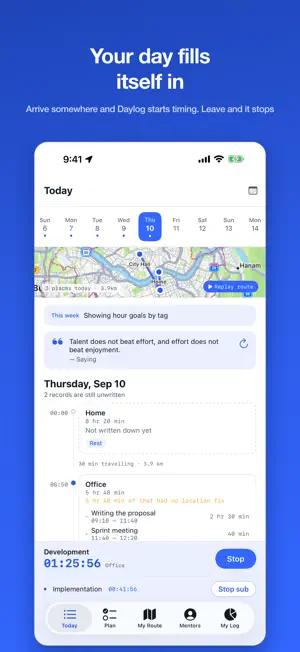
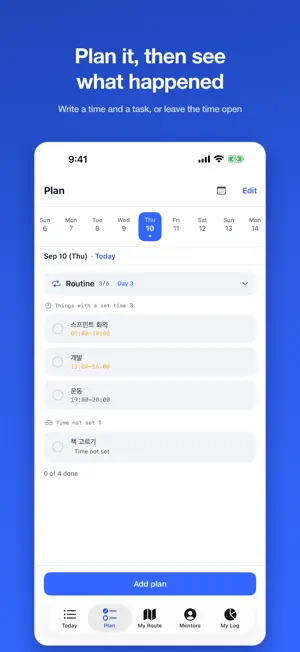
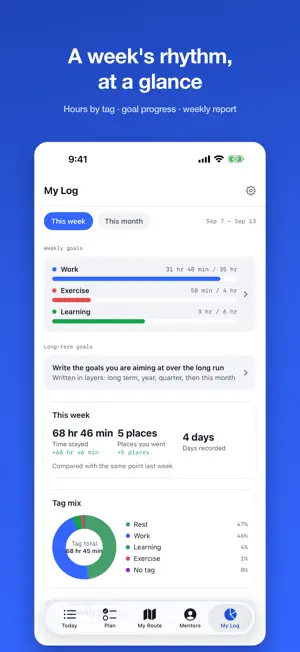
Daylog records your day by time and by place. No account. No server. Everything stays on this device. ■ It writes itself Arrive somewhere and Daylog starts timing. Leave and it stops. You don't have to press anything for your day to fill in. Give the entry a name later, or leave it as it is. ■ Time it with one tap Tap to start what you're doing, tap again to stop. Nest smaller activities inside a session, like Core and Legs inside Workout. Fill empty stretches in afterwards so the day joins up. ■ Places you keep going back to Daylog remembers where you stayed and for how long. Your route is kept too, so you can retrace the day on a map. If collecting that closely is too much, you can turn it off in Settings. Name a place once and it reads as "6 hours at the office" from then on. ■ Goals by tag Set a weekly target per tag, like 3 hours of exercise. A bar shows how much is left, and Daylog tells you when the pace slips. ■ Look back on a week A tag donut, an intensity map and a weekday rhythm show the week at a glance. If you did the same thing more than once, Daylog tells you how it compared. ■ Compare your day with theirs See how well-known figures split up a day, laid out as a timetable. Pick one as your mentor and put their day next to yours. These are reconstructions based on published interviews and articles. They are approximations, not confirmed schedules, so read them as a comparison rather than a plan. ■ Without opening the app Start and stop from the home screen widget. While something is running, the widget shows what you're timing. Lock screen widgets come in inline, circular and rectangular. ― Calendar ― Daylog treats its plans and your device calendar as the same thing. Write a plan and it appears as a calendar event. Change or delete it on either side and the other follows. You can also see which events were on at a given time. ― Privacy ― Daylog does not send what it collects anywhere. Your location, your activities and your schedule stay on this device. Delete the app and the records go with it. "Always" location access is only needed for automatic recording. Without it, everything you time by hand still works.
What’s new
Version 1.10 · Updated September 17, 2026
- Tracking now stops automatically when you leave a place - Touch and hold a card on Today and drop it on another to merge them - Tags now go on activities, not places, and stats count activity time - Checked plans move to the bottom of the list - Fixed time spent in one place showing up as a location gap - Clearer, shorter wording across the app
App privacy
The developer, Yun Gu Lee, reported these privacy practices to Apple.
Data Not Collected
The developer does not collect any data from this app.
Alternatives to Daylog: Time & Place Tracker
Looking for apps like Daylog: Time & Place Tracker? Here are 6 similar apps on the App Store.
-
 PureFlow - 심플 투두리스트
-
 RITMUS: Habits & Screen Time
-
 마이너스원데이 - 하루 카운트다운 & 할일
-
 TodoMaster: To-Do & Planner
-
 TasteShelf
-
 podoal — Daily Habit Tracker
| App | Rating | Price | Last updated | Compare |
|---|---|---|---|---|
| Daylog: Time & Place Tracker | – | Free | September 17, 2026 | |
| PureFlow - 심플 투두리스트 | – | Free | Feb 8, 2026 | Compare |
| RITMUS: Habits & Screen Time | – | Free | Sep 30, 2026 | Compare |
| 마이너스원데이 - 하루 카운트다운 & 할일 | – | Free | Sep 17, 2026 | Compare |
| TodoMaster: To-Do & Planner | – | Free | Sep 24, 2026 | Compare |
| TasteShelf | – | Free | May 5, 2026 | Compare |
| podoal — Daily Habit Tracker | – | Free | Sep 17, 2026 | Compare |