

Rectify - Straighten Slides
Keisuke Shibata Photo & Video iPhoneiPadiPod touch
Rectify - Straighten Slides is a free Photo & Video app for iPhone and iPad by Keisuke Shibata. Requires iOS 18.0. Updated October 24, 2026.
- Price
- Free
- on the App Store
- Size
- 5 MB
- Age 4+
- Updated
- Oct 24
- 2026 · v1.3
Screenshots


About Rectify - Straighten Slides
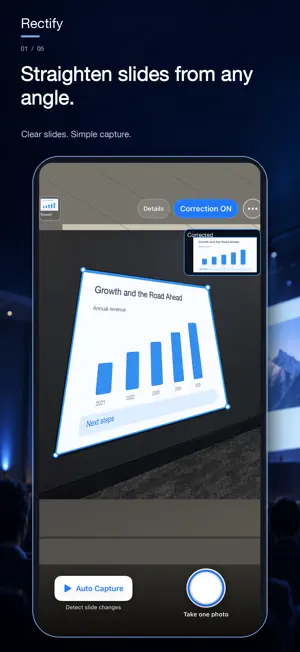
Turn angled slide photos into front-facing images. Use Rectify as a silent camera, too. Rectify captures presentation slides and corrects their perspective on your iPhone. Keep useful slides from lectures, conferences and meetings in a format that is easier to revisit, without straightening each photo by hand. STRAIGHTEN SLIDES AS YOU SHOOT Rectify detects the four corners of a slide and corrects the tilted shape. See the detected outline and a live corrected preview before capturing, so you can check what will be included. SILENT CAMERA FOR EVERYDAY PHOTOS Take photos without a shutter sound. Capture presentation slides during lectures and meetings without interrupting others with camera noise. Turn correction off to photograph food, objects and everyday moments without cropping the image to a slide. To save these photos directly to Photos, choose Photos as the save destination for original images in Settings. AUTO CAPTURE FOR SLIDE CHANGES Start Auto Capture and keep the camera aimed at the screen. Rectify uses changes in readable slide text to detect a slide change and trigger a capture. Use the shutter button whenever you want to capture a slide yourself, including while Auto Capture is running. OPEN STRAIGHT TO THE CAMERA Open the app directly to the camera. Take a single photo, start Auto Capture or turn correction on or off from the same screen. SAVE EACH VERSION WHERE YOU WANT Choose a separate destination for the original and corrected image: in the app, in Photos, in both places, or don't save. By default, originals stay in the app and corrected images go to Photos. If correction fails, Rectify saves the original instead. When the original is set to "Don't save," that fallback is kept in the app. FIND YOUR CAPTURES BY DATE Browse in-app images by date, zoom in, share them, save them to Photos or select several to delete. Deleting an in-app image leaves its copy in Photos untouched. Images stored only in the app are removed when you delete the app. IMAGE PROCESSING ON YOUR IPHONE Slide detection and perspective correction run on your device. Captured images are not uploaded to an external server for processing. Rectify does not record audio. For lectures, conference talks, training sessions, projected meeting materials, whiteboards and large displays. Only photograph content when permitted, and respect venue rules and other people's rights. Automatic detection depends on readable text, lighting and distance. Use manual capture for image-only slides or changes the app does not detect.
What’s new
Version 1.3 · Updated October 24, 2026
Improved layouts for iPhone Duo and reliability of image correction.
App privacy
The developer, Keisuke Shibata, reported these privacy practices to Apple.
Data Not Linked to You
The following data, which may be collected but is not linked to your identity, may be used for the following purposes:
- Identifiers: Device ID
- Usage Data: Product Interaction
Used for: Analytics
Alternatives to Rectify - Straighten Slides
Looking for apps like Rectify - Straighten Slides? Here are 6 similar apps on the App Store. The highest rated is re.photos (5.0/5), and all 6 are free to download.
-
 SlideCam: Session Camera
-
 Perspective Lab
-
 光阴 · 宝宝成长册 私密相册
-
 re.photos
5.0
-
 ArchCam: Perspective Camera
5.0
-
 ClockFire: Digital Photo Frame
5.0
| App | Rating | Price | Last updated | Compare |
|---|---|---|---|---|
| Rectify - Straighten Slides | – | Free | October 24, 2026 | |
| SlideCam: Session Camera | – | Free | Aug 29, 2026 | Compare |
| Perspective Lab | – | Free | Sep 1, 2026 | Compare |
| 光阴 · 宝宝成长册 私密相册 | – | Free | Jul 7, 2026 | Compare |
| re.photos | 5.0 / 5 (1) | Free | Aug 26, 2026 | Compare |
| ArchCam: Perspective Camera | 5.0 / 5 (6) | Free | Oct 27, 2026 | Compare |
| ClockFire: Digital Photo Frame | 5.0 / 5 (1) | Free | Oct 22, 2026 | Compare |