

SlideCam: Session Camera
KENICHI KAMBARA Photo & Video iPhoneiPadiPod touch
SlideCam: Session Camera is a free Photo & Video app for iPhone and iPad by KENICHI KAMBARA. Requires iOS 15.0. Updated August 29, 2026.
- Price
- Free
- on the App Store
- Size
- 67 MB
- Age 4+
- Updated
- Aug 29
- 2026 · v1.4.0
Screenshots



About SlideCam: Session Camera
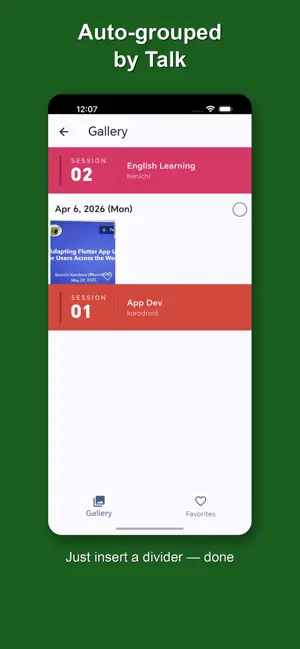
The smart camera app built for capturing lecture and presentation slides. SlideCam makes it easy to photograph slides during presentations, lectures, or seminars — and keeps everything neatly organized by session so you can find what you need later. ■ Key Features Session-Based Organization - Group your photos into sessions with a title, presenter name, and notes - Each session gets a color-coded header card for quick browsing - Start a new session with one tap, even mid-presentation Camera Built for Slides - Clean, distraction-free camera UI optimized for slide capture - Pinch-to-zoom and tap-to-focus for sharp, accurate shots - Max brightness mode to keep the screen visible in dark rooms - Volume button shutter — no need to reach for the screen Gallery - Scroll through all your shots grouped by session and date - Full-screen viewer with pinch zoom - Mark favorites for quick reference - Multi-select and batch delete to clean up fast Saved to Your Device - All photos are saved to your device gallery (SlideCam album) - No account required, no cloud upload — your data stays on your phone ■ Premium Features Upgrade to Premium (Monthly or One-time) - Video recording mode — capture live demos and moving content - High-resolution camera (up to Ultra HD / 4K) Free vs. Premium - Photo capture: Free (up to 3/session, 3 sessions/day) / Premium (unlimited) - Video recording: Free (not available) / Premium (available) - Camera resolution: Free (720p fixed) / Premium (up to 4K) ■ Premium Plans - Monthly: ¥250/month (cancel anytime) - One-time: ¥1,800 (pay once, use forever) Both plans unlock the same premium features. ■ Perfect For - Students photographing lecture slides or whiteboards - Attendees at conferences, seminars, and workshops - Teachers and presenters reviewing their own materials - Anyone who needs a fast, organized way to capture visual content Many features are available for free, but we also offer premium plans for an even better experience. Both monthly and one-time purchase plans are available, and both provide the same premium features. Have feedback or questions? Leave a review — we read every one and continuously improve the app based on your input. Privacy Policy: https://www.iplatform.org/blog/ Terms of Use (EULA): https://www.apple.com/legal/internet-services/itunes/dev/stdeula/
What’s new
Version 1.4.0 · Updated August 29, 2026
- Faster camera preview resume after flat suspend - Premium users can set the camera retention time from 0 to 10 minutes - The suspend screen now follows the orientation of the last captured image - How-to videos can now be watched in the app - Improved the suspend screen presentation
App privacy
The developer, KENICHI KAMBARA, reported these privacy practices to Apple.
Data Not Linked to You
The following data, which may be collected but is not linked to your identity, may be used for the following purposes:
- Identifiers: User ID, Device ID
- Usage Data: Advertising Data
- Purchases: Purchase History
Used for: Third-Party Advertising, App Functionality
Alternatives to SlideCam: Session Camera
Looking for apps like SlideCam: Session Camera? Here are 6 similar apps on the App Store. The highest rated is re.photos (5.0/5), and 5 of the 6 are free to download.
-
 Rectify - Straighten Slides
-
 re.photos
5.0
-
 RNI Colibri
4.6
-
 Micro Drone Fly
3.0
-
 Shot by AI: AI Headshot Studio
-
 EyeStabilizer: Eye Recording
5.0
| App | Rating | Price | Last updated | Compare |
|---|---|---|---|---|
| SlideCam: Session Camera | – | Free | August 29, 2026 | |
| Rectify - Straighten Slides | – | Free | Oct 24, 2026 | Compare |
| re.photos | 5.0 / 5 (1) | Free | Aug 26, 2026 | Compare |
| RNI Colibri | 4.6 / 5 (70) | 3.99 USD | Oct 22, 2026 | Compare |
| Micro Drone Fly | 3.0 / 5 (3) | Free | Oct 14, 2025 | Compare |
| Shot by AI: AI Headshot Studio | – | Free | May 26, 2026 | Compare |
| EyeStabilizer: Eye Recording | 5.0 / 5 (3) | Free | Nov 2, 2026 | Compare |