

Parlate: AI Dictation Keyboard
Ian Eduardo Vega Ortega Productivity iPhoneiPadiPod touch
Parlate: AI Dictation Keyboard is a free Productivity app for iPhone and iPad by Ian Eduardo Vega Ortega. Requires iOS 16.4. Updated September 15, 2026.
- Price
- Free
- on the App Store
- Size
- 92 MB
- Age 4+
- Updated
- Sep 15
- 2026 · v1.0.1
Screenshots
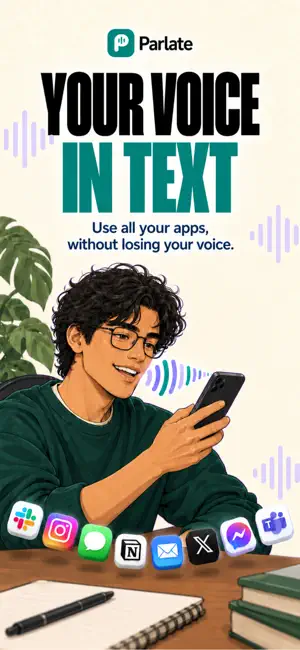


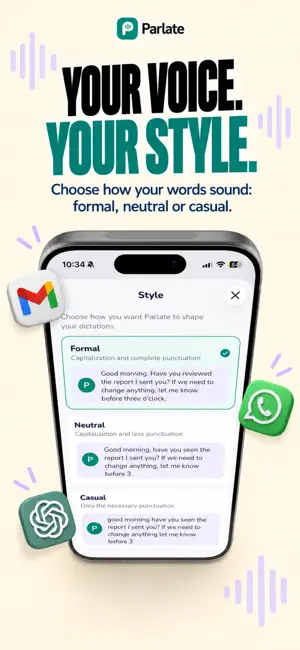
About Parlate: AI Dictation Keyboard
Speak naturally. Parlate writes. Parlate is a dictation keyboard for iPhone. Tap the mic, talk the way you actually talk, and your words land as clean, punctuated text inside whatever app you are already in: Messages, Mail, Notes, documents, your browser, anywhere the keyboard works. You stop retyping. You stop cleaning up the "um", the "you know" and the sentence you restarted twice. Parlate drops the filler, fixes the punctuation, and writes what you meant to say. Parlate requires a Parlate Pro auto-renewing subscription (see PARLATE PRO below). New subscribers can try the annual plan free for 7 days. WHAT IT DOES • Dictate anywhere. Parlate installs as a system keyboard, so it works inside every app on your iPhone. • Watch it write as you speak. Text appears in real time and is polished the moment you pause. • 16 languages: English, Spanish, French, German, Italian, Portuguese, Dutch, Polish, Russian, Turkish, Arabic, Hindi, Indonesian, Japanese, Korean and Chinese. • Speak one language, write another. Dictate in the language you think in and let Parlate translate naturally as it writes. • Unlimited dictation. No word counters, no weekly caps. MAKE IT WRITE LIKE YOU • Writing styles. Pick Formal, Neutral or Casual and Parlate matches the punctuation and register. Write a properly punctuated email, or a quick message with no period at the end. • Personal dictionary. Teach Parlate the names, brands and technical terms it keeps getting wrong: save how a word should be written and how it tends to be misheard. • Snippets. Say a trigger phrase and Parlate inserts a whole block of text: an address, a signature, the reply you send every week. • History. Your dictations are kept so you can copy them again, with controls to turn history off whenever you want. BUILT FOR SPEED • Instant Dictation starts the microphone without opening the app. • Automatic shutoff closes the microphone on its own, so it is never left listening. • Sounds and vibration tell you when Parlate is on, without looking at the screen. PARLATE PRO Parlate Pro is a paid auto-renewing subscription and it is required to use Parlate. It unlocks everything described above: unlimited dictation in every language, plus writing styles, personal dictionary and snippets. Plans: $2.99 per week, $9.99 per month or $69.99 per year (US pricing; varies by region). Eligible new subscribers can try the weekly or monthly plan free for 3 days, or the annual plan free for 7 days. Payment is charged to your Apple Account at confirmation of purchase. A subscription renews automatically unless it is turned off at least 24 hours before the end of the current period, and your account is charged for renewal within 24 hours before the current period ends. You can manage or cancel your subscription in your Apple Account settings after purchase. Unlimited use is subject to reasonable personal use. Terms of Use (EULA): https://www.apple.com/legal/internet-services/itunes/dev/stdeula/ Terms and Conditions: https://parlate.reserved-technologies.com/en/terms Privacy Policy: https://parlate.reserved-technologies.com/en/privacy
What’s new
Version 1.0.1 · Updated September 15, 2026
• New Home Screen widgets for your dictated words and time saved. • Improved keyboard suggestions, word corrections and multilingual typing. • A more personal introduction, with guided practice and new demos. • More reliable dictation and recovery after connection interruptions. • Helpful reminders and easier access to subscription options.
App privacy
The developer, Ian Eduardo Vega Ortega, reported these privacy practices to Apple.
Data Linked to You
The following data, which may be collected and linked to your identity, may be used for the following purposes:
- Purchases: Purchase History
- Location: Coarse Location
- Identifiers: User ID, Device ID
- Usage Data: Product Interaction, Other Usage Data
- User Content: Other User Content, Audio Data
- Contact Info: Email Address, Name
- Diagnostics: Crash Data, Performance Data, Other Diagnostic Data
Used for: Analytics, Product Personalization, App Functionality
Alternatives to Parlate: AI Dictation Keyboard
Looking for apps like Parlate: AI Dictation Keyboard? Here are 6 similar apps on the App Store. The highest rated is KeyVoice - AI Voice Keyboard (5.0/5), and all 6 are free to download.
-
 Klartext
-
 Dictura: AI Voice Keyboard
-
 KeyVoice - AI Voice Keyboard
5.0
-
 Lume Voice: Flow Keyboard AI
5.0
-
 Speak - Voice Keyboard
-
 SpeakApp Flow: Voice Keyboard
| App | Rating | Price | Last updated | Compare |
|---|---|---|---|---|
| Parlate: AI Dictation Keyboard | – | Free | September 15, 2026 | |
| Klartext | – | Free | Oct 8, 2026 | Compare |
| Dictura: AI Voice Keyboard | – | Free | Apr 28, 2026 | Compare |
| KeyVoice - AI Voice Keyboard | 5.0 / 5 (1) | Free | May 13, 2026 | Compare |
| Lume Voice: Flow Keyboard AI | 5.0 / 5 (1) | Free | Sep 24, 2026 | Compare |
| Speak - Voice Keyboard | – | Free | Apr 21, 2026 | Compare |
| SpeakApp Flow: Voice Keyboard | – | Free | Aug 31, 2026 | Compare |