

Notes - Notepad Free Note App
ZHONGCHENG YANG Productivity iPhoneiPadiPod touch
Notes - Notepad Free Note App is a free Productivity app for iPhone and iPad by ZHONGCHENG YANG. Requires iOS 16.0. Updated October 6, 2026.
- Price
- Free
- on the App Store
- Size
- 19 MB
- Age 4+
- Updated
- Oct 6
- 2026 · v2.4.2
Screenshots


About Notes - Notepad Free Note App
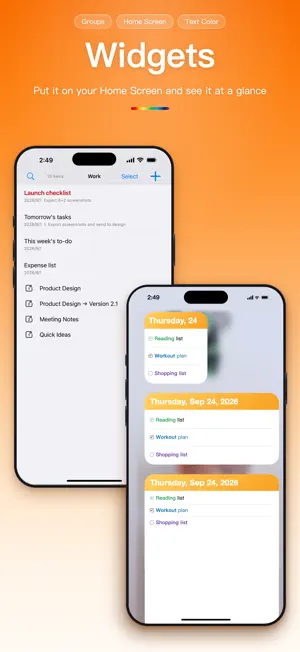
If you want a notes app that's “open and write, tidy as you go, never lose a word,” Mini Notes is built for you. **Auto-save, so every quick note is safe** Even if a call comes in, the app is interrupted, or your phone runs flat, anything you hadn't saved is brought back automatically. No hunting for a save button—just write. **Flexible organization, your own knowledge base** Manage things as “Notebook → Group → Note” with multi-level nesting for complex setups—or skip filing entirely and just jot things down. **One-tap sharing, capture ideas on the spot** When you spot a passage or link in Safari or another app, just tap Share and choose Mini Notes. It drops straight into your inbox—no copying back and forth. **Effortless formatting, clear at a glance** The rich-text editor gives you bold, strikethrough and a 12-color preset palette, and remembers the last color you used so you don't set it again. Titles inherit the body's formatting, keeping list previews clean and readable. **Home Screen widget, no need to open the app** Put your most recently edited notes on your Home Screen and see what you wrote today at a glance. Tap one to jump straight back into it. **Recently Deleted, for when you delete by mistake** Deleted notes stay in Recently Deleted for 30 days, so you can restore them anytime. Sure you don't need them? Clear them out in one tap. **Text Size, so everything is easy to read** Drag a slider in Settings to resize the text and icons throughout the app, without changing the setting for any other app. **Markdown checklists for quick to-dos** Type "# checklist" to turn the current line into a tappable checkbox. Press Return and the next line starts with a checkbox too. Tap to tick it off—tapped the wrong one? Just undo it. We'll keep updating Mini Notes. If there's something you'd like improved, or a feature you'd love to see, please leave a review on the App Store or get in touch via Send Feedback in the app. Your support and encouragement keep us building a better product. Thank you!
What’s new
Version 2.4.2 · Updated October 6, 2026
■ Side Menu A new Menu button at the top left of the notes list opens a side drawer, taking you straight to Groups and Settings. Swipe to close it. ■ Smoother Interactions Swipe a note or group and tap Group to move it to another group in a snap. Touch and hold to drag items into a new order — spots where they can't go are dimmed. Screen transitions feel smoother, too. ■ Recently Deleted Deleted notes now stay in Recently Deleted for 30 days instead of 3, giving you much more time to restore them. ■ Word Count in the Title Bar The word count in the title bar is clearer now: it shows the count for your selected text, or for the whole note when nothing is selected.
App privacy
The developer, ZHONGCHENG YANG, reported these privacy practices to Apple.
Data Used to Track You
The following data may be used to track you across apps and websites owned by other companies:
- Identifiers: Device ID
- Usage Data: Advertising Data
Data Linked to You
The following data, which may be collected and linked to your identity, may be used for the following purposes:
- Identifiers: Device ID
- Usage Data: Advertising Data
Used for: Third-Party Advertising
Data Not Linked to You
The following data, which may be collected but is not linked to your identity, may be used for the following purposes:
- Usage Data: Product Interaction
- Diagnostics: Crash Data, Performance Data
Used for: Analytics, App Functionality
Alternatives to Notes - Notepad Free Note App
Looking for apps like Notes - Notepad Free Note App? Here are 6 similar apps on the App Store. The highest rated is Time Cottage: AI Day Planner (5.0/5), and all 6 are free to download.
-
 To do Notes list Memos Tasks
-
 Time Cottage: AI Day Planner
5.0
-
 橙子计划:计划清单 自律打卡 todo番茄钟 提醒备忘录
-
 Kurun: Visual Daily Planner
-
 PinNote - Notes Always Visible
4.6
-
 AI Quick Notes: Voice To-Do
| App | Rating | Price | Last updated | Compare |
|---|---|---|---|---|
| Notes - Notepad Free Note App | – | Free | October 6, 2026 | |
| To do Notes list Memos Tasks | – | Free | Sep 11, 2026 | Compare |
| Time Cottage: AI Day Planner | 5.0 / 5 (1) | Free | Sep 20, 2026 | Compare |
| 橙子计划:计划清单 自律打卡 todo番茄钟 提醒备忘录 | – | Free | Oct 23, 2025 | Compare |
| Kurun: Visual Daily Planner | – | Free | Oct 13, 2026 | Compare |
| PinNote - Notes Always Visible | 4.6 / 5 (7) | Free | Sep 29, 2026 | Compare |
| AI Quick Notes: Voice To-Do | – | Free | Oct 11, 2026 | Compare |