

Dual Monitor For Mac
Harsh Paun Productivity iPhoneiPadiPod touch
Dual Monitor For Mac is a free Productivity app for iPhone and iPad by Harsh Paun. Requires iOS 15.0. Updated August 16, 2026.
- Price
- Free
- on the App Store
- Size
- 9 MB
- Age 4+
- Updated
- Aug 16
- 2026 · v1.0
Screenshots

About Dual Monitor For Mac
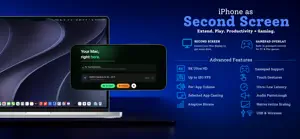
Turn your iPhone or iPad into a powerful second monitor, a virtual game controller, and a professional audio mixer for your Mac in seconds. Whether you need a dual display setup for coding, screen mirroring for presentations, or a virtual gamepad for Mac gaming, Dual Monitor for Mac delivers a lightning-fast, zero-lag experience over USB or Wi-Fi. Maximize your workspace and gain powerful new controls anywhere you go! KEY FEATURES Extend or Mirror Your Mac Screen Easily extend your Mac display to create a true second monitor for extreme productivity. Need to share your work? Mirror your Mac screen for seamless presentations and demos. Virtual Mac Gamepad Instantly transform your iPhone or iPad into a fully recognized physical game controller for your Mac. Play your favorite native Mac games with a virtual controller that works right out of the box. Pro HUD Customizer Take full control of your gaming layout. Drag, drop, and resize buttons, adjust transparency, and build the ultimate custom HUD for any game. Advanced Audio Mixer & Volume Control Route all Mac audio directly to your device. Use the built-in audio mixer to independently adjust volumes for individual Mac apps, or instantly mute specific windows with a single tap. Zero-Lag USB & Wireless Wi-Fi Enjoy an ultra-low latency USB connection for demanding tasks, or switch to convenient Wi-Fi for wireless freedom across your room. 120Hz Smooth Performance & 8K Support Optimized for Apple Silicon to provide incredibly responsive performance, high refresh rates (up to 120Hz), and crystal-clear support for high resolutions (up to 8K). PERFECT FOR • Productivity: Developers, designers, and remote workers who need a dual monitor setup on the go. • Gaming: Gamers who want a custom game controller for Mac without buying extra hardware. • Creatives: Content creators and video editors who need dedicated screens and audio mixers. WHY CHOOSE DUAL MONITOR FOR MAC? • Beautiful, native iOS and macOS interfaces • Reliable, low-latency performance • Simple plug-and-play setup (No complex configurations) • 100% Privacy-focused (Your screen data never leaves your local network) • Built exclusively for macOS Boost your productivity and elevate your Mac gaming today. Download Dual Monitor for Mac and unlock the ultimate companion display!
App privacy
The developer, Harsh Paun, reported these privacy practices to Apple.
Data Used to Track You
The following data may be used to track you across apps and websites owned by other companies:
- Identifiers: Device ID
- Usage Data: Product Interaction, Advertising Data
- Diagnostics: Crash Data, Performance Data
Data Linked to You
The following data, which may be collected and linked to your identity, may be used for the following purposes:
- Identifiers: Device ID
- Usage Data: Product Interaction, Advertising Data
- Diagnostics: Crash Data, Performance Data
Used for: Third-Party Advertising, Analytics, App Functionality
Alternatives to Dual Monitor For Mac
Looking for apps like Dual Monitor For Mac? Here are 6 similar apps on the App Store. The highest rated is Inuvika OVD Mobile Client (5.0/5), and all 6 are free to download.
-
 Easy Air Screen Lite
-
 MOD Vision Steel Detection AI
-
 IDrive® CRM
-
 Inuvika OVD Mobile Client
5.0
Inuvika OVD Mobile Client
5.0
-
 TourSolver Mobile
1.5
TourSolver Mobile
1.5
-
 Vision Board App
| App | Rating | Price | Last updated | Compare |
|---|---|---|---|---|
| Dual Monitor For Mac | – | Free | August 16, 2026 | |
| Easy Air Screen Lite | – | Free | Aug 27, 2026 | Compare |
| MOD Vision Steel Detection AI | – | Free | May 14, 2026 | Compare |
| IDrive® CRM | – | Free | Feb 5, 2025 | Compare |
| Inuvika OVD Mobile Client | 5.0 / 5 (2) | Free | Sep 19, 2026 | Compare |
| TourSolver Mobile | 1.5 / 5 (2) | Free | Sep 4, 2024 | Compare |
| Vision Board App | – | Free | Feb 7, 2024 | Compare |