

Trim Forge
Ronald Derksen Photo & Video iPhoneiPadiPod touch
Trim Forge is a free Photo & Video app for iPhone and iPad by Ronald Derksen. Requires iOS 15.6. Updated August 30, 2026.
- Price
- Free
- on the App Store
- Size
- 51 MB
- Age 4+
- Updated
- Aug 30
- 2026 · v1.4.0
Screenshots

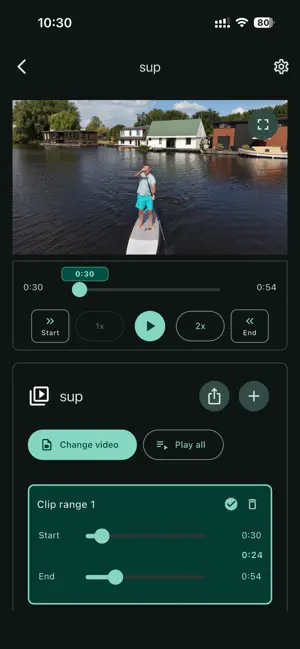
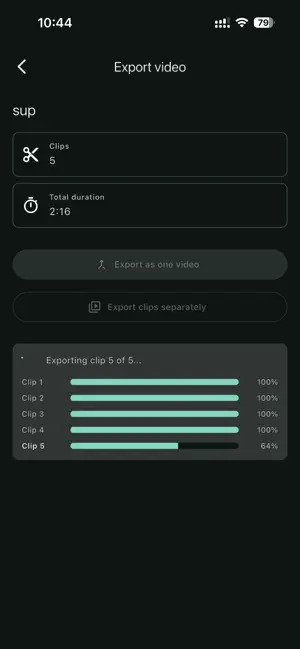
About Trim Forge
Trim Forge helps you turn longer videos into focused clips without setting up a full editing project. It is especially useful for camera and drone recordings, including videos captured with DJI drones, when you want to keep only the flight highlights. Create a project, choose a video from your library, mark the parts you want to keep, preview the selected ranges, and export the result back to Photos. Trim Forge is built for practical clip preparation: saving drone footage highlights, cutting long recordings into shorter segments, and keeping simple trimming work organized by project. What you can do: - Create local projects for videos you want to trim. - Choose videos from your photo library. - Trim camera, drone, and DJI drone videos into focused clips. - Add one or more clip ranges to a project. - Set clip start and end points from the video preview. - Play selected clips in sequence before exporting. - Export selected ranges as one combined video. - Export selected ranges as separate clips. - Save exported videos back to Photos in a Trim Forge album. - Keep project data stored locally on your device. - Switch between system, light, and dark appearance. Trim Forge always uses lossless copy export, so compatible videos can be trimmed without re-encoding. Export support depends on the source video format and the device. Privacy: Trim Forge does not require an account and does not send your videos to a server. Project metadata is stored locally on your device. The app requests photo library access so you can choose source videos and save exported clips back to Photos. Terms of Use: https://www.apple.com/legal/internet-services/itunes/dev/stdeula/
What’s new
Version 1.4.0 · Updated August 30, 2026
- Bug fixes and stability improvements.
App privacy
The developer, Ronald Derksen, reported these privacy practices to Apple.
Data Used to Track You
The following data may be used to track you across apps and websites owned by other companies:
- Usage Data: Product Interaction
Data Linked to You
The following data, which may be collected and linked to your identity, may be used for the following purposes:
- Usage Data: Product Interaction
Used for: Third-Party Advertising, Analytics
Alternatives to Trim Forge
Looking for apps like Trim Forge? Here are 6 similar apps on the App Store. The highest rated is VideoTrim: No Quality Loss (5.0/5), and 5 of the 6 are free to download.
-
 PoseSnap: AI Pose Camera
-
 VidBeam: Cast Web Videos to TV
-
 VideoTrim: No Quality Loss
5.0
VideoTrim: No Quality Loss
5.0
-
 VisuMarc: Video Collection
-
 Video Player & Editor
-
 PixOpus-Photo Editor & Filter
| App | Rating | Price | Last updated | Compare |
|---|---|---|---|---|
| Trim Forge | – | Free | August 30, 2026 | |
| PoseSnap: AI Pose Camera | – | Free | Oct 1, 2026 | Compare |
| VidBeam: Cast Web Videos to TV | – | Free | Oct 10, 2026 | Compare |
| VideoTrim: No Quality Loss | 5.0 / 5 (1) | 6.99 USD | Jul 15, 2026 | Compare |
| VisuMarc: Video Collection | – | Free | Aug 10, 2026 | Compare |
| Video Player & Editor | – | Free | Aug 24, 2026 | Compare |
| PixOpus-Photo Editor & Filter | – | Free | Jul 24, 2026 | Compare |
Compare Trim Forge with the top alternatives: ratings, updates, ASO score and keyword gaps →