

Flourish PDF: Editor & OCR
Fenul LLC Productivity iPhoneiPadiPod touchMac
Flourish PDF: Editor & OCR is a free Productivity app for iPhone and iPad by Fenul LLC. Rated 5.0/5 from 1 ratings. Requires iOS 17.0.
- Rating
- 5.0
- 1 ratings
- Price
- Free
- on the App Store
- Size
- 20 MB
- Age 4+
- Updated
- Oct 21
- 2026 · v1.9.5
Screenshots

About Flourish PDF: Editor & OCR
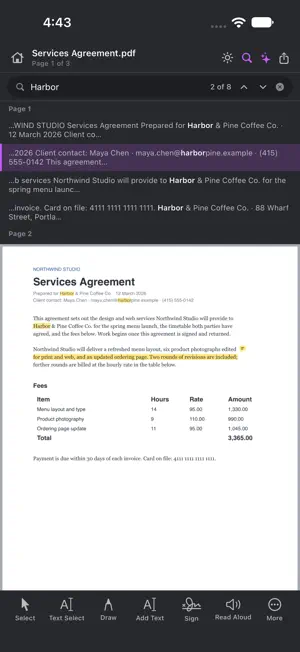
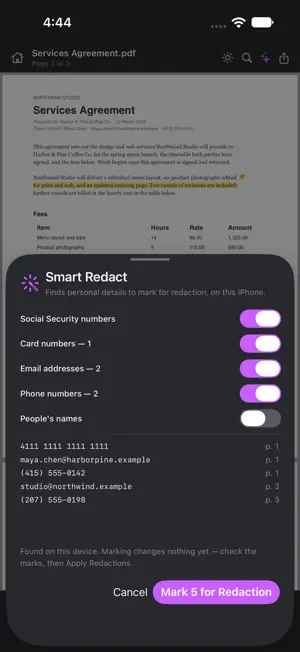
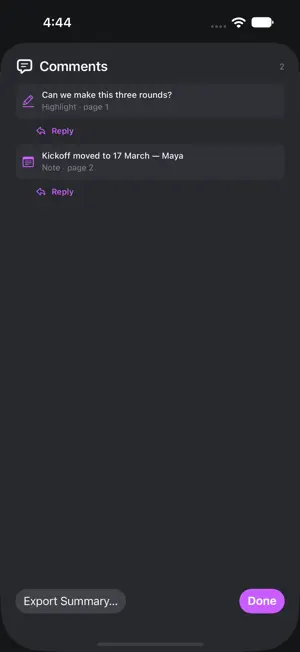
Flourish PDF is a private PDF editor and scanner for iPhone and iPad. Scan, edit, fill and sign, merge, compress, OCR, redact and password-protect PDFs — all on your device. There is no upload endpoint: your documents are never uploaded. SCAN • Scan paper with the camera, straight into a new or open document • Run OCR on the device and save a searchable PDF • Camera scans are straightened for you; OCR reads rotated and sideways pages • Make a scanned page editable: each line becomes real text in the closest font, size and colour (Pro) • Open a PDF or make it searchable from any app's share sheet EDIT PDF • Edit existing text line by line, matched to its font (Pro) • Rewrite a whole paragraph and it re-wraps; move, crop or replace pictures (Pro) • Add text, notes, links, bookmarks and shapes; Apple Pencil works too • Highlight, underline, squiggly and strike out; callouts and comment replies • Stamp library, plus stamps you save yourself FILL AND SIGN • Fill forms right on the page: text, check boxes, radio buttons and dropdowns • Autofill from My Details (Plus); certificate signatures: sign (Pro) and verify • Detect fields on a flat PDF and create new ones; flatten when done • Sign with a signature you save once ORGANIZE PAGES • Merge PDFs, split by page range, extract, insert, reorder, rotate and crop • Page numbers, headers and footers, watermarks and Bates numbers • Compress one file and see its size before and after, or a whole batch (Pro) • Export pages as PNG, JPG or TIFF; create a PDF from images • Export to Word, Excel and PowerPoint, on your device (Pro) • Create a PDF from a Word, Excel or PowerPoint file or a web page (Plus) PASSWORDS AND REDACTION • Open password-protected PDFs; change or remove a password • Redact by text, area or search, or let Smart Redact find SSNs, card numbers, emails and phone numbers (Pro) • Compare two versions, differences boxed in red; accessibility, PDF/A and preflight reports (Pro) • Save a print-ready PDF/X-4 file and see anything that would fail (Pro) ON-DEVICE AI (Pro, with Apple Intelligence) • Summarize or translate the whole document • Ask questions and get answers with page citations • Rewrite, proofread and define • Make bookmarks, chat across open PDFs and edit by asking ALSO Document tabs, saved workflows (Pro), Shortcuts, measure distance and area (Pro), draft LaTeX on iPad, version history, print, read aloud, reading themes and app lock. PLANS • Free — read, search, print, annotate, sign, scan, organize, merge and split, crop, page numbers, bookmarks, links and passwords; 5 OCR pages a month. The free version shows ads. • Plus ($4.99/month or $39.99/year) — no ads, forms, compress, image export and PDF from images; 250 OCR pages a month. • Pro ($9.99/month or $79.99/year) — everything unlimited, plus text editing, redaction, watermarks, Bates, batch, compare, accessibility, measuring and AI. Plus and Pro each start with a 7-day free trial — the trial is for the plan you choose, so a Plus trial gives you Plus and a Pro trial gives you Pro. Your trial becomes a paid subscription at the price above when it ends, unless you cancel at least 24 hours before that. Plus and Pro are auto-renewable subscriptions charged to your Apple ID at confirmation of purchase. A subscription renews automatically unless cancelled at least 24 hours before the end of the period. Manage or cancel anytime in Settings → Apple ID → Subscriptions. By using Flourish PDF you agree to our Terms of Use at https://softflourish.com/flourishpdf/terms and Privacy Policy at https://softflourish.com/flourishpdf/privacy. © 2026 Soft Flourish
What’s new
Version 1.9.5 · Updated October 21, 2026
• Bug fixes and reliability improvements.
App privacy
The developer, Fenul LLC, reported these privacy practices to Apple.
Data Linked to You
The following data, which may be collected and linked to your identity, may be used for the following purposes:
- Location: Coarse Location
- Identifiers: Device ID, User ID
- Usage Data: Advertising Data
- Purchases: Purchase History
- Contact Info: Email Address
Used for: Third-Party Advertising, Analytics, App Functionality
Data Not Linked to You
The following data, which may be collected but is not linked to your identity, may be used for the following purposes:
- Diagnostics: Crash Data, Performance Data
Used for: Third-Party Advertising, Analytics
Alternatives to Flourish PDF: Editor & OCR
Looking for apps like Flourish PDF: Editor & OCR? Here are 6 similar apps on the App Store. The highest rated is Crimson Pdf: Editor & Tools (5.0/5), and all 6 are free to download.
-
 Nekoni
-
 Pdf Studio: Reader & Listener
-
 Crimson Pdf: Editor & Tools
5.0
Crimson Pdf: Editor & Tools
5.0
-
 Papyrus - notes, PDF
-
 Archive This
-
 Vivy – Offline PDF Editor
5.0
Vivy – Offline PDF Editor
5.0
| App | Rating | Price | Last updated | Compare |
|---|---|---|---|---|
| Flourish PDF: Editor & OCR | 5.0 / 5 (1 rating) | Free | October 21, 2026 | |
| Nekoni | – | Free | Apr 6, 2026 | Compare |
| Pdf Studio: Reader & Listener | – | Free | Aug 20, 2026 | Compare |
| Crimson Pdf: Editor & Tools | 5.0 / 5 (1) | Free | May 21, 2026 | Compare |
| Papyrus - notes, PDF | – | Free | Aug 20, 2026 | Compare |
| Archive This | – | Free | Oct 2, 2026 | Compare |
| Vivy – Offline PDF Editor | 5.0 / 5 (1) | Free | Sep 13, 2026 | Compare |