

Crimson Pdf: Editor & Tools
Nguyen Trong Nhan Productivity iPhoneiPadiPod touch
Crimson Pdf: Editor & Tools is a free Productivity app for iPhone and iPad by Nguyen Trong Nhan. Rated 5.0/5 from 1 ratings. Requires iOS 17.0.
- Rating
- 5.0
- 1 ratings
- Price
- Free
- on the App Store
- Size
- 5 MB
- Age 4+
- Updated
- May 21
- 2026 · v1.0.0
Screenshots

About Crimson Pdf: Editor & Tools
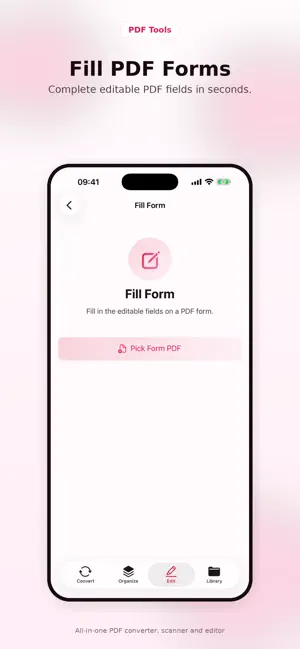
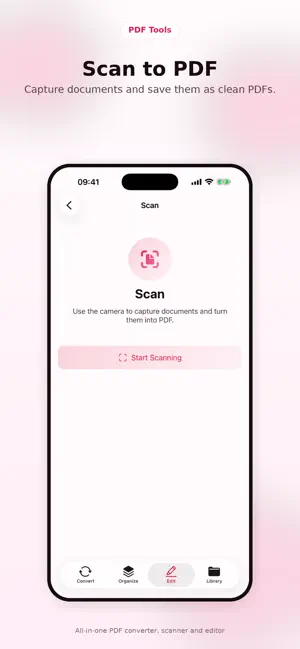
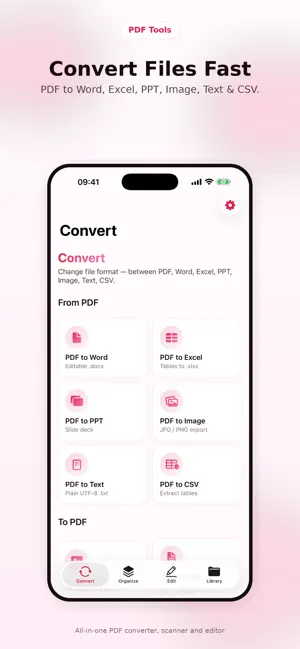
Crimson Pdf is the everyday PDF toolkit for iPhone and iPad. Convert, scan, sign, edit and protect documents — all 100% on-device. Nothing uploaded, nothing tracked, completely free with no in-app purchases or ads. Whether you're sending an invoice from a coffee shop, signing a lease before a viewing, or compressing a 200-page report for email, Crimson handles it in seconds. Powered by Apple's native PDFKit, VisionKit and PencilKit frameworks for instant offline processing. ■ CONVERT — 10 TOOLS Turn PDFs into Word (DOCX / RTF), Excel (XLSX), PowerPoint (PPTX), images (JPG / PNG), plain text and CSV. Convert back the other way: images, Word (.docx / .doc / RTF / HTML / TXT), Excel spreadsheets and PowerPoint slides into clean PDFs. ■ SCAN & OCR Snap any printed page with the built-in scanner — auto edge detection, perspective correction, multi-page output. Extract searchable text from photos and PDFs using Apple's on-device Vision framework. Nothing is sent to a server. ■ SIGN & ANNOTATE Draw your signature with Apple Pencil or finger using PencilKit, then stamp it onto any contract. Highlight, add sticky notes, and erase — all with precise tap targeting on the page. ■ ORGANIZE Merge, split, rotate, reorder pages. Compress to shrink a 10 MB PDF down to ~1 MB before sharing. Lock with a password. Add page numbers (1, 1/12, or Page 1 of 12 styles) and watermarks for confidential drafts. ■ FORMS Detect and fill PDF form fields automatically. Save filled copies without flattening so you can edit later. ■ DESIGNED FOR iOS Built entirely with SwiftUI for iOS 17 and above. Clean light theme, smooth gradient animations, haptic feedback, dynamic type and accessibility support. Files surface in the iOS Files app — no walled garden. ■ PRIVACY FIRST — NO DATA COLLECTED Every conversion, scan and OCR pass runs on your device. No cloud uploads, no analytics, no tracking, no third-party processing. Crimson Pdf makes zero network requests for its core functionality. ■ MULTI-LANGUAGE Available in 17 languages: English, Vietnamese, Spanish, French, German, Portuguese (Brazilian & European), Arabic, Hindi, Bengali, Indonesian, Japanese, Korean, Russian, Turkish, Chinese (Simplified & Traditional). Crimson Pdf is completely free. Every tool is unlocked from day one — no ads, no subscriptions, no in-app purchases.
App privacy
The developer, Nguyen Trong Nhan, reported these privacy practices to Apple.
Data Not Collected
The developer does not collect any data from this app.
Alternatives to Crimson Pdf: Editor & Tools
Looking for apps like Crimson Pdf: Editor & Tools? Here are 6 similar apps on the App Store. The highest rated is Flourish PDF: Editor & OCR (5.0/5), and all 6 are free to download.
-
 Flourish PDF: Editor & OCR
5.0
Flourish PDF: Editor & OCR
5.0
-
 Pagez PDF Tools
-
 Foliato: Offline PDF Tools
-
 Bayran Office: PDF Editor
-
 PDF Reader & Editor: AI Scan
-
 Leaf: Document Scanner & PDF
| App | Rating | Price | Last updated | Compare |
|---|---|---|---|---|
| Crimson Pdf: Editor & Tools | 5.0 / 5 (1 rating) | Free | May 21, 2026 | |
| Flourish PDF: Editor & OCR | 5.0 / 5 (1) | Free | Oct 12, 2026 | Compare |
| Pagez PDF Tools | – | Free | May 5, 2026 | Compare |
| Foliato: Offline PDF Tools | – | Free | Oct 6, 2026 | Compare |
| Bayran Office: PDF Editor | – | Free | Aug 28, 2026 | Compare |
| PDF Reader & Editor: AI Scan | – | Free | Jun 19, 2026 | Compare |
| Leaf: Document Scanner & PDF | – | Free | Sep 13, 2026 | Compare |