

Sketchthru: Trace Timelapse
Parra LLC Graphics & Design iPhoneiPadiPod touchApple Watch
Sketchthru: Trace Timelapse is a free Graphics & Design app for iPhone and iPad by Parra LLC. Requires iOS 17.0. Updated October 13, 2026.
- Price
- Free
- on the App Store
- Size
- 5 MB
- Age 4+
- Updated
- Oct 13
- 2026 · v1.3.0
Screenshots



About Sketchthru: Trace Timelapse
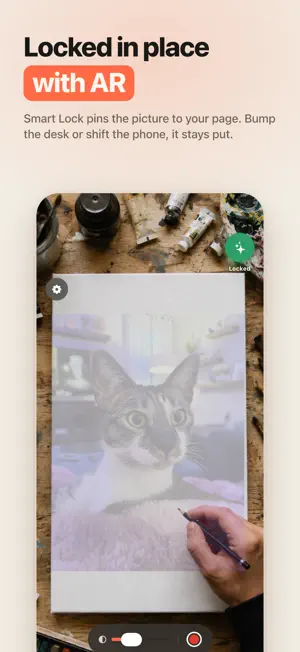
Sketchthru turns your phone into a drawing projector. Pick a photo, prop your phone over real paper, and trace what you see on screen with a real pencil. The camera shows your paper live while your reference photo floats on top at the opacity you choose. Line up your shot, lock it in place, and start drawing. Smart Lock uses AR to keep the overlay glued to your paper even if your phone shifts. HOW IT WORKS 1. Pick a photo you love 2. Prop your phone over your paper 3. Trace what you see on screen DRAW ANYTHING, ONTO ANYTHING A sketchbook, a canvas, a greeting card, a wall. If your camera can see it, you can trace onto it. EVERYTHING YOU NEED TO TRACE - Sample gallery to get you started - Opacity slider so you can see paper and photo at once - Pinch, drag and twist to place your photo, or drag the corners to resize it - Nudge the camera view instead of the picture when that lines up faster - Rule of thirds grid and flip tool - Undo and redo for every adjustment - Press and hold to peek at your drawing RECORD YOUR PROCESS Record while you draw and Sketchthru turns hours of sketching into a shareable timelapse. Start and stop from the volume button or your Apple Watch so you never knock the phone out of line, and keep an eye on the take from your Lock Screen. GO PRO - Upload photos from your camera roll - Edges and Posterize filters turn any photo into clean line art, ready to ink and paint inside - Subject filter lifts your subject off its background - Strobe mode blinks the overlay to check your lines - Timelapse in crisp 1080p without a watermark - Unlimited saved traces ALSO INCLUDED - Share a photo straight into Sketchthru from any app - Home Screen and Lock Screen widgets for your last session and your drawing streak - Ask Siri to start a trace or start recording Sketchthru is made for beginners, doodlers, and anyone who wants to put real pencil to real paper. No account needed. Start tracing in under a minute. Terms of Service: https://parra.io/terms-of-service.html Privacy Policy: https://parra.io/privacy-policy.html
What’s new
Version 1.3.0 · Updated October 13, 2026
Timelapse exports are more flexible: • New 16x and 32x speeds turn marathon sketch sessions into quick clips. • Pick a video length instead: 15, 30, 60, or 90 seconds, or 2 minutes. Sketchthru works out the speed to land on it exactly.
App privacy
The developer, Parra LLC, reported these privacy practices to Apple.
Data Not Collected
The developer does not collect any data from this app.
Alternatives to Sketchthru: Trace Timelapse
Looking for apps like Sketchthru: Trace Timelapse? Here are 6 similar apps on the App Store.
-
 TraceLens: Sketch & Trace
-
 AR Sketch - Tracing & Drawing
-
 TraceCam: Sketch Overlay
-
 Drawwii: Draw, Edit & Collage
-
 LightPad: Tracing Light Box
-
 DrawArt: Drawing & Trace
| App | Rating | Price | Last updated | Compare |
|---|---|---|---|---|
| Sketchthru: Trace Timelapse | – | Free | October 13, 2026 | |
| TraceLens: Sketch & Trace | – | Free | Oct 13, 2026 | Compare |
| AR Sketch - Tracing & Drawing | – | Free | Oct 28, 2026 | Compare |
| TraceCam: Sketch Overlay | – | Free | Sep 15, 2026 | Compare |
| Drawwii: Draw, Edit & Collage | – | Free | Jul 3, 2026 | Compare |
| LightPad: Tracing Light Box | – | Free | Sep 22, 2026 | Compare |
| DrawArt: Drawing & Trace | – | Free | Sep 28, 2026 | Compare |