

Drawwii: Draw, Edit & Collage
JIYOUNG RYU Graphics & Design iPhoneiPadiPod touch
Drawwii: Draw, Edit & Collage is a free Graphics & Design app for iPhone and iPad by JIYOUNG RYU. Requires iOS 17.0. Updated July 3, 2026.
- Price
- Free
- on the App Store
- Size
- 80 MB
- Age 4+
- Updated
- Jul 3
- 2026 · v26.27.5
Screenshots


About Drawwii: Draw, Edit & Collage
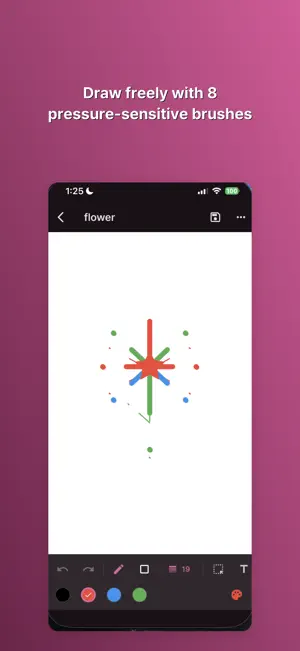
Drawwii turns your phone into a full creative studio — draw freely, edit photos with on-device AI, and turn ideas into finished designs, all in one app. DRAW FREELY • 8 pressure-sensitive brushes — pen, highlighter, calligraphy, neon, spray, marker, pencil, and eraser • 10 shapes with gradient fill, plus selection & transform tools (marquee, lasso) • Unlimited layers with blend modes and opacity • Symmetry & mirror mode, color picker, eyedropper, and recent colors • Snapshot undo/redo, pinch-to-zoom canvas EDIT PHOTOS — PRIVATELY, ON YOUR DEVICE • Magic Eraser: remove unwanted objects from any photo with AI inpainting, and compare before/after • Background Remover: cut out the subject and swap in a solid color, gradient, photo, or blur • All AI processing happens on your device — your photos are never uploaded to a server COLLAGE & TEMPLATES • Combine photos with grid or freeform collage layouts • Start from 290+ ready-made templates across 20+ categories, including invitations, planners, checklists, and celebrations • Keep editing your collage or template right in the drawing editor STICKERS & PHOTO ELEMENTS • Add emoji stickers or cut-out photos as movable layers • Draw directly on top of a photo, or overlay a reference image while you sketch MORE TOOLS, ONE TAP AWAY • Filters, watermark, borders & frames, and social media resize presets • Batch background removal, image compressor, and image-to-PDF • Document scanner, QR code generator, GIF maker, and photo stitching BUILD A DRAWING HABIT • Track your daily drawing streak, see your activity heatmap, and take on weekly challenges YOUR GALLERY, ORGANIZED • Search, sort, tag, and favorite your work • Trash with undo, plus full backup & restore to a file Available in English, Japanese, and Korean, with manual language switching in Settings. Start drawing — Drawwii is free to download.
What’s new
Version 26.27.5 · Updated July 3, 2026
Fixed some bugs, improved performance, and took a half-day off in the afternoon.
App privacy
The developer, JIYOUNG RYU, reported these privacy practices to Apple.
Data Not Linked to You
The following data, which may be collected but is not linked to your identity, may be used for the following purposes:
- Location: Coarse Location
- Identifiers: Device ID
- Usage Data: Product Interaction
- Diagnostics: Crash Data, Performance Data, Other Diagnostic Data
Used for: Analytics
Alternatives to Drawwii: Draw, Edit & Collage
Looking for apps like Drawwii: Draw, Edit & Collage? Here are 6 similar apps on the App Store. The highest rated is 背景透過 - 自動で背景を透明化 (5.0/5), and all 6 are free to download.
-
 Sketchthru: Trace Timelapse
-
 Pic to Line Art - Lines Me
4.5
Pic to Line Art - Lines Me
4.5
-
 ReCall: Old Photo Restore & AI
4.6
ReCall: Old Photo Restore & AI
4.6
-
 AI Art Generator - Sketch AI
4.2
AI Art Generator - Sketch AI
4.2
-
 背景透過 - 自動で背景を透明化
5.0
背景透過 - 自動で背景を透明化
5.0
-
 Photo Collage Maker: Jodu
5.0
Photo Collage Maker: Jodu
5.0
| App | Rating | Price | Last updated | Compare |
|---|---|---|---|---|
| Drawwii: Draw, Edit & Collage | – | Free | July 3, 2026 | |
| Sketchthru: Trace Timelapse | – | Free | Oct 13, 2026 | Compare |
| Pic to Line Art - Lines Me | 4.5 / 5 (4) | Free | Jul 14, 2026 | Compare |
| ReCall: Old Photo Restore & AI | 4.6 / 5 (5) | Free | Oct 30, 2026 | Compare |
| AI Art Generator - Sketch AI | 4.2 / 5 (5) | Free | Jul 20, 2026 | Compare |
| 背景透過 - 自動で背景を透明化 | 5.0 / 5 (1) | Free | May 13, 2024 | Compare |
| Photo Collage Maker: Jodu | 5.0 / 5 (9) | Free | Oct 28, 2026 | Compare |