

MinSec Clock: Seconds
杰 曹 Utilities iPhoneiPadiPod touch
MinSec Clock: Seconds is a free Utilities app for iPhone and iPad by 杰 曹. Rated 5.0/5 from 2 ratings. Requires iOS 16.2. Updated October 21, 2026.
- Rating
- 5.0
- 2 ratings
- Price
- Free
- on the App Store
- Size
- 4 MB
- Age 4+
- Updated
- Oct 21
- 2026 · v2.5
Screenshots
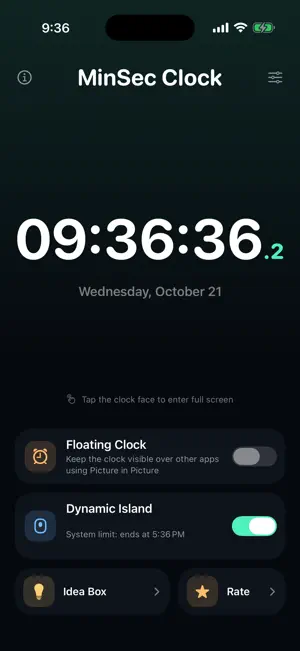

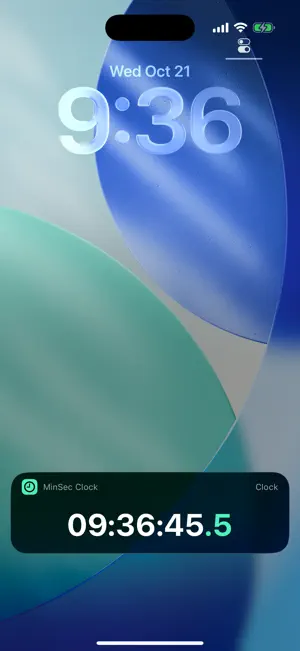

About MinSec Clock: Seconds
See hours, minutes, and seconds clearly in the app, on the Lock Screen, and in the Dynamic Island. On supported devices, use Picture in Picture to keep the clock visible over other apps. MinSec combines a precise seconds display, a full-screen desk clock, and customizable clock faces in one clean iPhone app. WHY MINSEC - Dynamic Island and Lock Screen time: show your selected hours, minutes, seconds, and optional fractional seconds with a Live Activity - Picture in Picture clock: keep the clock visible over other apps on supported devices - Lock Screen clock: check the current time without unlocking - Full-screen desk clock: turn your iPhone sideways for a clear landscape display - Analog and digital clock faces: switch styles to suit the moment - Custom time display: choose which hours, minutes, and seconds to show, plus fractional seconds - Detailed time: choose 12- or 24-hour time and display fractional seconds - Personalize the look: use a smooth second hand and a choice of accent colors - Shortcuts support: quickly start or stop the Live Activity - Private by design: no ads, accounts, analytics, or tracking MinSec uses your iPhone's system time and does not require a network connection. Seconds on the Lock Screen and in the Dynamic Island use Live Activities. iOS allows each Live Activity to run for up to 8 hours. On some older iOS versions, it may stop at midnight; restart it to keep displaying the time.
What’s new
Version 2.5 · Updated October 21, 2026
Set up each clock the way you need it, with independent settings for different places. • Dynamic Island, in-app digital, analog, and floating clocks now have separate display settings. Changing one no longer changes the others. • Choose 12- or 24-hour time separately for the digital and floating clocks, with live previews in settings. • On iOS 18 and later, add a Dynamic Island clock toggle to Control Center to quickly start or stop the Live Activity. • Fixed oversized AM/PM indicators and uneven time layouts in 12-hour mode. • Improved floating clock startup, cancellation, and recovery after a failed start, plus custom time zones and time-component display in the Dynamic Island.
App privacy
The developer, 杰 曹, reported these privacy practices to Apple.
Data Not Collected
The developer does not collect any data from this app.
Alternatives to MinSec Clock: Seconds
Looking for apps like MinSec Clock: Seconds? Here are 6 similar apps on the App Store. The highest rated is 1Stopwatch (5.0/5), and all 6 are free to download.
-
 Exact Seconds
4.4
Exact Seconds
4.4
-
 SecBlink
-
 Floating Clock Pro
-
 悬浮时间-抢购抢票秒杀悬浮窗灵动岛计时器
-
 CUE! Time Signal Sync
-
 1Stopwatch
5.0
1Stopwatch
5.0
| App | Rating | Price | Last updated | Compare |
|---|---|---|---|---|
| MinSec Clock: Seconds | 5.0 / 5 (2 ratings) | Free | October 21, 2026 | |
| Exact Seconds | 4.4 / 5 (7) | Free | Oct 3, 2026 | Compare |
| SecBlink | – | Free | Apr 30, 2026 | Compare |
| Floating Clock Pro | – | Free | Oct 17, 2026 | Compare |
| 悬浮时间-抢购抢票秒杀悬浮窗灵动岛计时器 | – | Free | Oct 18, 2026 | Compare |
| CUE! Time Signal Sync | – | Free | Sep 20, 2026 | Compare |
| 1Stopwatch | 5.0 / 5 (2) | Free | Oct 17, 2025 | Compare |