

Exact Seconds
Vagram Malkhasian Utilities iPhoneiPadiPod touch
Exact Seconds is a free Utilities app for iPhone and iPad by Vagram Malkhasian. Rated 4.4/5 from 7 ratings. Requires iOS 17.0. Updated October 3, 2026.
- Rating
- 4.4
- 7 ratings
- Price
- Free
- on the App Store
- Size
- 7 MB
- Age 4+
- Updated
- Oct 3
- 2026 · v2.4
Screenshots



About Exact Seconds
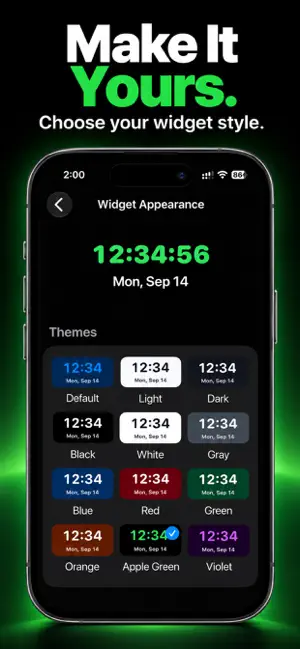
Exact Seconds is a clean, focused clock that shows the current time down to the second. Use it whenever precise timing matters: coordinate an exact moment, check the current second at a glance, or keep a large, easy-to-read clock open on your iPhone. CUSTOMIZABLE LIVE CLOCK Choose the appearance that works best for you. Set the time format, clock color, background, and optional date display directly in the app. LIVE SECONDS WIDGETS Keep the exact time visible without opening the app. Exact Seconds supports Home Screen widgets, a Lock Screen widget, and supported CarPlay displays. Choose from multiple widget sizes and customize their appearance with built-in themes or independent background, time, and date colors. Appearance changes apply to existing widgets without requiring you to remove and add them again. Features: • Large in-app clock with live seconds • Home Screen widgets with live seconds • Lock Screen widget with live seconds • CarPlay widget support • Multiple widget sizes • 12 built-in widget themes • Independent background, time, and date colors • System, 12-hour, and 24-hour time formats • Live seconds preserved in every time format • Multiple in-app clock colors • Black or white in-app background • Optional in-app date display • No account required • No ads • No advertising or cross-app tracking Exact Seconds uses your iPhone system time. For the best accuracy, keep Set Automatically enabled in iOS Date & Time settings. Exact Seconds uses limited anonymous analytics to understand whether widgets remain active over time and to improve widget reliability. This analytics does not use IDFA and is not used for advertising or cross-app tracking.
Ratings & reviews
4.4
7 ratings
What’s new
Version 2.4 · Updated October 3, 2026
Exact Seconds 2.4 adds more control over your clock and widgets: • Choose System, 12-hour, or 24-hour time format while keeping live seconds. • Pick from 12 widget themes, including Apple Green. • Customize widget background, time, and date colors independently. • Widget appearance changes now refresh quickly without removing and re-adding the widget. • Improved Small and Medium widget layout and readability. • Fixed an incorrect widget-settings warning and other minor issues.
App privacy
The developer, Vagram Malkhasian, reported these privacy practices to Apple.
Data Linked to You
The following data, which may be collected and linked to your identity, may be used for the following purposes:
- Identifiers: Device ID
- Usage Data: Other Usage Data
Used for: Analytics
Alternatives to Exact Seconds
Looking for apps like Exact Seconds? Here are 6 similar apps on the App Store. The highest rated is MinSec Clock: Seconds (5.0/5), and all 6 are free to download.
-
 MinSec Clock: Seconds
5.0
MinSec Clock: Seconds
5.0
-
 NiteTime Clock
4.0
NiteTime Clock
4.0
-
 Floatory: Floating Clock PiP
5.0
Floatory: Floating Clock PiP
5.0
-
 AutoSnooze Bedside Clock
5.0
AutoSnooze Bedside Clock
5.0
-
 SeClock: Seconds Clock Widget
4.8
SeClock: Seconds Clock Widget
4.8
-
 Studio Clock - Studio Uhr
5.0
Studio Clock - Studio Uhr
5.0
| App | Rating | Price | Last updated | Compare |
|---|---|---|---|---|
| Exact Seconds | 4.4 / 5 (7 ratings) | Free | October 3, 2026 | |
| MinSec Clock: Seconds | 5.0 / 5 (2) | Free | Oct 10, 2026 | Compare |
| NiteTime Clock | 4.0 / 5 (2) | Free | Jul 6, 2026 | Compare |
| Floatory: Floating Clock PiP | 5.0 / 5 (3) | Free | Oct 19, 2026 | Compare |
| AutoSnooze Bedside Clock | 5.0 / 5 (2) | Free | Jul 27, 2026 | Compare |
| SeClock: Seconds Clock Widget | 4.8 / 5 (5) | Free | May 18, 2026 | Compare |
| Studio Clock - Studio Uhr | 5.0 / 5 (1) | Free | Feb 19, 2025 | Compare |
Compare Exact Seconds with the top alternatives: ratings, updates, ASO score and keyword gaps →