

Image to PDF - Convert to PDFs
Kiran Gajjar Utilities iPhoneiPadiPod touch
Image to PDF - Convert to PDFs is a free Utilities app for iPhone and iPad by Kiran Gajjar. Requires iOS 17.0. Updated October 12, 2026.
- Price
- Free
- on the App Store
- Size
- 10 MB
- Age 4+
- Updated
- Oct 12
- 2026 · v1.2
Screenshots

About Image to PDF - Convert to PDFs
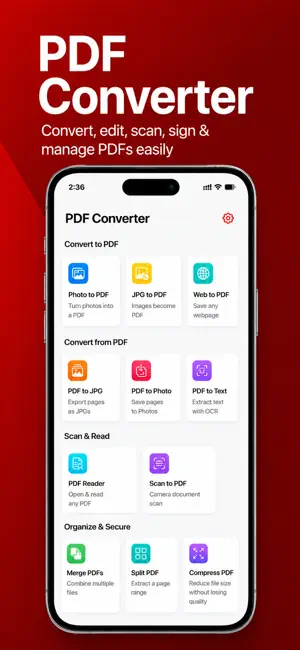
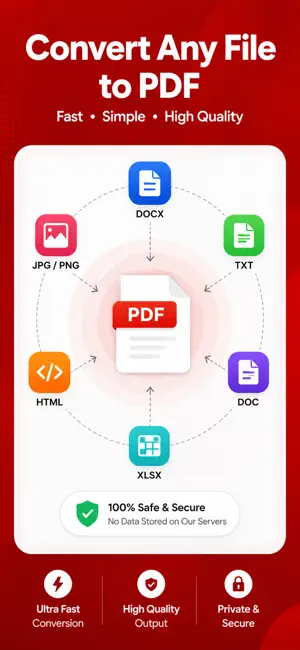
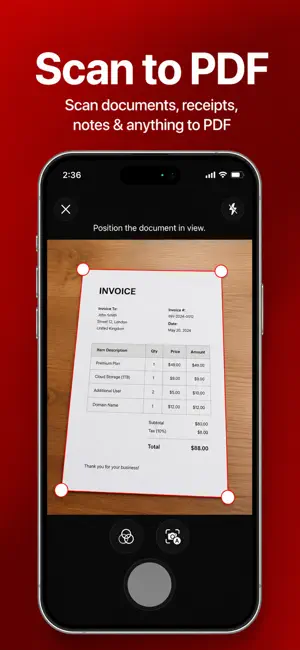
Convert anything to PDF in one tap — and keep it on your phone. Image to PDF ‧ PDF Converter turns photos, scans, Word documents, Excel sheets and PowerPoint slides into clean, shareable PDFs in seconds. No account. No upload. No watermark. WHAT YOU CAN DO - Photos & images to PDF — JPG, PNG, HEIC, multi-page - Word, Excel and PowerPoint to PDF, formatting preserved - Scan paper documents with your camera, with edge detection - Merge several PDFs into one file - Compress a PDF to email or upload it - Sign documents with your finger - Extract text from any scan with on-device OCR - Reorder, rotate and delete pages PRIVATE BY DESIGN Every conversion runs on your iPhone using Apple's own frameworks. Your documents are never uploaded to a server, never stored in the cloud and never seen by anyone but you. Works fully offline — on a plane, on the subway, anywhere. BUILT FOR EVERYONE Full VoiceOver support and Dynamic Type throughout. Works with the iOS Share Sheet, the Files app and Shortcuts, so you can convert without opening the app at all. App offers premium features through auto-renewable subscriptions. Payment will be charged to your Apple ID account upon confirmation of purchase. Subscriptions automatically renew unless canceled at least 24 hours before the end of the current period. You can manage your subscription and turn off auto-renewal in your account settings. For more details on managing subscriptions, visit: support.apple.com/en-us/HT202039 Privacy Policy: https://sites.google.com/view/thepdfconverter/privacy-policy Terms of Use: https://sites.google.com/view/thepdfconverter/terms-of-use
What’s new
Version 1.2 · Updated October 12, 2026
- Minor Bug Fixes
App privacy
The developer, Kiran Gajjar, reported these privacy practices to Apple.
Data Linked to You
The following data, which may be collected and linked to your identity, may be used for the following purposes:
- Usage Data: Product Interaction
Used for: Analytics
Data Not Linked to You
The following data, which may be collected but is not linked to your identity, may be used for the following purposes:
- Purchases: Purchase History
- Identifiers: User ID, Device ID
Used for: Analytics, App Functionality
Alternatives to Image to PDF - Convert to PDFs
Looking for apps like Image to PDF - Convert to PDFs? Here are 6 similar apps on the App Store.
-
 PDF Maker | Photo to PDF
-
 Image to PDF Converter : Scans
-
 PDF Maker - Editor & Converter
-
 PDF Tools: Edit, Merge & Sign
-
 JPG / PNG Image Converter
-
 PDF Maker & Enhancer
| App | Rating | Price | Last updated | Compare |
|---|---|---|---|---|
| Image to PDF - Convert to PDFs | – | Free | October 12, 2026 | |
| PDF Maker | Photo to PDF | – | Free | Jul 11, 2026 | Compare |
| Image to PDF Converter : Scans | – | Free | Oct 6, 2026 | Compare |
| PDF Maker - Editor & Converter | – | Free | Aug 27, 2026 | Compare |
| PDF Tools: Edit, Merge & Sign | – | Free | Aug 12, 2026 | Compare |
| JPG / PNG Image Converter | – | Free | Apr 14, 2024 | Compare |
| PDF Maker & Enhancer | – | Free | Oct 22, 2026 | Compare |