

Vyrra: AI Voice to Text
Brandon Runner Productivity iPhoneiPadiPod touch
Vyrra: AI Voice to Text is a free Productivity app for iPhone and iPad by Brandon Runner. Requires iOS 18.0. Updated October 7, 2026.
- Price
- Free
- on the App Store
- Size
- 6 MB
- Age 4+
- Updated
- Oct 7
- 2026 · v1.0
Screenshots

About Vyrra: AI Voice to Text
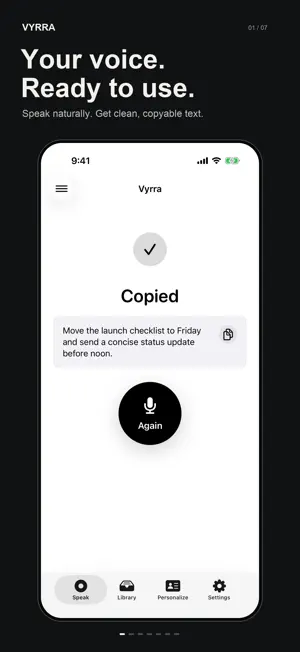
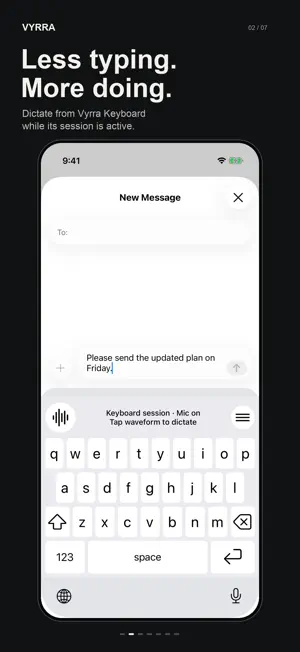
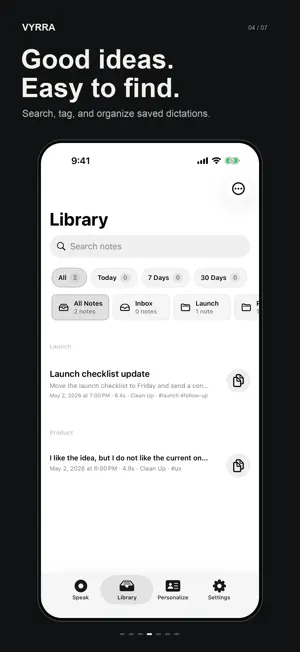
Speak naturally. Vyrra turns your voice into clean, ready-to-use text on iPhone. Capture a quick thought, draft a message, or turn a spoken note into text. Hold to record, release to transcribe, then copy, save, organize, or insert the result. WHY VYRRA • Natural voice to text: Talk normally, then choose polished Clean Up or faithful Verbatim output. • Named speech models: Choose Whisper Tiny, Whisper Small, or Whisper Large v3. Inspect model details in Settings. • Personal vocabulary: Teach Vyrra names, brands, acronyms, and specialized terms. • Reusable phrases: Save frequent text and insert it with Vyrra Keyboard. • Searchable notes: Edit, tag, and organize useful dictations in your Library. • Weekly word totals: Browse calendar weeks and see totals from your saved dictations. • Flexible export: Share individual results as plain text or Markdown. • No account, subscription, advertising, or analytics SDK. A FASTER IPHONE WORKFLOW 1. Open Vyrra and hold the record control to speak. 2. Release when finished and wait for the transcript. 3. Review the result in Clean Up or Verbatim mode. 4. Copy, save, export, or insert the fresh result where it belongs. You can also start a dictation from Shortcuts, Siri, Spotlight, or a supported Action Button. VYRRA KEYBOARD Type normally or dictate repeated phrases while a Keyboard Session is active. Enable the session in Vyrra, return to your text field, then tap the keyboard waveform to start and finish each phrase. Listening and processing have distinct animations. The main app handles microphone input and transcription. The keyboard requires Full Access for local dictation commands and result insertion; it does not record audio or launch Vyrra. Audio between phrases is discarded. Stop the session at any time, or choose when it turns off while unused. iOS interruptions or closing the app can require reopening Vyrra. Choose a keyboard height and text size that suit you. Vyrra's Haptic Feedback setting also controls the keyboard. MODEL SETUP Speech recognition requires downloading and preparing a model. Download size depends on the model you choose. Settings > Model shows the model name, spoken language, source and local processing details. Built for voice typing, quick memos, messages, email drafts, writing, and everyday speech-to-text on iPhone.
App privacy
The developer, Brandon Runner, reported these privacy practices to Apple.
Data Not Collected
The developer does not collect any data from this app.
Alternatives to Vyrra: AI Voice to Text
Looking for apps like Vyrra: AI Voice to Text? Here are 6 similar apps on the App Store. The highest rated is Voice Inbox AI (5.0/5), and all 6 are free to download.
-
 Voice Inbox AI
5.0
Voice Inbox AI
5.0
-
 NoteTap - Voice to Notes
-
 Wispen: Whisper & Listen
5.0
Wispen: Whisper & Listen
5.0
-
 Speech Notes: Voice Note Taker
-
 Hovor: Voice to Text Keyboard
-
 Aurisper: AI Voice Input
5.0
Aurisper: AI Voice Input
5.0
| App | Rating | Price | Last updated | Compare |
|---|---|---|---|---|
| Vyrra: AI Voice to Text | – | Free | October 7, 2026 | |
| Voice Inbox AI | 5.0 / 5 (1) | Free | Jul 25, 2026 | Compare |
| NoteTap - Voice to Notes | – | Free | Feb 21, 2026 | Compare |
| Wispen: Whisper & Listen | 5.0 / 5 (2) | Free | Oct 21, 2026 | Compare |
| Speech Notes: Voice Note Taker | – | Free | Oct 11, 2026 | Compare |
| Hovor: Voice to Text Keyboard | – | Free | Oct 17, 2026 | Compare |
| Aurisper: AI Voice Input | 5.0 / 5 (1) | Free | Mar 23, 2026 | Compare |