

Hovor: Voice to Text Keyboard
Kyrylo Holovchenko Productivity iPhoneiPadiPod touch
Hovor: Voice to Text Keyboard is a free Productivity app for iPhone and iPad by Kyrylo Holovchenko. Requires iOS 18.0. Updated November 4, 2026.
- Price
- Free
- on the App Store
- Size
- 55 MB
- Age 4+
- Updated
- Nov 4
- 2026 · v2.6.8
Screenshots



About Hovor: Voice to Text Keyboard
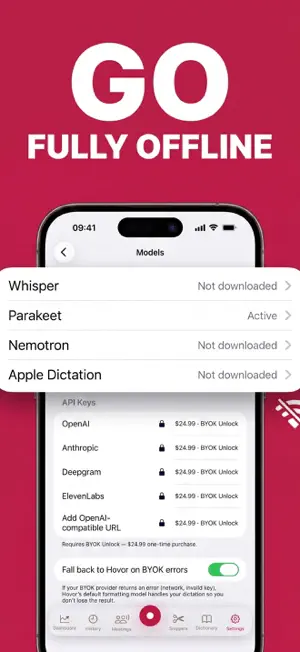
Talk instead of typing — in any app. Hovor is a voice keyboard that turns your speech into clean, punctuated text in seconds. Run it on-device with no internet, and pay once instead of subscribing if you prefer. — DICTATE IN EVERY APP Messages, Notes, Gmail, Slack, Telegram, WhatsApp, ChatGPT, Safari — anywhere the system keyboard works. Tap Start Hovor, speak, and the text lands right in the field. No copying, no app-switching. — OFFLINE AND PRIVATE Choose an on-device model (NVIDIA Parakeet or Whisper) on supported devices and your audio never leaves the phone — dictate on a plane, in the subway, or with sensitive notes. — TEXT THAT COMES OUT RIGHT Hovor adds punctuation, removes filler words, and can rewrite your words in the tone you need — a polished email, a casual Slack message, or source code. Speak in one language and get text in another with built-in translation. — LEARNS YOUR WORDS Names, brands, slang, technical terms — Hovor picks up your vocabulary as you type and recognizes it next time. Add your own replacement rules ("open ai → OpenAI") and reusable snippets like your address or signature, triggered by voice. — BILINGUAL KEYBOARD Ukrainian and English layouts side by side — switch with one tap. 30+ languages for dictation. — MEETINGS WITH SPEAKER LABELS Record a meeting and get a clean transcript split by speaker. Rename people, copy the whole conversation or one person's lines — stored on your device. Included with Local Unlock or Pro. — MORE • Voice Fingerprint — Hovor ignores other voices in noisy or shared rooms (on-device, opt-in) • Silence and noise filter before transcription • Live Activity and Dynamic Island with a live word count • Searchable history of every dictation — copy the formatted or original text • Words per minute, streaks and weekly challenges — BRING YOUR OWN AI KEY Already pay for OpenAI, Anthropic, Deepgram or ElevenLabs? Connect your key and pay the provider directly. Keys stay in this device's Keychain and are never sent to us. With Pro, Hovor also falls back automatically if your provider fails, so you never lose a dictation. — ONE ACCOUNT ACROSS YOUR DEVICES Sync your dictionary, snippets and stats across iPhone, iPad, Mac and Windows (beta). Free plan: 2 devices, Pro: up to 5. — PLANS Free: 2,000 words a week, 30+ languages, 20 replacements, 20 snippets and 3 workflows. Pro subscription: no weekly word limit on cloud dictation, translation and sync; includes Local and BYOK access. Prefer to pay once? One-time unlocks, no subscription: • Local Unlock — unlimited offline dictation • BYOK Unlock — use your own AI provider keys • Local + BYOK Bundle — both at a lower price Family Sharing works for every one-time purchase. Prices are shown in your local currency in the app. Hovor is for everyone who speaks faster than they type.
What’s new
Version 2.6.8 · Updated November 4, 2026
• Simpler keyboard setup: the steps now match exactly what you see in Settings, and the keyboard is listed as “Hovor”. • Fixed untranslated text in Settings and onboarding. • Your account now shows Local Unlock, BYOK Unlock or Bundle if you bought one, and one-time purchases keep the free 2000 cloud words per week.
App privacy
The developer, Kyrylo Holovchenko, reported these privacy practices to Apple.
Data Linked to You
The following data, which may be collected and linked to your identity, may be used for the following purposes:
- Usage Data: Product Interaction
- Contact Info: Email Address, Name
- User Content: Other User Content
- Identifiers: User ID
Used for: Analytics, App Functionality
Data Not Linked to You
The following data, which may be collected but is not linked to your identity, may be used for the following purposes:
- User Content: Audio Data
Used for: App Functionality
Alternatives to Hovor: Voice to Text Keyboard
Looking for apps like Hovor: Voice to Text Keyboard? Here are 6 similar apps on the App Store. The highest rated is Altboard: AI Voice Keyboard (5.0/5), and all 6 are free to download.
-
 Hallig: Voice to Text
-
 Altboard: AI Voice Keyboard
5.0
-
 use.fo - AI Voice Typing
-
 Codictate: AI Dictation
4.0
-
 Spokn: Voice to Clipboard
-
 Airgap Voice Mobile
| App | Rating | Price | Last updated | Compare |
|---|---|---|---|---|
| Hovor: Voice to Text Keyboard | – | Free | November 4, 2026 | |
| Hallig: Voice to Text | – | Free | Aug 12, 2026 | Compare |
| Altboard: AI Voice Keyboard | 5.0 / 5 (3) | Free | Oct 27, 2026 | Compare |
| use.fo - AI Voice Typing | – | Free | Oct 15, 2026 | Compare |
| Codictate: AI Dictation | 4.0 / 5 (2) | Free | Oct 30, 2026 | Compare |
| Spokn: Voice to Clipboard | – | Free | May 12, 2026 | Compare |
| Airgap Voice Mobile | – | Free | Apr 16, 2026 | Compare |