

TaskPlate
Vasuraj V Arni Productivity iPhoneiPadiPod touch
TaskPlate is a free Productivity app for iPhone and iPad by Vasuraj V Arni. Requires iOS 17.0. Updated October 18, 2026.
- Price
- Free
- on the App Store
- Size
- 2 MB
- Age 4+
- Updated
- Oct 18
- 2026 · v1.9
Screenshots


About TaskPlate
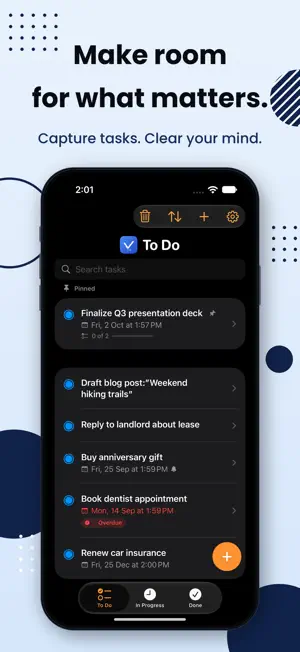
TaskPlate is a straightforward task manager built around one idea: get things done without the clutter. CAPTURE IT FAST Tap + at the bottom, type, and press Return — saved, with the next blank line already waiting. Empty your head in one go, and add the details later if they matter. BOARD YOUR WAY Organize every task across three simple stages — To Do, In Progress, and Done. Swipe between them or tap to switch, and move tasks forward as you make progress. BREAK IT DOWN Add a checklist to any task and tick off the steps as you go. Press Return to move to the next step, check or uncheck the whole list in one tap, reorder items however you like, remove the ones you don't need, and see your progress right on the task list — "2 of 5" at a glance, without opening anything. STAY ON TOP OF WHAT MATTERS - Pin your most important tasks to the top of To Do or In Progress - Drag to reorder tasks exactly how you want them - Search instantly across task names, notes, and checklist items - Filter any list by due date — this week, month, quarter, or year — sorted earliest first - Select several tasks and move them to another list in one go - Add due dates and set alerts — local reminders 5 minutes, 15 minutes, an hour, or up to a week ahead, your choice - Tap an alert to jump straight to that task, and clear it when you're ready — it stays counted on the app icon until you do NOTHING GETS LOST Deleted a task by mistake? It's not gone — recover it anytime from the Deleted Tasks view before it's permanently purged. Set your own auto-cleanup schedule, or clear things out manually whenever you're ready. MAKE IT YOURS Choose Light, Dark, or System appearance, and pick your own accent color — from curated presets or a full custom color picker. In Light appearance, go further with Color Scheme: four warm, hand-picked palettes that recolor the whole app. Changed your mind? One tap puts it all back the way it started. YOUR DATA STAYS YOURS TaskPlate doesn't require an account, doesn't use the cloud, and doesn't collect your data. Every task lives only on your device. No sign-up, no syncing servers, no tracking — just a private, fast to-do list. Please note: because nothing is sent to the cloud, your tasks are stored separately on each device and do not sync between your iPhone and iPad. Works great on iPhone and iPad.
What’s new
Version 1.9 · Updated October 18, 2026
New: see all three lists at once in landscape. - Turn your device sideways and To Do, In Progress, and Done sit side by side - Fold away the Done list to give the two working lists more room - A task you have open now stays open when you rotate - Better support for the largest accessibility text sizes
App privacy
The developer, Vasuraj V Arni, reported these privacy practices to Apple.
Data Not Collected
The developer does not collect any data from this app.
Alternatives to TaskPlate
Looking for apps like TaskPlate? Here are 6 similar apps on the App Store. The highest rated is PearList (5.0/5), and all 6 are free to download.
-
 MonoList: To-Do & Tasks
-
 Munich Apartments Rent Finder
-
 PearList
5.0
PearList
5.0
-
 CGCS Communities
-
 Sealed Calendar
3.0
Sealed Calendar
3.0
-
 PearCal: P2P Calendar
5.0
PearCal: P2P Calendar
5.0
| App | Rating | Price | Last updated | Compare |
|---|---|---|---|---|
| TaskPlate | – | Free | October 18, 2026 | |
| MonoList: To-Do & Tasks | – | Free | Aug 5, 2026 | Compare |
| Munich Apartments Rent Finder | – | Free | Jun 13, 2026 | Compare |
| PearList | 5.0 / 5 (1) | Free | Oct 20, 2026 | Compare |
| CGCS Communities | – | Free | Aug 27, 2026 | Compare |
| Sealed Calendar | 3.0 / 5 (1) | Free | Feb 22, 2026 | Compare |
| PearCal: P2P Calendar | 5.0 / 5 (3) | Free | Oct 23, 2026 | Compare |
Compare TaskPlate with the top alternatives: ratings, updates, ASO score and keyword gaps →