

RouteMeasure
AIビジョンテクノロジー株式会社 Utilities iPhoneiPadiPod touch
RouteMeasure is a free Utilities app for iPhone and iPad by AIビジョンテクノロジー株式会社. Requires iOS 17.0. Updated September 1, 2026.
- Price
- Free
- on the App Store
- Size
- 4 MB
- Age 4+
- Updated
- Sep 1
- 2026 · v1.0.1
Screenshots


About RouteMeasure
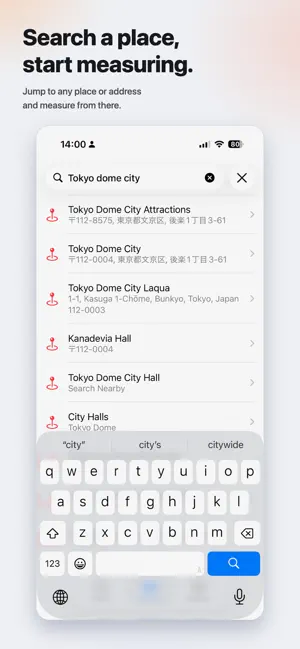
Route Measure makes it easy to measure and save distances between points by placing pins on a map. Use it to plan a walk, running route, cycling course, hike, or trip; estimate distances before you set out; or check the spacing between places and properties directly on the map. EASY DISTANCE MEASUREMENT Press and hold the map to add pins. Route Measure connects them in sequence and shows the total distance across all segments. You can also check each segment and the straight-line distance from the first pin to the last. Drag any pin to fine-tune its position. QUICK PLACE SEARCH Search by place name, facility, or address. Switch between standard and satellite maps, and allow location access if you want to show your current position. Measuring distances does not require location access. SAVE AND REVIEW Name and save each measurement, then reopen it later with its map and distance details. Pins from an unfinished measurement are saved on your device automatically, so you can continue after closing the app. EXPORT IN FOUR FORMATS Export a saved route as CSV, GPX, KML, or HTML. Use your data in spreadsheets, compatible map apps, Google Earth, or a web browser. BACKUP AND PRIVACY Back up and restore all your saved routes in one file. Route Measure does not send your measurement history or location data to an app-operated server. The free version lets you save one route at a time. A one-time Full Access purchase unlocks unlimited saved routes. Distance measurement, exporting, backup, and restore remain available in the free version. KEY FEATURES • Add pins with a long press • View total route, individual segment, and start-to-end straight-line distances • Drag pins for precise placement • Search for places, facilities, and addresses • Switch between standard and satellite maps • Save, rename, review, and delete measurements • Export CSV, GPX, KML, and HTML files • Back up and restore route history • Available in English and Japanese Route Measure is not a directions or navigation app. Distances are calculated along geodesic lines between the pins you place on the map.
What’s new
Version 1.0.1 · Updated September 1, 2026
v1.0.1 - Added the new Distance Circle feature. • Draw a circle with a specified radius centered on your current location, first pin, or last pin • Update the radius or hide the circle at any time • Improved usability and interface details
App privacy
The developer, AIビジョンテクノロジー株式会社, reported these privacy practices to Apple.
Data Not Collected
The developer does not collect any data from this app.
Alternatives to RouteMeasure
Looking for apps like RouteMeasure? Here are 6 similar apps on the App Store. The highest rated is Simple Measure -GPS & Map Area (1.0/5), and all 6 are free to download.
-
 Chimer - Voice Time Announcer
-
 Time Talks
-
 QKeyboard: AI Writing
-
 みちびき - ドライブルート生成アプリ
-
 EntryCom
-
 Simple Measure -GPS & Map Area
1.0
Simple Measure -GPS & Map Area
1.0
| App | Rating | Price | Last updated | Compare |
|---|---|---|---|---|
| RouteMeasure | – | Free | September 1, 2026 | |
| Chimer - Voice Time Announcer | – | Free | Oct 3, 2026 | Compare |
| Time Talks | – | Free | May 18, 2026 | Compare |
| QKeyboard: AI Writing | – | Free | Sep 5, 2026 | Compare |
| みちびき - ドライブルート生成アプリ | – | Free | May 12, 2026 | Compare |
| EntryCom | – | Free | Aug 26, 2026 | Compare |
| Simple Measure -GPS & Map Area | 1.0 / 5 (1) | Free | Oct 10, 2026 | Compare |
Compare RouteMeasure with the top alternatives: ratings, updates, ASO score and keyword gaps →