

QKeyboard: AI Writing
Quy Vo Utilities iPhoneiPadiPod touch
QKeyboard: AI Writing is a free Utilities app for iPhone and iPad by Quy Vo. Requires iOS 18.0. Updated September 5, 2026.
- Price
- Free
- on the App Store
- Size
- 19 MB
- Age 4+
- Updated
- Sep 5
- 2026 · v1.1.0
Screenshots



About QKeyboard: AI Writing
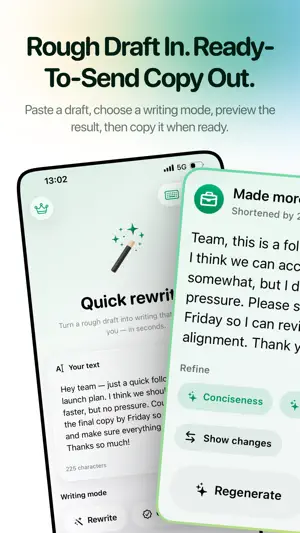
Write better wherever you type with QKeyboard, an AI writing assistant built for iPhone and iPad. Use the QKeyboard extension in compatible apps to turn rough drafts into clear, ready-to-send writing. Review every result before you replace or copy it. WRITE WITH CONFIDENCE • Rewrite text for clarity and fluency • Fix grammar, spelling, and punctuation • Make writing shorter and more concise • Switch to a professional or friendly tone • Translate between the supported languages • Refine selected text to clarify, soften, shorten, or strengthen it • Create custom writing modes for your own voice WORKS WHERE YOU WRITE Bring AI writing tools into compatible messaging, email, notes, and productivity apps. Some apps and secure text fields may restrict third-party keyboards. PRIVACY AND CONTROL QKeyboard does not continuously record what you type. Text is sent for processing only after you intentionally choose a writing action. Results are shown for review before replacement. Optional rewrite history created inside the main app is stored on your device; keyboard rewrites are not saved to history. CHOOSE YOUR AI Use QKeyboard AI for quick setup, or connect your own supported AI provider with Bring Your Own Key. Your API key is stored in Apple Keychain. Provider terms, availability, and usage fees may apply. TRACK YOUR PROGRESS See rewrites completed, words polished, milestones, and the local history you choose to keep. QKEYBOARD PRO Upgrade with a monthly or yearly subscription, or a lifetime purchase, to remove QKeyboard’s free daily rewrite limits and keep every writing mode available. Subscriptions renew automatically unless canceled through your Apple ID settings. Family Sharing is available for eligible purchases. QKeyboard requires Allow Full Access so the keyboard extension can contact the selected AI service when you request a rewrite. An internet connection is required for AI features. Terms of Use (EULA): https://www.apple.com/legal/internet-services/itunes/dev/stdeula/ Privacy Policy: https://www.qkeyboard.app/privacy
What’s new
Version 1.1.0 · Updated September 5, 2026
Refining a rewrite now has room to breathe. Tap any result to open it full screen. Undo and redo through every version, show exactly what changed, and choose from suggestions written for the text in front of you — or select a single phrase and fix only that part. Prefer your own words? Type an instruction and watch it land. QKeyboard also speaks ten more languages. The app, the keyboard and Translate mode now cover Spanish, Portuguese, Traditional Chinese, Italian, Turkish, Thai, Indonesian, Polish, Dutch and Hindi, and systems set to Taiwan or Hong Kong get Traditional Chinese as they should.
App privacy
The developer, Quy Vo, reported these privacy practices to Apple.
Data Not Collected
The developer does not collect any data from this app.
Alternatives to QKeyboard: AI Writing
Looking for apps like QKeyboard: AI Writing? Here are 6 similar apps on the App Store.
-
 Noetic: AI Writing Keyboard
-
 TapFix: AI Keyboard & Grammar
-
 コピー履歴・定型文・AIキーボード|RiReKey(履歴)
-
 SmartClip
-
 MasterFabric AI Keyboard
-
 StarLoto: Lottery Results
| App | Rating | Price | Last updated | Compare |
|---|---|---|---|---|
| QKeyboard: AI Writing | – | Free | September 5, 2026 | |
| Noetic: AI Writing Keyboard | – | Free | Sep 28, 2026 | Compare |
| TapFix: AI Keyboard & Grammar | – | Free | Oct 2, 2026 | Compare |
| コピー履歴・定型文・AIキーボード|RiReKey(履歴) | – | Free | Oct 14, 2026 | Compare |
| SmartClip | – | Free | May 4, 2026 | Compare |
| MasterFabric AI Keyboard | – | Free | Jul 16, 2026 | Compare |
| StarLoto: Lottery Results | – | Free | Jul 5, 2026 | Compare |