

Downsize: Media Shrinker
Gilmar Quinelato Photo & Video iPhoneiPadiPod touch
Downsize: Media Shrinker is a free Photo & Video app for iPhone and iPad by Gilmar Quinelato. Requires iOS 26.0. Updated September 9, 2026.
- Price
- Free
- on the App Store
- Size
- 12 MB
- Age 4+
- Updated
- Sep 9
- 2026 · v1.5
Screenshots
About Downsize: Media Shrinker
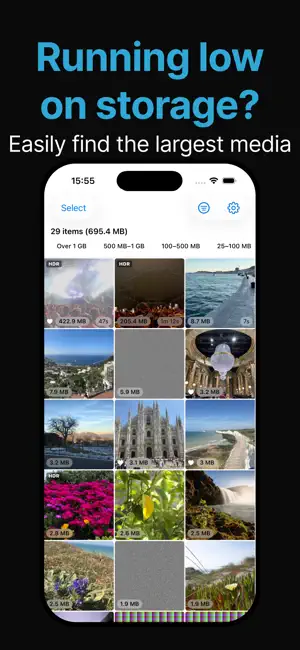
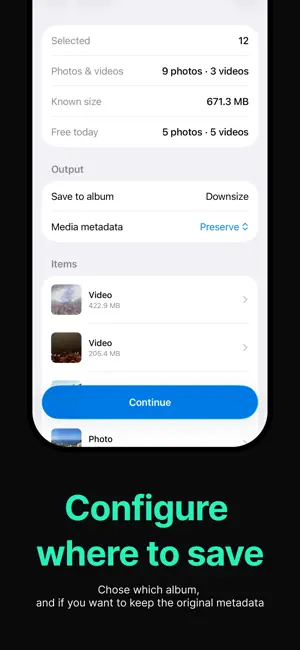
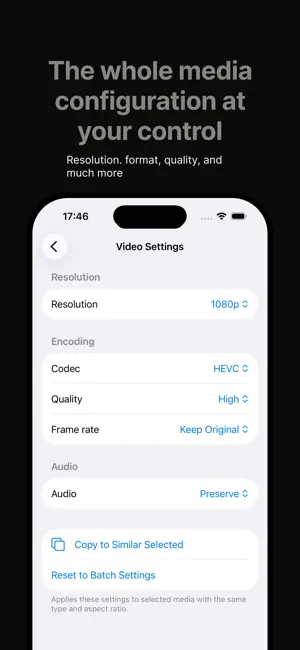
Running out of storage? Downsize finds the photos and videos eating the most space and shrinks them — right on your iPhone, without deleting a single memory or sending anything to the cloud. Everything happens on your device. Your photos never leave your iPhone, your originals are never changed, and you stay in control. HOW IT WORKS • Browse your library sorted largest-first, so the biggest space hogs are right at the top. • Select the photos and videos you want to shrink — or drag to select a whole range at once. • Choose how to optimize: resize, adjust quality, or convert to more efficient formats. • Downsize saves a smaller copy and leaves your original exactly as it was. CONTROLS THAT RESPECT YOU • Photos: HEIC or JPEG, quality presets, and resize by percentage or resolution. • Videos: HEVC or H.264, resolution, frame rate, and audio options. • Live Photos: keep them live, or convert to a still. • HDR videos stay HDR. • Compare before and after — side by side or with a slider — and pinch to zoom in on the detail. • Filter by favorites and by size, and see exactly how much space each item uses. • Metadata is yours: keep it, remove location only, or strip all optional data. PRIVATE BY DESIGN • All processing runs on your device — your media is never uploaded and we never see it. • No account required. • Your originals are never modified, and deleting anything is always a separate, explicit choice. DOWNSIZE PRO Unlock unlimited photo and video optimization and remove ads with a single one-time purchase — no subscription. Free up space, keep your memories, stay private. That's Downsize.
What’s new
Version 1.5 · Updated September 9, 2026
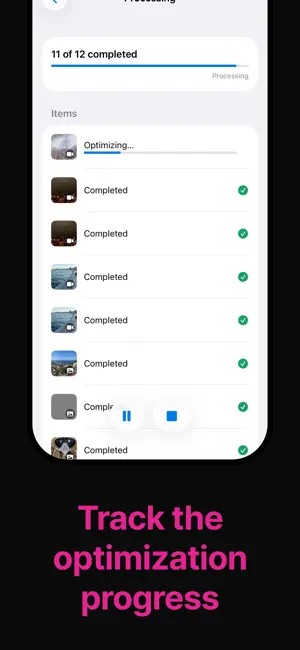
• Faster batches: photos are now converted several at a time, and iCloud downloads happen while the previous item is still being processed. • Processing no longer stops when your screen turns off on its own. • Pause now stops the item being processed, not just the ones waiting. • Stop now cancels everything and takes you straight back to your library. • If a batch stops, Downsize now tells you why — including when your iPhone needs to cool down.
App privacy
The developer, Gilmar Quinelato, reported these privacy practices to Apple.
Data Used to Track You
The following data may be used to track you across apps and websites owned by other companies:
- Location: Coarse Location
- Identifiers: Device ID
- Usage Data: Advertising Data, Other Usage Data
Data Not Linked to You
The following data, which may be collected but is not linked to your identity, may be used for the following purposes:
- Location: Coarse Location
- Identifiers: Device ID
- Usage Data: Advertising Data, Other Usage Data, Product Interaction
- Diagnostics: Crash Data, Performance Data
Used for: Third-Party Advertising, Analytics, App Functionality
Alternatives to Downsize: Media Shrinker
Looking for apps like Downsize: Media Shrinker? Here are 6 similar apps on the App Store. The highest rated is Video Compressor: ClipKit (5.0/5), and all 6 are free to download.
-
 Squeezy: Video Compressor
-
 Video Compressor: ClipKit
5.0
Video Compressor: ClipKit
5.0
-
 Photo Cleaner: Sort by Size
-
 Video Compressor - SlimClip
5.0
Video Compressor - SlimClip
5.0
-
 Compress: Photo & Video
-
 Video Compressor – Easy Shrink
| App | Rating | Price | Last updated | Compare |
|---|---|---|---|---|
| Downsize: Media Shrinker | – | Free | September 9, 2026 | |
| Squeezy: Video Compressor | – | Free | Sep 9, 2026 | Compare |
| Video Compressor: ClipKit | 5.0 / 5 (1) | Free | Oct 16, 2026 | Compare |
| Photo Cleaner: Sort by Size | – | Free | Oct 7, 2026 | Compare |
| Video Compressor - SlimClip | 5.0 / 5 (1) | Free | Aug 10, 2026 | Compare |
| Compress: Photo & Video | – | Free | Mar 18, 2026 | Compare |
| Video Compressor – Easy Shrink | – | Free | Aug 27, 2026 | Compare |