

FrictionBlock: App Blocker
Beijing Baitemi Technology Co., Ltd Productivity iPhoneiPadiPod touch
FrictionBlock: App Blocker is a free Productivity app for iPhone and iPad by Beijing Baitemi Technology Co., Ltd. Requires iOS 17.0. Updated July 25, 2026.
- Price
- Free
- on the App Store
- Size
- 14 MB
- Age 4+
- Updated
- Jul 25
- 2026 · v1.0
Screenshots

About FrictionBlock: App Blocker
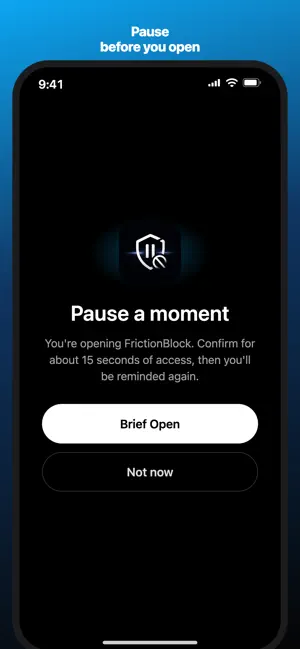
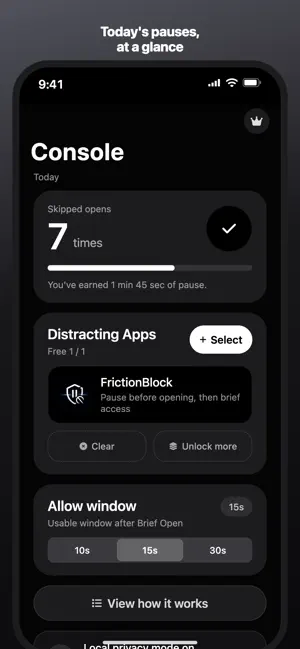
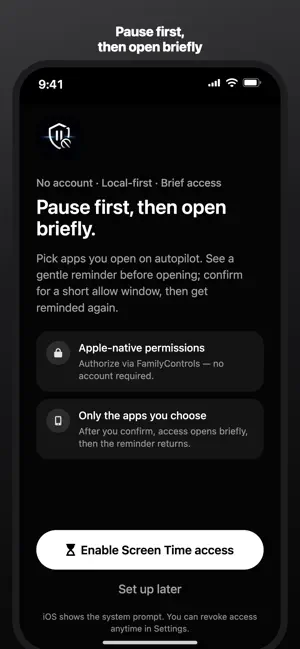
FrictionBlock is a gentle screen time and focus helper that adds a pause before opening distracting apps, so you can decide whether it is an intentional choice or just muscle memory. Hard blockers are easy to disable when they feel too strict. FrictionBlock is softer: choose the apps that pull you in, then add a small moment of friction before opening them. Use it for social media, video, shopping, games, or any app you open on autopilot. Key features: - Add friction before selected apps - Start free with one app - Upgrade to add more apps - Choose a short pause window - See how many times you chose not to open today - No account required - Local-first privacy - Built on Apple's Screen Time APIs FrictionBlock cannot read your private messages, passwords, browsing content, or what you do inside other apps. Your selected apps and pause stats stay on device. FrictionBlock is not a medical device and does not diagnose, treat, or cure ADHD or any health condition. It is a lightweight focus tool for building more intentional phone habits. Auto-Renewable Subscription Information: 1. Subscription: FrictionBlock Premium (Yearly) 2. Length: 1 year. During an active subscription period, you can unlock Premium features such as managing more than 1 distracting app. 3. Price: USD 19.99 per year (or the equivalent local price shown in the App Store). A one-time Lifetime purchase (USD 39.99 or local equivalent) is also available and is not auto-renewable. 4. Payment: Payment will be charged to your Apple ID account at confirmation of purchase. 5. Cancellation: To cancel auto-renewal, turn it off at least 24 hours before the end of the current period in Settings → Apple ID → Subscriptions. After cancellation, no further charges will be made for that subscription. If you do not cancel at least 24 hours before renewal, the subscription renews automatically. 6. Renewal: Within 24 hours before the current period ends, Apple will charge your Apple ID and extend Premium by one year upon successful payment. 7. Privacy Policy: https://baitemi.com/frictionblock/privacy 8. Terms of Use / Subscription Terms: https://baitemi.com/frictionblock/terms
App privacy
The developer, Beijing Baitemi Technology Co., Ltd, reported these privacy practices to Apple.
Data Not Collected
The developer does not collect any data from this app.
Alternatives to FrictionBlock: App Blocker
Looking for apps like FrictionBlock: App Blocker? Here are 6 similar apps on the App Store. The highest rated is Intention: Focus & Screen Time (3.0/5), and all 6 are free to download.
-
 Scroll Timer: Doomscroll Log
-
 F2Unlock: App Blocker & Focus
-
 App Blocker: Block Apps & Web
-
 AppBlock: App Blocker & Limits
-
 Intention: Focus & Screen Time
3.0
Intention: Focus & Screen Time
3.0
-
 PomoLock: AppBlocker
| App | Rating | Price | Last updated | Compare |
|---|---|---|---|---|
| FrictionBlock: App Blocker | – | Free | July 25, 2026 | |
| Scroll Timer: Doomscroll Log | – | Free | Sep 21, 2026 | Compare |
| F2Unlock: App Blocker & Focus | – | Free | Jun 23, 2026 | Compare |
| App Blocker: Block Apps & Web | – | Free | Sep 28, 2026 | Compare |
| AppBlock: App Blocker & Limits | – | Free | Oct 3, 2026 | Compare |
| Intention: Focus & Screen Time | 3.0 / 5 (1) | Free | Jul 31, 2026 | Compare |
| PomoLock: AppBlocker | – | Free | Apr 21, 2026 | Compare |