

AppBlock: App Blocker & Limits
Saif Ur Rehman Productivity iPhoneiPadiPod touch
AppBlock: App Blocker & Limits is a free Productivity app for iPhone and iPad by Saif Ur Rehman. Requires iOS 18.0. Updated October 3, 2026.
- Price
- Free
- on the App Store
- Size
- 46 MB
- Age 4+
- Updated
- Oct 3
- 2026 · v1.0.2
Screenshots

About AppBlock: App Blocker & Limits
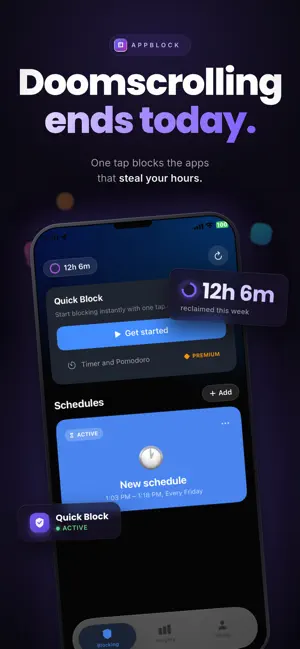
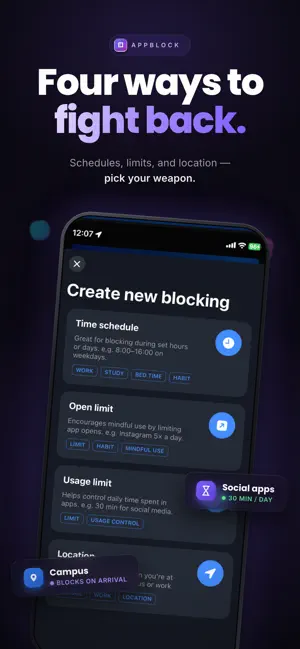
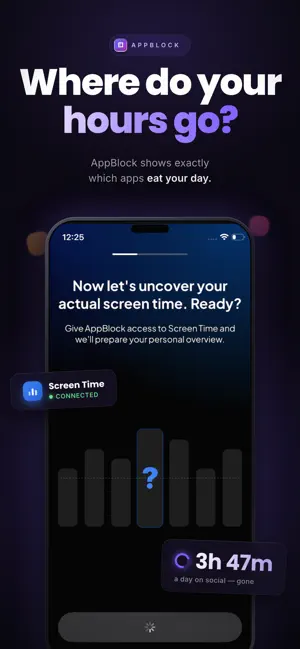
Block the apps that waste your time, by schedule, by daily limit or by location. AppBlock uses Apple's Screen Time system, so a blocked app shows a shield screen when you open it. Pick the apps that distract you, then choose how to block them. CHOOSE HOW TO BLOCK • Quick Block: choose your apps and start a focus session in one tap. A countdown shows how long is left. • Schedules: block apps during work, study, dinner or bedtime. Set the days and the time ranges. • Usage limits: set how long you can use an app each day. When your time is up, the app is blocked. • Open limits: allow only a few opens per day. The blocked screen shows how many opens you have left. • Location blocking: block apps when you are at a place you choose, like school, the library or the office. You can also block them when you are away from it. SEE WHERE YOUR TIME GOES Start by guessing your daily screen time, then see the real number. Insights show your screen time and your most used apps by day for free. Weekly and monthly views come with Premium. BUILT FOR REAL LIFE Stop doomscrolling at night. Study without your phone pulling you away. Keep dinner phone free. Switch off work apps when you get home. PRIVACY The apps you choose stay private. Apple's Screen Time system keeps your list hidden from us, and your schedules and limits are stored on your device. HOW IT WORKS 1. Allow Screen Time access once 2. Pick the apps that distract you 3. Start Quick Block, or set a schedule, a limit or a place 4. Get your time back FREE AND PREMIUM AppBlock is free to start. The free plan includes 4 hour Quick Block sessions, schedules on one day, a few usage, open and location rules, and daily Insights. Premium adds more rules, longer usage limits, schedules on several days, 24 hour Quick Block sessions, and weekly and monthly Insights. Try Premium free for 7 days, then choose monthly or yearly. SUBSCRIPTION DETAILS • Premium is an auto-renewing subscription, billed monthly or yearly • Payment is charged to your Apple Account at confirmation of purchase • The subscription renews automatically unless you turn it off at least 24 hours before the end of the current period • Your account is charged for renewal within 24 hours before the end of the current period • Manage or cancel in your Apple Account settings • Any unused part of a free trial is lost when you buy a subscription Privacy Policy: https://o9tech.com/appblocker/privacypolicy.html Terms of Use: https://www.apple.com/legal/internet-services/itunes/dev/stdeula/ Support: [email protected]
What’s new
Version 1.0.2 · Updated October 3, 2026
AppBlock now speaks your language. The app is now available in Spanish, Portuguese (Brazil and Portugal), German, French, Italian, Dutch, Japanese, Korean and Simplified Chinese. It follows your device language on first launch, and you can change it any time in Settings. Also in this release: • Fixed scrolling on the Insights screen • The settings button on Insights now opens your profile • Fixed an issue where onboarding screens could lose their state, which sometimes caused repeated permission prompts • Stability improvements and better crash reporting
App privacy
The developer, Saif Ur Rehman, reported these privacy practices to Apple.
Data Linked to You
The following data, which may be collected and linked to your identity, may be used for the following purposes:
- Purchases: Purchase History
- Contact Info: Email Address, Name
- Identifiers: User ID, Device ID
- Usage Data: Product Interaction
- Diagnostics: Crash Data, Performance Data
Used for: App Functionality
Alternatives to AppBlock: App Blocker & Limits
Looking for apps like AppBlock: App Blocker & Limits? Here are 6 similar apps on the App Store.
-
 App Blocker: Block Apps & Web
-
 FrictionBlock: App Blocker
-
 Blocker: Limit Screen Time
-
 App Block - ReadToUnlock
-
 App Blocker: Focus Lock
-
 PomoLock: AppBlocker
| App | Rating | Price | Last updated | Compare |
|---|---|---|---|---|
| AppBlock: App Blocker & Limits | – | Free | October 3, 2026 | |
| App Blocker: Block Apps & Web | – | Free | Sep 28, 2026 | Compare |
| FrictionBlock: App Blocker | – | Free | Jul 25, 2026 | Compare |
| Blocker: Limit Screen Time | – | Free | Jul 7, 2026 | Compare |
| App Block - ReadToUnlock | – | Free | Sep 24, 2026 | Compare |
| App Blocker: Focus Lock | – | Free | Jul 30, 2026 | Compare |
| PomoLock: AppBlocker | – | Free | Apr 21, 2026 | Compare |