

Kamerii: Voice Diary & Journal
Atsuki Kakehi Lifestyle iPhoneiPadiPod touch
Kamerii: Voice Diary & Journal is a free Lifestyle app for iPhone and iPad by Atsuki Kakehi. Requires iOS 26.0. Updated September 20, 2026.
- Price
- Free
- on the App Store
- Size
- 20 MB
- Age 4+
- Updated
- Sep 20
- 2026 · v1.0.0
Screenshots


About Kamerii: Voice Diary & Journal
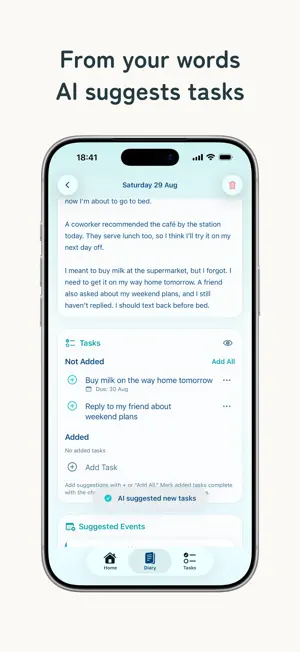
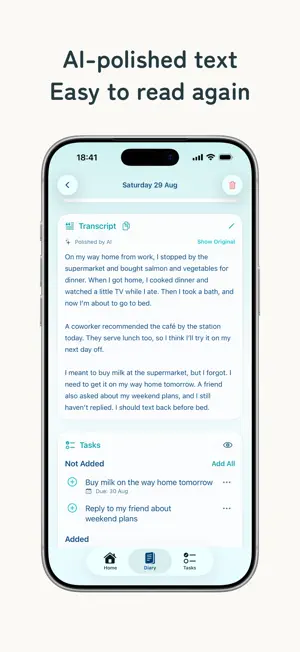
“I want to keep a diary, but I don’t have the energy to write.” Kamerii is a voice-first diary app for days like that. Tap Record and talk about your day or how you feel. You do not need to organize your thoughts or write perfectly—your words become text you can revisit later. Optional AI Organizing creates a title, polished entry, and summary from your transcript. It can also suggest to-dos and calendar events. Review each suggestion, choose what to add, and sync with Apple Reminders or Calendar if you want. Your entries are stored on your device. Lock the app with Face ID, Touch ID, or your device passcode, and start without creating an account. [IDEAL FOR] ■ People who find journaling difficult Speak instead of searching for the perfect first sentence. ■ People with busy schedules Capture your day after work, before bed, or while on the go. ■ People who want to organize their thoughts Speak freely, then use AI only when you want a clearer version to revisit. ■ People who value a private record Save daily events, feelings, travel memories, and family moments in your own way. [FEATURES] ■ Real-time transcription Tap Record and speak. Your voice is transcribed on your device in real time. Microphone input is used only for transcription and is not saved as an audio file. ■ Optional AI Organizing AI can create a title, polished entry, and summary while preserving your original transcript. It is off by default and can be disabled at any time. ■ Suggested to-dos AI can identify shopping items, plans, and other tasks in your diary. Review the suggestions and add only what you need. You can also add to-dos manually. ■ Suggested calendar events Say, “Dentist tomorrow from 10 to 11,” and AI can suggest an event. Review or edit its details and time before adding it. ■ Apple Reminders and Calendar integration Send selected to-dos to Apple Reminders and optionally sync events with Apple Calendar. Turn each integration on or off separately. ■ Entries organized by date View, edit, or delete entries. Record multiple times in one day and revisit them together. Your original transcript remains available after AI Organizing. ■ Daily summaries AI can combine multiple entries from one day into a summary, helping you revisit the day as one story. ■ App Lock Require Face ID, Touch ID, or your device passcode to open Kamerii. Turn App Lock on or off in Settings. ■ Backup and restore Export diaries, photos, to-dos, and other records as one backup file. Choose where to save it and restore your data when needed. ■ Photos Add up to 10 photos to each entry. Location information and other metadata are removed during import, and photos are stored on your device. [FREE AND PREMIUM] Voice input, transcription, and saving and viewing entries are free. The Free plan includes one use of AI Organizing per day; Premium includes up to 50 uses per day. Premium-level features are available at no cost for your first 7 days. After that, the app automatically switches to the Free plan, and you will not be charged. Purchase a monthly or annual plan only if you choose to continue with Premium. Manage subscriptions in iOS Settings. [PRIVACY] Transcripts and diary entries are stored on your device, not on the developer’s servers. Microphone input is not saved as an audio file. Your transcript and the data needed for processing are encrypted and sent to Google Gemini only when you use AI Organizing. They are not used to train AI models. Google may retain them for up to 55 days for abuse monitoring before deletion. Turning off AI Organizing stops future AI requests. [HELP AND SUPPORT] Find instructions, troubleshooting, and the voice diary tutorial in Settings > Help. For assistance, contact [email protected]. Never include diary entries or passwords. Help https://kamerii.app/help/ Terms of Use https://kamerii.app/terms/ Privacy Policy https://kamerii.app/privacy/ Your thoughts do not have to be organized. Start by talking for one minute.
App privacy
The developer, Atsuki Kakehi, reported these privacy practices to Apple.
Data Linked to You
The following data, which may be collected and linked to your identity, may be used for the following purposes:
- Purchases: Purchase History
- Location: Coarse Location
- Identifiers: User ID, Device ID
- Usage Data: Product Interaction
- Diagnostics: Crash Data
Used for: Analytics, App Functionality
Alternatives to Kamerii: Voice Diary & Journal
Looking for apps like Kamerii: Voice Diary & Journal? Here are 6 similar apps on the App Store. The highest rated is Aloud: Voice Journal & Diary (5.0/5), and all 6 are free to download.
-
 Child Growth Journal - Sodachi
-
 Aloud: Voice Journal & Diary
5.0
Aloud: Voice Journal & Diary
5.0
-
 VoiceMemo Daily - Personal Log
-
 推しPay - 推し活・推し事をまとめて管理。推して何日も。
5.0
推しPay - 推し活・推し事をまとめて管理。推して何日も。
5.0
-
 Pairwork: Chores Value Tracker
-
 SWEET DECORATION(スイートデコレーション)
| App | Rating | Price | Last updated | Compare |
|---|---|---|---|---|
| Kamerii: Voice Diary & Journal | – | Free | September 20, 2026 | |
| Child Growth Journal - Sodachi | – | Free | Jul 19, 2026 | Compare |
| Aloud: Voice Journal & Diary | 5.0 / 5 (2) | Free | Oct 10, 2026 | Compare |
| VoiceMemo Daily - Personal Log | – | Free | Oct 17, 2026 | Compare |
| 推しPay - 推し活・推し事をまとめて管理。推して何日も。 | 5.0 / 5 (2) | Free | Jul 28, 2026 | Compare |
| Pairwork: Chores Value Tracker | – | Free | Oct 8, 2026 | Compare |
| SWEET DECORATION(スイートデコレーション) | – | Free | Jun 23, 2026 | Compare |