

VoiceMemo Daily: Voice Journal
ryo muranaka Lifestyle iPhoneiPadiPod touch
VoiceMemo Daily: Voice Journal is a free Lifestyle app for iPhone and iPad by ryo muranaka. Requires iOS 16.6. Updated November 13, 2026.
- Price
- Free
- on the App Store
- Size
- 26 MB
- Age 4+
- Updated
- Nov 13
- 2026 · v1.10.7
Screenshots
Save to Pinterest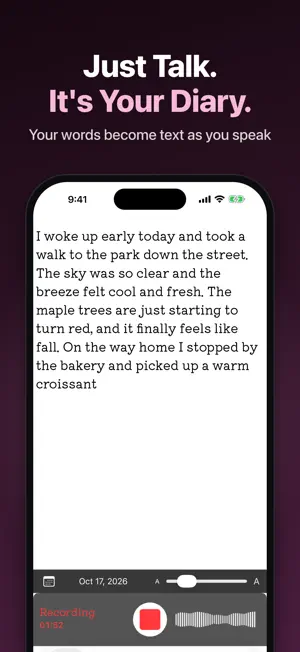


About VoiceMemo Daily: Voice Journal
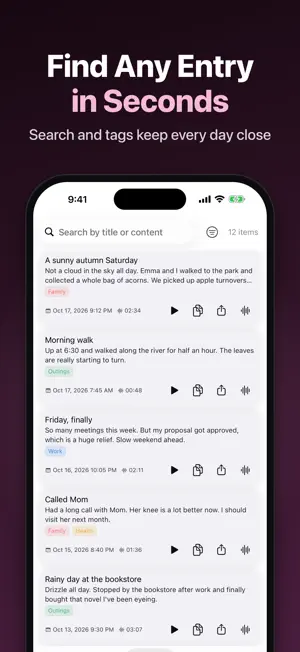
VoiceMemo Daily lets you keep a diary just by talking. Tap the record button and speak — the app records your voice and turns it into text as you go. On days when typing feels like too much, you can still capture your day in a few words. RECORD • Start recording with one tap. Your words appear as text in real time • Both the audio file and the transcript are saved • See the elapsed time and your voice level while recording • Edit the transcript afterwards and add a title • Pick the date before recording, so yesterday's events can go on yesterday's page LOOK BACK WITH THE CALENDAR • Days with entries are marked on the calendar • Tap a date to see that day's entries • Long-press a date to record an entry for that day right away LISTEN AND READ • Playback speed: 0.5x, 1x, 1.5x or 2x • Skip forward or back by 10 or 30 seconds • Play entries straight from the list • Adjust the text size for comfortable reading FIND AND ORGANIZE • Search titles and text by keyword • Filter by year, month and tag • Sort entries with color-coded tags • Find entries from iPhone's Spotlight search • Undo a deletion right after you make it SHARE AND BACK UP • Copy text, or share the text or audio file • Back up audio and text together as a ZIP file — choose where to save it, such as iCloud Drive, from the Files app • Restore from a backup file (entries that already exist are skipped) • Export to CSV, filtered by date range or tag STAY CONSISTENT • Diary reminders (up to 3): set the time, choose every day, weekdays, weekends or specific days, and write your own message • Check how much space your recordings use and delete several at once LOOK AND LANGUAGE • Dark mode (System, Light or Dark) • Set the app's display language and the speech recognition language separately YOUR DATA AND GOOD TO KNOW • Your audio and text are stored in the app on this device. No account is needed • Transcription uses iOS speech recognition. Accuracy depends on how you speak and the noise around you • Microphone and speech recognition permissions are required • If you close the app or switch to another app, recording stops and everything up to that point is saved • Free to use, with ads GREAT FOR • People who want to keep a diary but find writing hard to keep up • Anyone who wants to keep their feelings in their own voice • Quick entries before bed or between errands
What’s new
Version 1.10.7 · Updated November 13, 2026
Minor improvements and stability updates.
App privacy
The developer, ryo muranaka, reported these privacy practices to Apple.
Data Used to Track You
The following data may be used to track you across apps and websites owned by other companies:
- Location: Coarse Location
- Identifiers: Device ID
- Usage Data: Product Interaction, Advertising Data
- Diagnostics: Crash Data, Performance Data
Data Linked to You
The following data, which may be collected and linked to your identity, may be used for the following purposes:
- Location: Coarse Location
- Identifiers: Device ID
- Usage Data: Product Interaction, Advertising Data
- Diagnostics: Crash Data, Performance Data
Used for: Third-Party Advertising
Alternatives to VoiceMemo Daily: Voice Journal
Looking for apps like VoiceMemo Daily: Voice Journal? Here are 6 similar apps on the App Store. The highest rated is Moments - The AI Voice Diary (5.0/5), and all 6 are free to download.
-
 音声認識メモ日記:シャべマル
-
 Murmur - Voice Diary
4.4
-
 話すだけ日記
-
 Moments - The AI Voice Diary
5.0
-
 ImmediMemo
5.0
-
 AI Voice Diary
3.5
| App | Rating | Price | Last updated | Compare |
|---|---|---|---|---|
| VoiceMemo Daily: Voice Journal | – | Free | November 13, 2026 | |
| 音声認識メモ日記:シャべマル | – | Free | Oct 30, 2024 | Compare |
| Murmur - Voice Diary | 4.4 / 5 (83) | Free | Nov 16, 2026 | Compare |
| 話すだけ日記 | – | Free | Aug 30, 2026 | Compare |
| Moments - The AI Voice Diary | 5.0 / 5 (1) | Free | Nov 6, 2026 | Compare |
| ImmediMemo | 5.0 / 5 (2) | Free | Jul 14, 2025 | Compare |
| AI Voice Diary | 3.5 / 5 (2) | Free | Oct 5, 2026 | Compare |