

TileFit: Tile Layout Planner
家宝 戴 Utilities iPhoneiPadiPod touch
TileFit: Tile Layout Planner is a free Utilities app for iPhone and iPad by 家宝 戴. Rated 5.0/5 from 3 ratings. Requires iOS 17.6. Updated October 21, 2026.
- Rating
- 5.0
- 3 ratings
- Price
- Free
- on the App Store
- Size
- 2 MB
- Age 4+
- Updated
- Oct 21
- 2026 · v1.0.2
Screenshots
About TileFit: Tile Layout Planner
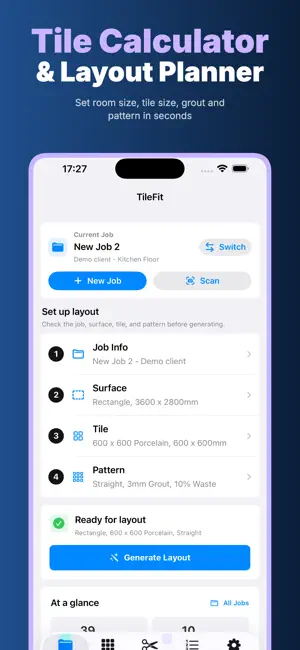
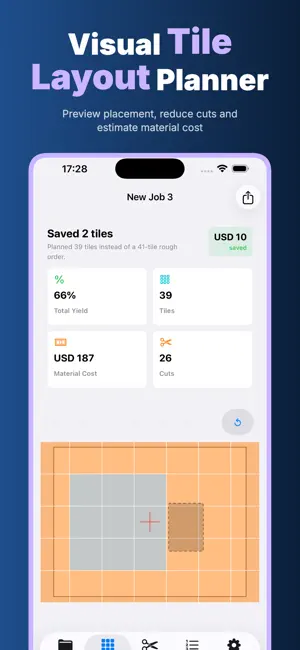
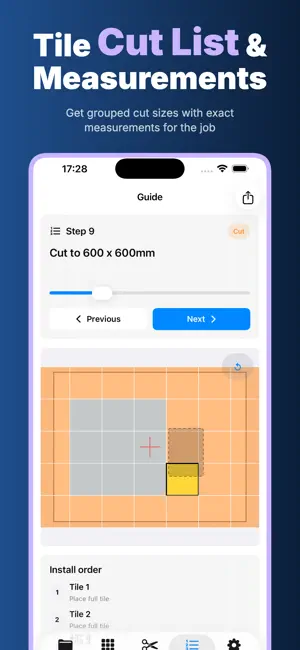
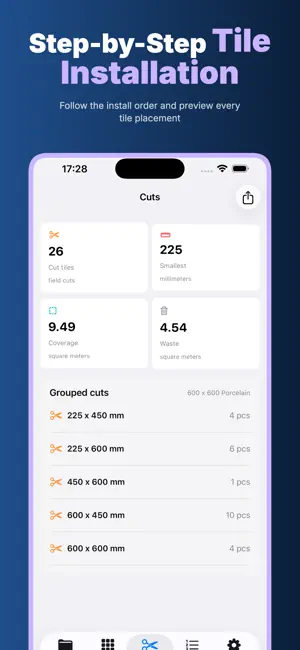
Plan the tile job before the first cut. TileFit turns measurements, tile specifications and layout choices into a visual plan with quantities, box estimates, grouped cuts, installation order and PDF. It is built for installers, contractors, designers and DIY renovators who need practical answers without sending project data to an online service. PRIVACY FIRST, BY DESIGN • Offline — the core planner works without an internet connection • No Login — no account, email address or team workspace is required • Privacy First — no analytics SDKs are used to track your projects • On Device — projects, calculations and OCR processing stay on your iPhone • No Cloud Upload — TileFit does not automatically upload plans, photos or documents Measurements, notes, tile choices and layouts stay on your device. Apple Vision reads labels and sketches locally. PDFs are created locally and shared only through a destination you choose. MODEL THE SURFACE Set up a floor, wall, backsplash or countertop. Start with a rectangle, define an L-shaped area, or edit a custom polygon for an irregular room. Add deductions for doorways, islands, columns, cabinets and other areas that should not receive tile. Choose millimeters, centimeters, inches or feet-and-inches so the job can be entered in the units you use. DEFINE THE TILE AND PRICE Use ceramic, porcelain, mosaic or natural-stone examples, or enter your own dimensions. Add directional texture, pieces and coverage per box, and a price per tile, box or square meter. Cost estimates support USD, CNY, EUR, GBP, CAD and AUD. COMPARE SIX LAYOUT PATTERNS Generate straight stack, 50% running bond, one-third offset, 45-degree herringbone, 90-degree herringbone or 45-degree diagonal layouts. Adjust grout width, waste allowance and the starting point from the center, a corner or a custom offset. A full-tile border option provides another way to test the visual balance around the edge. SEE THE PLAN BEFORE ORDERING The interactive layout canvas distinguishes full and cut tiles and supports zooming and tile inspection. Tap a tile to review its sequence, position, rotation and visible size. TileFit reports coverage, total tiles including your waste allowance, boxes to buy, full and cut tile counts, estimated material cost, purchased-material yield and spare pieces caused by box rounding. A small-cut warning highlights pieces under one-third of the tile width so you can revisit the starting point or pattern. CUTS AND INSTALLATION ORDER Matching cut sizes are grouped with quantities. The step guide highlights each tile on the drawing as you move through the planned installation order. SCAN SPECS ON DEVICE Photograph a tile box label or select an existing image. Local OCR can suggest tile width and height, pieces per box and a printed price. It can also read dimensions written on a room sketch and prepare a surface-size draft. You review the detected values before creating a tile or applying dimensions; scanning never silently replaces project data. KEEP JOBS ORGANIZED Save, switch, duplicate, archive or delete local projects. Defaults for grout, waste, units and currency speed up repeat estimates. EXPORT A CLEAR INSTALLATION PACKET Create an A4 or US Letter PDF containing the layout drawing, tile and box totals, coverage, waste, full/cut counts and grouped cut list. Send it to a printer, save it to Files, or share it with an installer or client through the standard iOS share sheet. TileFit does not choose a cloud destination for you. TILEFIT PRO Pro offers unlimited layouts, smart optimization, on-device OCR and PDF reports. Choose US$7.99/month or US$39.99/year; both include a 7-day free trial and renew automatically unless canceled in App Store settings. Verify measurements before buying or cutting. Support: https://woodcuttool.com/legal/TileFit/support/ Privacy Policy: https://woodcuttool.com/legal/TileFit/privacy/ Terms of Use: https://www.apple.com/legal/internet-services/itunes/dev/stdeula/
What’s new
Version 1.0.2 · Updated October 21, 2026
Bug fixes and performance improvements for faster, more reliable planning.
App privacy
The developer, 家宝 戴, reported these privacy practices to Apple.
Data Not Collected
The developer does not collect any data from this app.
Alternatives to TileFit: Tile Layout Planner
Looking for apps like TileFit: Tile Layout Planner? Here are 6 similar apps on the App Store. The highest rated is TilePlan – Flooring Calculator (3.0/5), and all 6 are free to download.
-
 ScalarCut Precision Tile Floor
-
 Pro Tile: Layout & Flooring
-
 Tile Calculator: Estimator
-
 TilePlan – Flooring Calculator
3.0
TilePlan – Flooring Calculator
3.0
-
 TileCount: Tile Calculator
-
 TilePlanner
| App | Rating | Price | Last updated | Compare |
|---|---|---|---|---|
| TileFit: Tile Layout Planner | 5.0 / 5 (3 ratings) | Free | October 21, 2026 | |
| ScalarCut Precision Tile Floor | – | Free | Oct 5, 2026 | Compare |
| Pro Tile: Layout & Flooring | – | Free | Mar 23, 2026 | Compare |
| Tile Calculator: Estimator | – | Free | Aug 15, 2026 | Compare |
| TilePlan – Flooring Calculator | 3.0 / 5 (2) | Free | Feb 20, 2026 | Compare |
| TileCount: Tile Calculator | – | Free | Aug 19, 2026 | Compare |
| TilePlanner | – | Free | Oct 5, 2026 | Compare |