

OpenAssistant AI
3Gen Internet Corporation Productivity iPhoneiPadiPod touch
OpenAssistant AI is a free Productivity app for iPhone and iPad by 3Gen Internet Corporation. Requires iOS 17.0. Updated November 17, 2026.
- Price
- Free
- on the App Store
- Size
- 101 MB
- Age 17+
- Updated
- Nov 17
- 2026 · v1.0.3
Screenshots
Save to Pinterest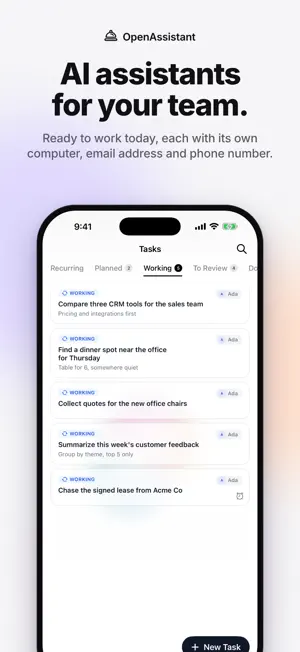


About OpenAssistant AI
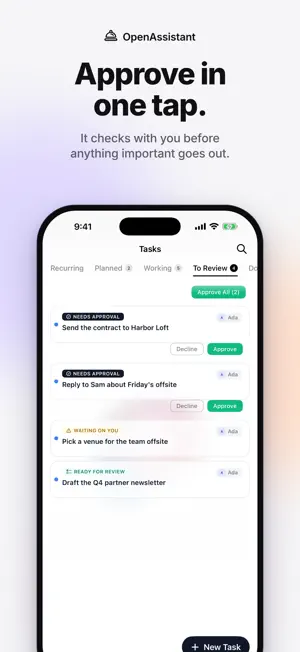
Give your team AI assistants that get real work done. Each one has its own computer, email address and phone number, so it can schedule meetings, handle email, do research and much more. Tell it what you need in plain words. It plans the work, does it, and checks with you before anything important goes out. WHAT IT DOES FOR YOU • Takes tasks off your plate, and you can follow each one from planned to done • Asks for your OK with Approve and Decline right on the notification • Shows you every email, invite and change before it happens • Reads your calendar, finds a time that works and books it • Runs routines like a morning agenda, weekly follow-ups or an end-of-day wrap-up • Talks with you by voice or text • Answers people who email, text or call it YOU STAY IN CONTROL • Decide how much your assistant does on its own • Review, edit or decline anything before it goes out • See why a task is waiting on you BUILT FOR TEAMS • Give each assistant a role on your team • Connect your work accounts • Switch between accounts in the app Sign in with Apple, Google, Microsoft or a code sent to your email. You can delete your account at any time from Profile.
What’s new
Version 1.0.3 · Updated November 17, 2026
• Coordinators can switch Settings to the person they work for, and manage their scheduling, profile, instructions and connections. • Approvals for connected apps show exactly what will be sent. • Calendar approvals show attached files. • Messages between your own assistants show their names. • Project groups on To Review can now be collapsed. • Every task notification shows its status. • Conversation cards show who's on the thread. • New Task keeps your unsent text when you close it. • Tasks shows a notice when your assistants are paused. • Pick your own assistant on a recurring task, and recurring tasks the developer pays for show a Free badge. • Turn on a workflow a teammate shared with one switch. • Fixed saving a contact or an assistant's email changing details you didn't edit, the Review button in dark mode, and more.
App privacy
The developer, 3Gen Internet Corporation, reported these privacy practices to Apple.
Data Linked to You
The following data, which may be collected and linked to your identity, may be used for the following purposes:
- Identifiers: User ID, Device ID
- Usage Data: Product Interaction
- Diagnostics: Crash Data, Other Diagnostic Data
- Contact Info: Email Address, Name, Phone Number
- Contacts: Contacts
- User Content: Emails or Text Messages, Photos or Videos, Audio Data, Other User Content
Used for: Analytics, App Functionality
Alternatives to OpenAssistant AI
Looking for apps like OpenAssistant AI? Here are 6 similar apps on the App Store. The highest rated is ShootCal (5.0/5), and all 6 are free to download.
-
 MCP Notes
-
 Read Scripts: Teleprompter Pro
1.0
-
 ShootCal
5.0
-
 Ox - Local Bot
5.0
-
 Orbit: A Fancy Planner
5.0
-
 OmniAI - AI Chat Assistant
4.9
| App | Rating | Price | Last updated | Compare |
|---|---|---|---|---|
| OpenAssistant AI | – | Free | November 17, 2026 | |
| MCP Notes | – | Free | Nov 16, 2026 | Compare |
| Read Scripts: Teleprompter Pro | 1.0 / 5 (1) | Free | Nov 11, 2026 | Compare |
| ShootCal | 5.0 / 5 (2) | Free | Nov 20, 2026 | Compare |
| Ox - Local Bot | 5.0 / 5 (3) | Free | Nov 22, 2026 | Compare |
| Orbit: A Fancy Planner | 5.0 / 5 (1) | Free | Jun 26, 2026 | Compare |
| OmniAI - AI Chat Assistant | 4.9 / 5 (13) | Free | Jun 24, 2026 | Compare |
Compare OpenAssistant AI with the top alternatives: ratings, updates, ASO score and keyword gaps →