

ScreenCommand
Simple Products Studio Productivity iPhoneiPadiPod touch
ScreenCommand is a paid Productivity app for iPhone and iPad by Simple Products Studio. Requires iOS 17.0. Updated October 22, 2026.
- Price
- 4.99 USD
- on the App Store
- Size
- 15 MB
- Age 17+
- Updated
- Oct 22
- 2026 · v2.1
Screenshots


About ScreenCommand
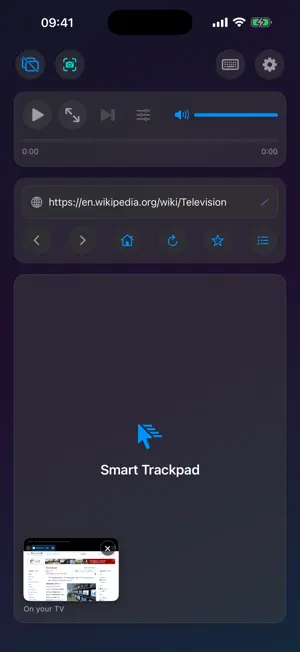
Turn your iPad or iPhone and an external monitor or TV into a desktop browsing workstation, even on a non-M iPad, where iPadOS extended display isn't available. The big screen gets a full desktop-class browser. Your iPad or iPhone becomes the trackpad and keyboard: 8 cursor styles, up to 12 persistent tabs, YouTube quality up to 4K, and Netflix and other streaming over a cable. A hardware keyboard works too, and so does a mouse on iPad. Pay once, no subscription. IMPORTANT: REQUIRES AN EXTERNAL MONITOR OR TV. ScreenCommand runs the browser on an external display connected over USB-C (or a USB-C-to-HDMI/DisplayPort adapter) or via AirPlay to an Apple TV, and your iPad or iPhone becomes the trackpad and control center. Without a display connected, the app opens to a "Connect External Monitor" setup screen. There is no standalone on-device browsing mode. ScreenCommand shows websites on the TV; other apps can't run there. STREAMING ON THE BIG SCREEN: Netflix, Prime Video, Apple TV+, Paramount+, Peacock and other streaming services play on the TV over a USB-C cable. YouTube, Vimeo, and other web video play over a cable or AirPlay. SEAMLESS EXTERNAL DISPLAY • Full web browsing on your external monitor • Automatic display detection - plug and play • Optimized for 1080p, 4K, and ultrawide displays ADVANCED CURSOR & CONTROLS • Eight stunning cursor styles: Default, Cyberpunk Neon, Elegant Glass, Liquid Crystal, Gaming Pro, Luxury Gold, Aurora Borealis, Minimal Dark • Smooth trackpad navigation with gesture support • Use a Bluetooth or USB mouse or trackpad on iPad • Natural scrolling with two-finger gestures • Precise click, double-click, and right-click support INTELLIGENT KEYBOARD INPUT • Full keyboard support for web forms and search • Type on a hardware keyboard, with shortcuts like ⌘L, ⌘T and ⌘R • Smart URL bar: type a web address or a search query • Automatic input field detection and focus MEDIA CONTROLS • Play/pause video with one tap • Change YouTube video quality on the fly, up to 4K (2160p), even in fullscreen • Adjust media volume with an on-screen slider • Seek through videos with intuitive progress bar • Fullscreen toggle support • Cinema mode for distraction-free viewing POWERFUL BROWSING FEATURES • Up to 4 browser windows with 12 tabs each, saved between sessions • Two windows side by side on the TV • Password AutoFill for sign-ins on the TV • Desktop mode for full website compatibility • "What Works Here" shows how your device connects • Prevents unwanted app redirects • Pop-up blocker with a per-site switch CUSTOMIZATION • Adjustable cursor size (0.2x - 5.0x) • Adjustable mouse speed for precision or speed (0.5x - 5.0x) • Configure homepage URL • Auto-launch browser on monitor connect PRIVACY FIRST • No data collection or tracking • No third-party analytics • All processing happens locally on your device • No internet connection required (except for browsing) PERFECT FOR: • Professionals who need a larger workspace • Students doing research on a bigger screen • Content creators managing social media • Anyone wanting desktop browsing from an iPad or iPhone HOW IT WORKS: 1. Connect your iPad or iPhone to an external monitor (USB-C or HDMI adapter), or AirPlay to an Apple TV 2. Launch ScreenCommand 3. Browser automatically opens on your external display 4. Use your iPad or iPhone as a trackpad and control center 5. Enjoy desktop-class browsing! REQUIREMENTS: • iPad with a USB-C port on iPadOS 17.0 or later (no M-series chip required) • Or iPhone on iOS 17.0 or later. A cable needs USB-C video out (iPhone 15 or later, except iPhone 16e, iPhone 17e and iPhone Air); any iPhone can use AirPlay • External monitor or TV • USB-C to HDMI/DisplayPort adapter (or direct USB-C connection), or an Apple TV for wireless AirPlay (wired recommended for the lowest cursor latency) ScreenCommand brings true desktop browsing to the external display of your iPad or iPhone.
What’s new
Version 2.1 · Updated October 22, 2026
ScreenCommand 2.1 fixes the keyboard and makes pages on the TV look right from an iPhone. • The on-screen keyboard opens again when you click a text field on the TV. If the TV was already connected the first time you opened ScreenCommand, the walkthrough could get stuck out of sight and hold back the keyboard, a hardware keyboard, the mouse and the shortcuts. • Type in your own language: the globe key on the compact keyboard switches to your iPad's or iPhone's own keyboard, in every language you've added, with accents and dictation. "Compact Keyboard" above it switches back. • It also opens when a page puts the cursor in its own box, like Google's search box. And the cursor now goes where you click, instead of to the start of the text. • Clicking in the box where you write an email, a chat message or a post now puts the cursor there, ready to type. • From an iPhone, pages on the TV are no longer zoomed in: they fill the TV's width, with the same text size as from an iPad. • Video and audio files opened directly now play, instead of showing an error page. Questions or feedback? [email protected]
App privacy
The developer, Simple Products Studio, reported these privacy practices to Apple.
Data Not Collected
The developer does not collect any data from this app.
Alternatives to ScreenCommand
Looking for apps like ScreenCommand? Here are 6 similar apps on the App Store. The highest rated is External Display Desktop: XeOS (4.2/5), and 4 of the 6 are free to download.


| App | Rating | Price | Last updated | Compare |
|---|---|---|---|---|
| ScreenCommand | – | 4.99 USD | October 22, 2026 | |
| exBrowser | – | 4.99 USD | Dec 4, 2025 | Compare |
| topoArea | – | 2.99 USD | Jan 14, 2026 | Compare |
| Up+ Fibra | – | Free | Jul 26, 2025 | Compare |
| DeskState | 3.0 / 5 (2) | Free | Oct 16, 2026 | Compare |
| External Display Desktop: XeOS | 4.2 / 5 (18) | Free | Oct 21, 2026 | Compare |
| Invitee | – | Free | Nov 15, 2025 | Compare |
Compare ScreenCommand with the top alternatives: ratings, updates, ASO score and keyword gaps →