

Memolet Garden: Cute Notes
asopi Productivity iPhoneiPadiPod touch
Memolet Garden: Cute Notes is a free Productivity app for iPhone and iPad by asopi. Requires iOS 13.0. Updated October 20, 2026.
- Price
- Free
- on the App Store
- Size
- 46 MB
- Age 4+
- Updated
- Oct 20
- 2026 · v1.1.0
Screenshots



About Memolet Garden: Cute Notes
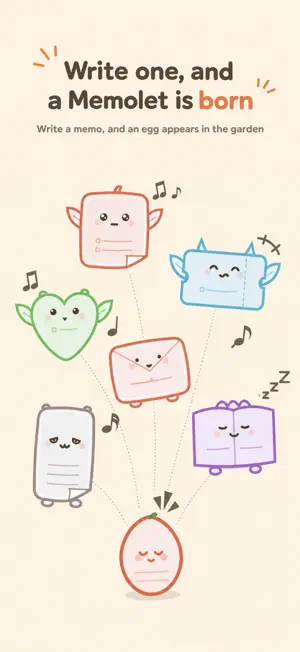
Memolet Garden (memoniwa) is a cute notes app: every memo you write becomes a little creature, a Memolet, that lives in your garden. Shopping lists, to-do lists, reminders. Each memo adds one more Memolet to the garden. Memolets live in the Memolet Garden. ■ Write, and one is born Write a memo and an egg appears in your garden. Reread and add to it, and it hatches; the more you write, the more your Memolet grows. Shopping lists and checklists become winged Sky Memolets. Notes and ideas become Land Memolets that walk on the ground. Depending on what you write, they grow into all kinds of shapes. ■ A shopping list is one creature, too Check items off with one tap, and add things you often buy right from Regulars. Even the family's grocery run becomes one creature in your garden. ■ It remembers the time and the place Tell a Memolet "When?" and it comes to remind you then. Tell it "Where?" and it also lets you know when you get near the store. ■ Whistle, and they come running No folders. No tidying up. Looking for something? Blow the Whistle (search), and the matching Memolets come running to you. ■ Free to use Unlimited memos, search, reminders and shopping lists — all free. Making or joining a Shared Garden is free too. In-app purchases: one-time items such as garden decorations and Memolet outfits, plus two optional subscriptions (keeping a backup on our server and syncing / extending the day a Shared Garden disappears). When you save to the server and sync, devices that share the same passphrase keep the same memos. ■ Memos and photos never get sent on their own Memos are saved only on your phone or tablet. No account needed. Memo content leaves the device only when you make a share card link, use a Shared Garden or keep a backup on our server. (With the setting "Include the title and text when sharing" on, opening a memo also creates such a link.) It is all encrypted on your device first, so not even we can read it (only the Memolet picture on share cards and readers' marks and counts are kept unencrypted). Photos are never sent. Other communication (in-app purchases, maps and so on) never contains your memos. Privacy policy: https://memoniwa.app/privacy/ ■ Shared Garden — for group notices and surveys Share a whole garden with others. Send an invite link, and people answer with their own Memolets (they need the app too). ・Ask who's coming or what people would like (Note / List) ・Have people pick the days they can make (Calendar) ・Vote Only the garden's maker can see the results. Even for a class or a team, making the garden bigger keeps it free. A garden disappears on the date its maker picks (free plan: up to 14 days ahead). ■ Plans go on the calendar Give a Memolet a date, and its label in the garden shows that day instead of its name. A single day or a span of days. It can become a reminder, too. ■ Pick what you copied, and paste Up to 20 things you copy in the app are kept, newest first. Pick one to paste later, or paste several lines one by one. Put the Memolets widget on your home screen to write right away and open your copy history. On iPhone (iOS 26 or later), paste from your copy history into other apps line by line or item by item via a small window (Picture in Picture). With the Memolets Keyboard on iPhone, put your copy history straight into other apps' text fields (no Full Access requested). Choose Memolets in another app's share menu to add to your copy history or make a Memolet from it. ■ The garden is your place Set out decorations, build fences, add more gardens. You can even put family photos in a photo frame. The more memos you write, the livelier your garden gets. ■ About generative AI Your memos and images are never sent to generative AI. It was used in parts of development (such as coding), with final review by people. -- Terms of Use: https://memoniwa.app/terms/ Apple EULA: https://www.apple.com/legal/internet-services/itunes/dev/stdeula/ Support: https://memoniwa.app/support/
What’s new
Version 1.1.0 · Updated October 20, 2026
A major rebuild. ・Memolets and decor items are now drawn in 3D ・Backup & Sync: devices with the same passphrase now keep the same memos. Pull down in the garden to sync right away ・Readers can leave “marks” on a Memolet you share. Reads and marks arrive in your “Share record” (they can read it in a browser, too) ・Home screen widget: write right away, straight into the garden. It opens your copy history, too ・Copy history: pick what you copied in the app and paste it later, even line by line ・Memolets Keyboard: put your copy history straight into text fields in other apps ・Simple mode: choose from 4 options which features to show, to suit how you use the app ・Tidied up Settings and added a Help page ・Put a shop item in your garden and tap it: your Memolets gather and put on a show ・From the top-left button, once a day, place one item in your garden for today only ・Treats and weather have ended. Fireworks stay as before ・Touching a Memolet gives a light vibration (you can turn it off in Settings) ・Pick up a Memolet and hold it over another for a moment: a string ties them, and they walk together
App privacy
The developer, asopi, reported these privacy practices to Apple.
Data Not Linked to You
The following data, which may be collected but is not linked to your identity, may be used for the following purposes:
- Location: Coarse Location
- Identifiers: Device ID
- Usage Data: Product Interaction, Advertising Data
- Diagnostics: Crash Data, Performance Data
- User Content: Other User Content
Used for: Third-Party Advertising, Analytics, App Functionality
Alternatives to Memolet Garden: Cute Notes
Looking for apps like Memolet Garden: Cute Notes? Here are 6 similar apps on the App Store. The highest rated is DailyWall: Sticky Notes Widget (5.0/5), and 5 of the 6 are free to download.
-
 Zutext - Private Notes
-
 Nook: Private Journal & Diary
4.5
Nook: Private Journal & Diary
4.5
-
 DailyWall: Sticky Notes Widget
5.0
DailyWall: Sticky Notes Widget
5.0
-
 NextNote: Notes & AI Writing
-
 Notes, To-Do List & Planner
4.7
Notes, To-Do List & Planner
4.7
-
 Word Keeper - Track Word Count
4.5
Word Keeper - Track Word Count
4.5
| App | Rating | Price | Last updated | Compare |
|---|---|---|---|---|
| Memolet Garden: Cute Notes | – | Free | October 20, 2026 | |
| Zutext - Private Notes | – | Free | Sep 26, 2026 | Compare |
| Nook: Private Journal & Diary | 4.5 / 5 (2) | Free | Sep 1, 2026 | Compare |
| DailyWall: Sticky Notes Widget | 5.0 / 5 (1) | Free | Oct 15, 2026 | Compare |
| NextNote: Notes & AI Writing | – | 5.99 USD | Oct 12, 2026 | Compare |
| Notes, To-Do List & Planner | 4.7 / 5 (111) | Free | Sep 17, 2026 | Compare |
| Word Keeper - Track Word Count | 4.5 / 5 (501) | Free | Sep 3, 2026 | Compare |