

DailyWall: Sticky Notes Widget
Serkan Kaplan Productivity iPhoneiPadiPod touchApple Watch
DailyWall: Sticky Notes Widget is a free Productivity app for iPhone and iPad by Serkan Kaplan. Rated 5.0/5 from 1 ratings. Requires iOS 17.0.
- Rating
- 5.0
- 1 ratings
- Price
- Free
- on the App Store
- Size
- 128 MB
- Age 4+
- Updated
- Oct 15
- 2026 · v1.8.3
Screenshots


About DailyWall: Sticky Notes Widget
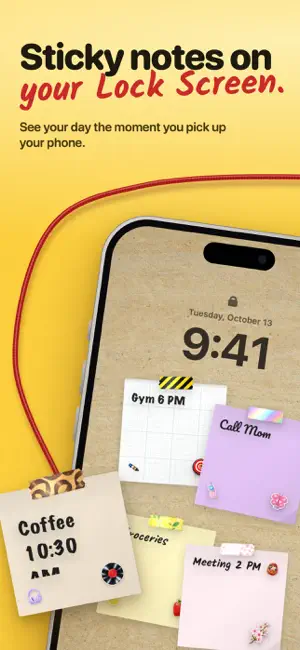
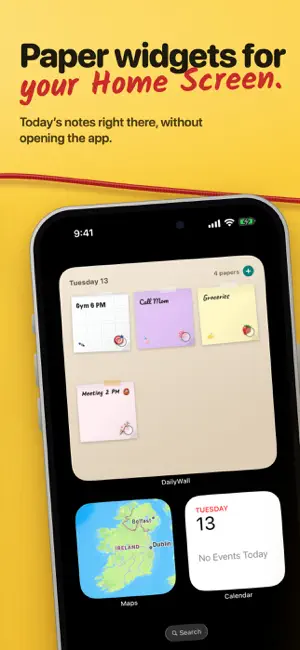
Your day, on a wall. A to-do list isn't a list — it's paper you stick on a wall. Write it, draw it, tape it up. In the evening, that wall becomes your Lock Screen. TOGETHER, ON ONE WALL Create a shared wall and invite friends with a link or a QR code. Creating and joining are free. Everyone hangs paper; you're notified when someone does, and every paper shows who put it up. Free gives each person two notes per wall; Pro removes the limit. HANG IT, DON'T LIST IT Tap an empty spot and a sheet of paper opens. Type on it, or draw straight onto it with Apple Pencil or a finger — both layers stay on the same sheet. Drag the note where you like, turn it with two fingers, pick its colour and its tape. YOUR WALL ON THE LOCK SCREEN Set it up once. From then on, every time you leave the app, that day's wall becomes your wallpaper: the same paper, in the same places, at the same size. Nothing is rescaled, shifted or cropped. DailyWall never writes to your photo library on its own, and it never deletes anything. PAPER THAT BEHAVES LIKE PAPER 15 paper shapes, 140 tapes, 210 stickers, 55 walls, 34 strings and 20 handwriting styles — and any paper colour you like. Torn edges, curled corners, notebook pages, cork, slate, brick, graph paper — or a photo of your own behind it all. When a sheet is full, it is genuinely full. STRINGS BETWEEN PAPERS Drag from the top of one paper to another and a string is pulled between them, under the tape. Yarn, twine, fairy lights, neon, candy — 34 kinds. Tap a string to change it, hold it to cut it. Strings work on shared walls too. EVERY DAY HAS ITS OWN WALL Arrows step through the days. For anything further back, a calendar opens from the corner of the wall and takes you straight there — dots underneath show which days have paper on them. THE DRAWER Somewhere to put "I don't know when yet". The drawer holds every note without a day, and it is the only place that searches across every wall you have made: titles, the writing on the paper, and the items inside a list. WRITE IT THE WAY YOU'D SAY IT "dentist tomorrow at 2" arrives as a note on tomorrow's wall, at 14:00. A shopping list typed on one line comes back as a checklist. AND EVERYWHERE ELSE Home Screen widgets, Apple Watch, a Lock Screen control for writing a note in one tap, and iCloud backup that carries your handwriting with it. DAILYWALL PRO Free: five notes a day, the free papers, tapes, stickers and strings, and the Lock Screen wall. Pro: unlimited notes a day, iCloud backup, and every pack — Pro stickers, tapes, walls and strings, with a new one in every update. Invite friends to a shared wall and unlock three gift packs for free, yours to keep. The subscription renews automatically unless cancelled. You can cancel anytime in Settings. Privacy Policy: https://dailywall.app/privacy/ Terms of Use: https://www.apple.com/legal/internet-services/itunes/dev/stdeula/
What’s new
Version 1.8.3 · Updated October 15, 2026
A new icon and a sturdier wall - A brand-new app icon. - On iPad, drawing with Apple Pencil or your finger now shows up instantly. - A heads-up when notifications are off or the reminder time has already passed. - Safer sync between iPhone, iPad, Apple Watch and iCloud: deleted notes stay deleted, drawings and photos are kept. - Smoother wall, shelves and widgets. Plus many small fixes.
App privacy
The developer, Serkan Kaplan, reported these privacy practices to Apple.
Data Linked to You
The following data, which may be collected and linked to your identity, may be used for the following purposes:
- Purchases: Purchase History
- Identifiers: Device ID
Used for: Analytics, App Functionality
Data Not Linked to You
The following data, which may be collected but is not linked to your identity, may be used for the following purposes:
- Identifiers: Device ID
- Usage Data: Product Interaction
- User Content: Other User Content
Used for: Analytics, App Functionality
Alternatives to DailyWall: Sticky Notes Widget
Looking for apps like DailyWall: Sticky Notes Widget? Here are 6 similar apps on the App Store. The highest rated is TodoLing: Daily Todo & Planner (5.0/5), and all 6 are free to download.
-
 Sticky Notes : StickMe
-
 TodoLing: Daily Todo & Planner
5.0
TodoLing: Daily Todo & Planner
5.0
-
 Notella - AI Note Taking app
5.0
Notella - AI Note Taking app
5.0
-
 Hi Sticky: Sticky Notes
4.6
Hi Sticky: Sticky Notes
4.6
-
 Sync Sticky Notes
5.0
Sync Sticky Notes
5.0
-
 Desktop Note - Notes & Photos
4.0
Desktop Note - Notes & Photos
4.0
| App | Rating | Price | Last updated | Compare |
|---|---|---|---|---|
| DailyWall: Sticky Notes Widget | 5.0 / 5 (1 rating) | Free | October 15, 2026 | |
| Sticky Notes : StickMe | – | Free | Jul 4, 2026 | Compare |
| TodoLing: Daily Todo & Planner | 5.0 / 5 (1) | Free | Sep 20, 2026 | Compare |
| Notella - AI Note Taking app | 5.0 / 5 (2) | Free | Oct 19, 2026 | Compare |
| Hi Sticky: Sticky Notes | 4.6 / 5 (44) | Free | Oct 12, 2026 | Compare |
| Sync Sticky Notes | 5.0 / 5 (5) | Free | Sep 28, 2026 | Compare |
| Desktop Note - Notes & Photos | 4.0 / 5 (6) | Free | Oct 15, 2026 | Compare |